AudioTool使用手册
Audio tools使用手册
Rev 1 .0
This translated version is for reference only, and the English version shall prevail incase ofany discrepancy between the translated and English versions.
版权所有 2018杰理科技有限公司未经许可,禁止转载
目录
目录
版本说明....................................................................................................................................................3
一、 EQ....................................................................................................................................................... 4
二、AEC ................................................................................................................................................... 12
三、记录.................................................................................................................................................. 14
版本说明
| 版本号 | 修改说明 |
|---|---|
| V1 .0 |
一、EQ
在线调试EQ功能,主要是在播歌、通话过程,根据需要,调整EQ各个参数。建议是先播歌
或打电话,再进入工具界面,调整参数。调试完成,保存导出eq_hw_cfg. bin配置文件。
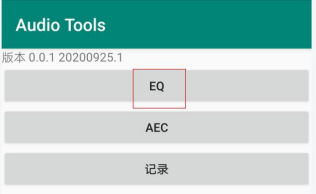
1、打开Audio Tools,点击“EQ”
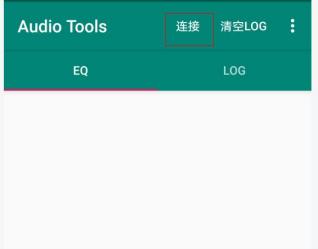
2、点击 “连接”,选择对应的设备,并与之连接
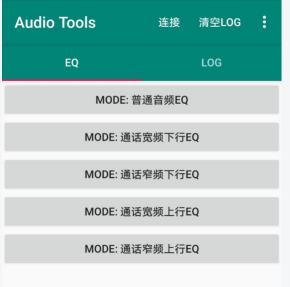
3、连接成功,会显示当前的可调的EQ模式,比如普通音频EQ、通话宽频下行EQ等
4、比如点击MODE:普通音频EQ,进入设置界面
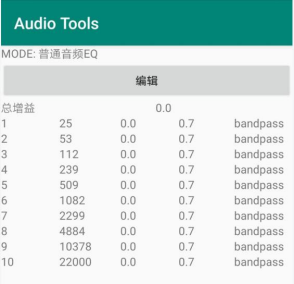
5、 点击编辑,进入EQ 曲线调试介面、
All information provided in this document is subject to legal disclaimers © JL.V. 2016. All rights reserved.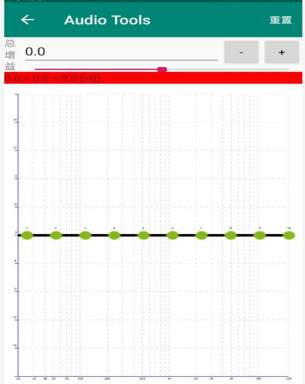
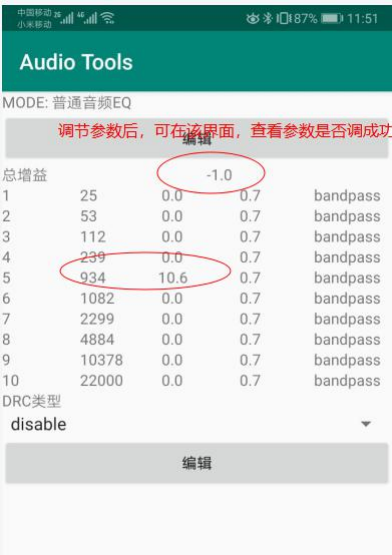
6、 如何确定调节的参数是否已经生效进入界面,对参数进行调整
All information provided in this document is subject to legal disclaimers © JL.V. 2016. All rights reserved.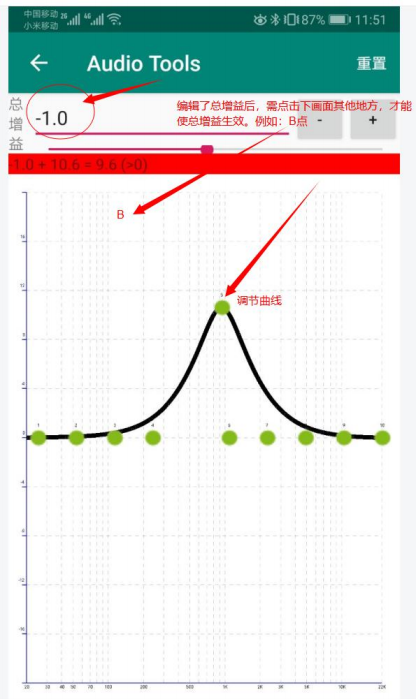 All information provided in this document is subject to legal disclaimers © JL.V. 2016. All rights reserved.
参数调整后
 7、 调试完成,点击保存参数。
调试完成,点击保存参数,生成eq_cfg_hw. bin
All information provided in this document is subject to legal disclaimers © JL.V. 2016. All rights reserved.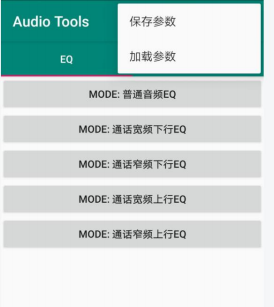
8、 下载eq_cfg_hw. bin
将eq_cfg_hw. bin文件放到下载目录,并在download. bat 中-res 后添加eq_cfg_hw. bin文件。此外,调试完成需要将在线eq宏定义关闭,同时使能 使用eq文件宏定义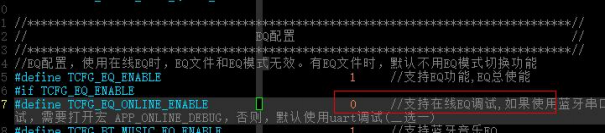 例如在earphne 的 standard sdk添加 eq_cfg_hw.bin
All information provided in this document is subject to legal disclaimers © JL.V. 2016. All rights reserved.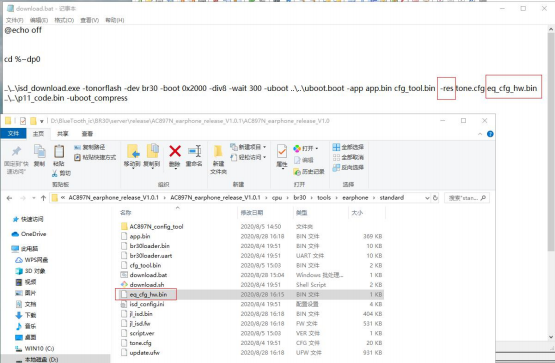
 注意:外部的配置资源一定要放在-res这个所属项里头,例如eq_cfg_hw.bin 的资源,因为跟工具的识别项是同步的。
All information provided in this document is subject to legal disclaimers © JL.V. 2016. All rights reserved.
11
二、AEC
在线调试通话功能,主要是在通话过程,根据需要,调整各个参数。建议是先打电话,再进入工具界面,调整参数。如果支持导出配置,则可以保存导出配置,如果不支持,则把修改参数对应写到配置工具即可。
9、打开Audio Tools,点击“AEC”
10、点击 “连接”,选择对应的设备,并与之连接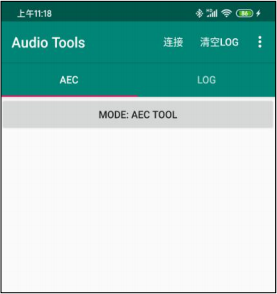
11、连接成功,会显示当前的回音消除类型,比如是单mic回音消除还是双mic回音消除
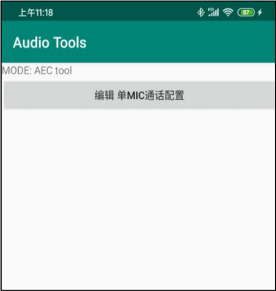
12、点击编解通话配置,进入设置界面
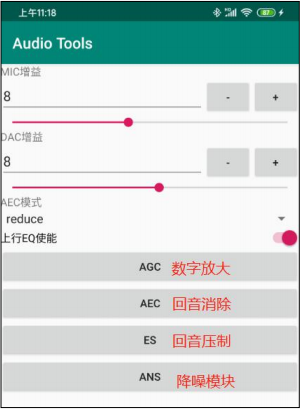 13、注意事项:
为了提高效率,参数修改过后响应生效会有少许延迟,程序设置是500ms。
All information provided in this document is subject to legal disclaimers © JL.V. 2016. All rights reserved.
三、记录
1、先在手机设置蓝牙界面,找到对应的蓝牙设备,连接设备。连接成功后,断开设备。然后把小机设备重启回连手机蓝牙(一定要回连,每次录音都要回连,否则录音可能不正常)
2、打开 “Audio Tools”APP,点击“记录”按钮,进入记录界面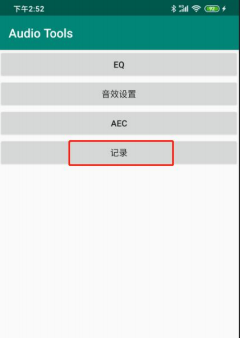
3、点击 “连接”,选择对应的蓝牙设备
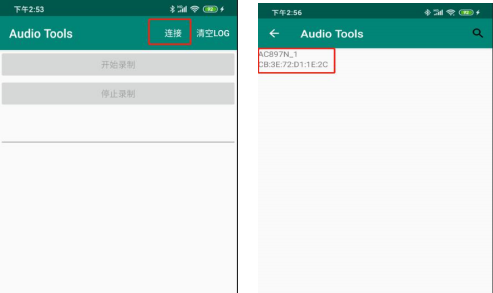
4、 “开始录制”可操作,表示连接app和小机连接成功
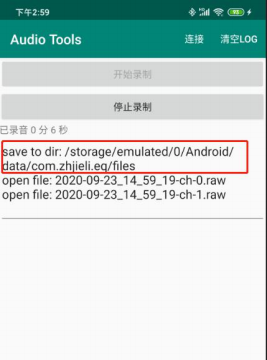
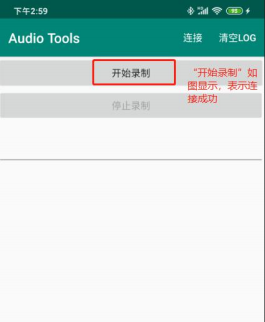 5、接下来就可以开始录音了,根据小机的配置,可以录制不同通道的数据。录音文件有具体时间信息。
 All information provided in this document is subject to legal disclaimers © JL.V. 2016. All rights reserved.
6、录音文件保存路径:Android/data/com.zhjieli.eq/files
All information provided in this document is subject to legal disclaimers © JL.V. 2016. All rights reserved.