蓝牙电话本
📎 原始文档:https://www.kdocs.cn/l/cjMAwticenV5 蓝牙电话本
一、AC690N系列的电话本list
1、【金山文档】 bluetooth_lib-690-opp修改电话本条目+pin确认.zip
https://kdocs.cn/l/crlt9MigXzIM
2、程序修改点,需要打上上面第1点的库
【金山文档】 ac69_sdk_v2012_opp电话本.zip
https://kdocs.cn/l/ch22Ds7Xm7yW
二、AC692N系列电话本list
1、【金山文档】 AC692X电话本和蓝牙ID3获取.pdf
2、【金山文档】 AC692X电话本及蓝牙ID3-20180929-V1.zip
https://kdocs.cn/l/cnhNpOl1AEQH
三、AC695/AC696的电话本
1、 AC695X SDK310 需要替换以下库文件:
【金山文档】 695_v310修改电话本兼容性
https://kdocs.cn/l/cpUD2VaWQdL5
AC696X SDK170 需要替换以下库文件:(2023年11月14日 更新:修复停止后无法再读问题)
btstack_br25_170_231114(修复获取电话本问题).zip
2、在 apps\earphone\earphone.c 中加一个强函数, 库里面的弱函数失效, 编译直接用外部的 。
void phonebook_packet_handler(u8 type, const u8 *name, const u8 *number, const u8 *date)
{
    static u16 number_cnt = 0;
    printf("NO.%d:", number_cnt);
    number_cnt++;
    printf("type:%d ", type);
    if (type == 0xff)
    {
        number_cnt = 0;
    }
    if(name) {
        printf(" NAME:%s ", name);
    }
    if(number) {
        printf("number:%s ", number);
    }
    if(date) {
        printf("date:%s ", date);
    }
    putchar('\n');
}
3、 在函数 void bt_function_select_init()中, 用__change_hci_class_type(0x200420); 或者__change_hci_class_type(0x240420);重新设置一下设备的
类型编码
4、在 apps\config\bt_profile_config.c 中加上 PBAP 的协议定义。
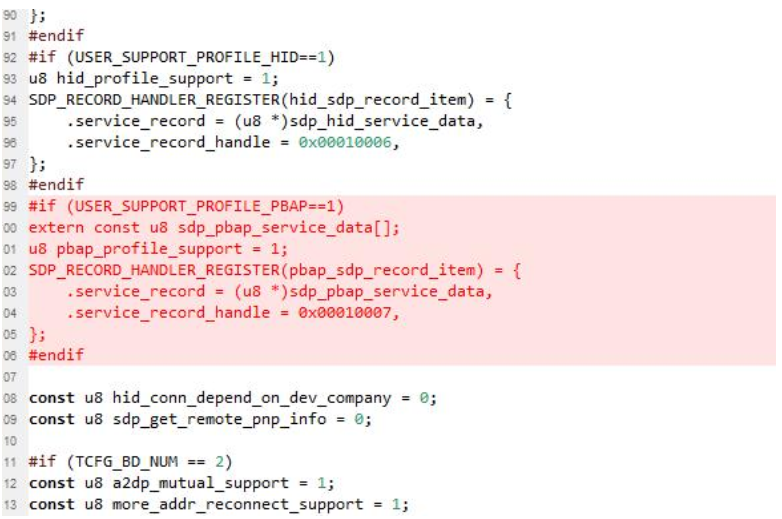
#if (USER_SUPPORT_PROFILE_PBAP==1)
extern const u8 sdp_pbap_service_data[];
u8 pbap_profile_support = 1;
SDP_RECORD_HANDLER_REGISTER(pbap_sdp_record_item) = {
    .service_record = (u8 *)sdp_pbap_service_data,
    .service_record_handle = 0x00010007,
};
#endif
本文档为保密信息,未经授权,请勿转发或告知第三方。非常感谢!
This electronic documentation and any attachments are confidential and may be legally privileged or otherwise protected from disclosure. If you are not the intended recipient, please do not disclose the contents to anyone。
Thank you for your cooperation!
解析权归杰理所有!
The analysis right belongs to JieLi Technology Co., Ltd.