27. Streaming Media Transfer Function
Functionality for controlling streaming media transfer
Streaming media function implementation class : StreamingTransferImpl
Standard characteristic values :
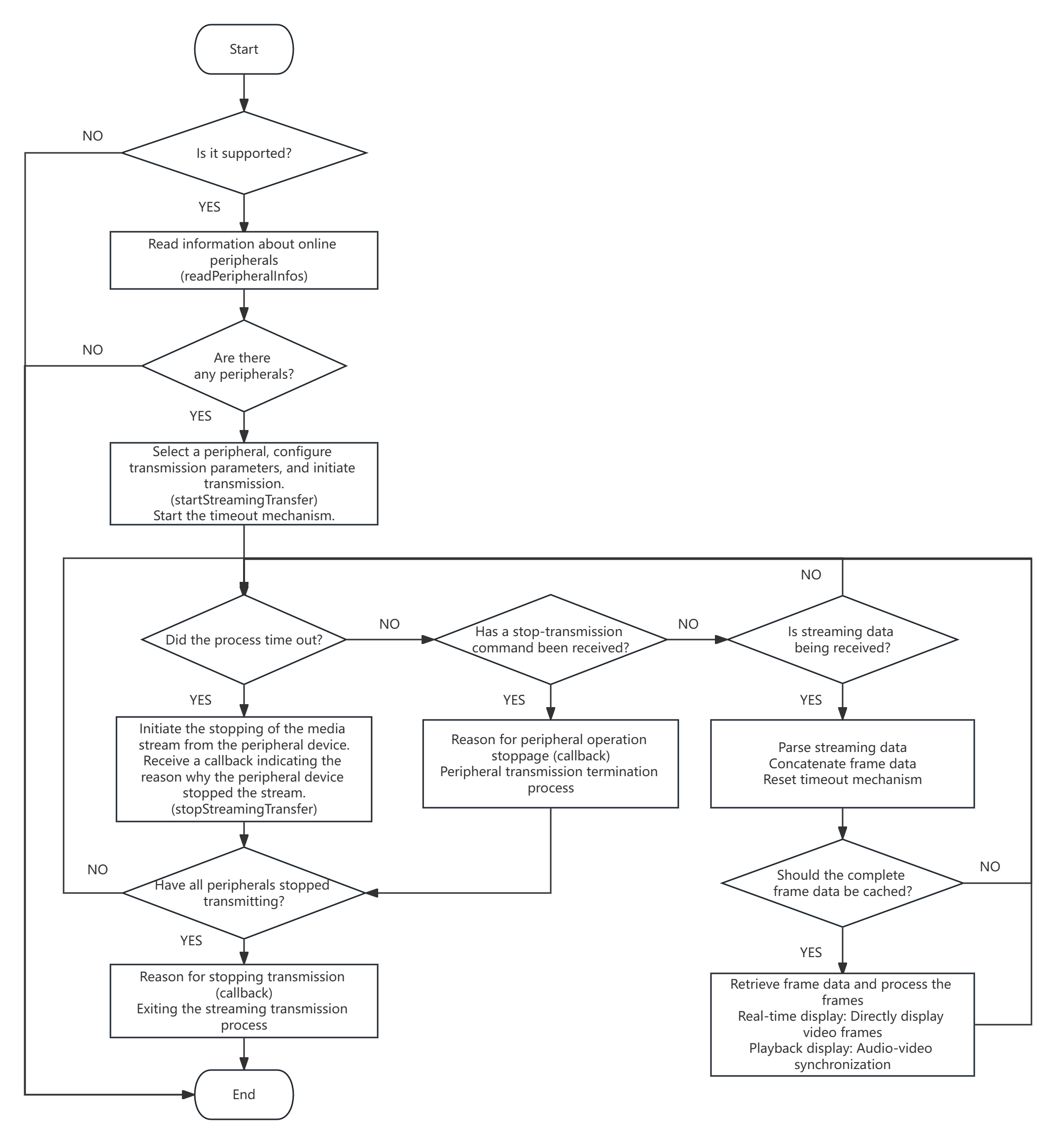
0xAE000xAE010xAE020xAE030xAE04Flow Charts
Streaming media transfer flow chart
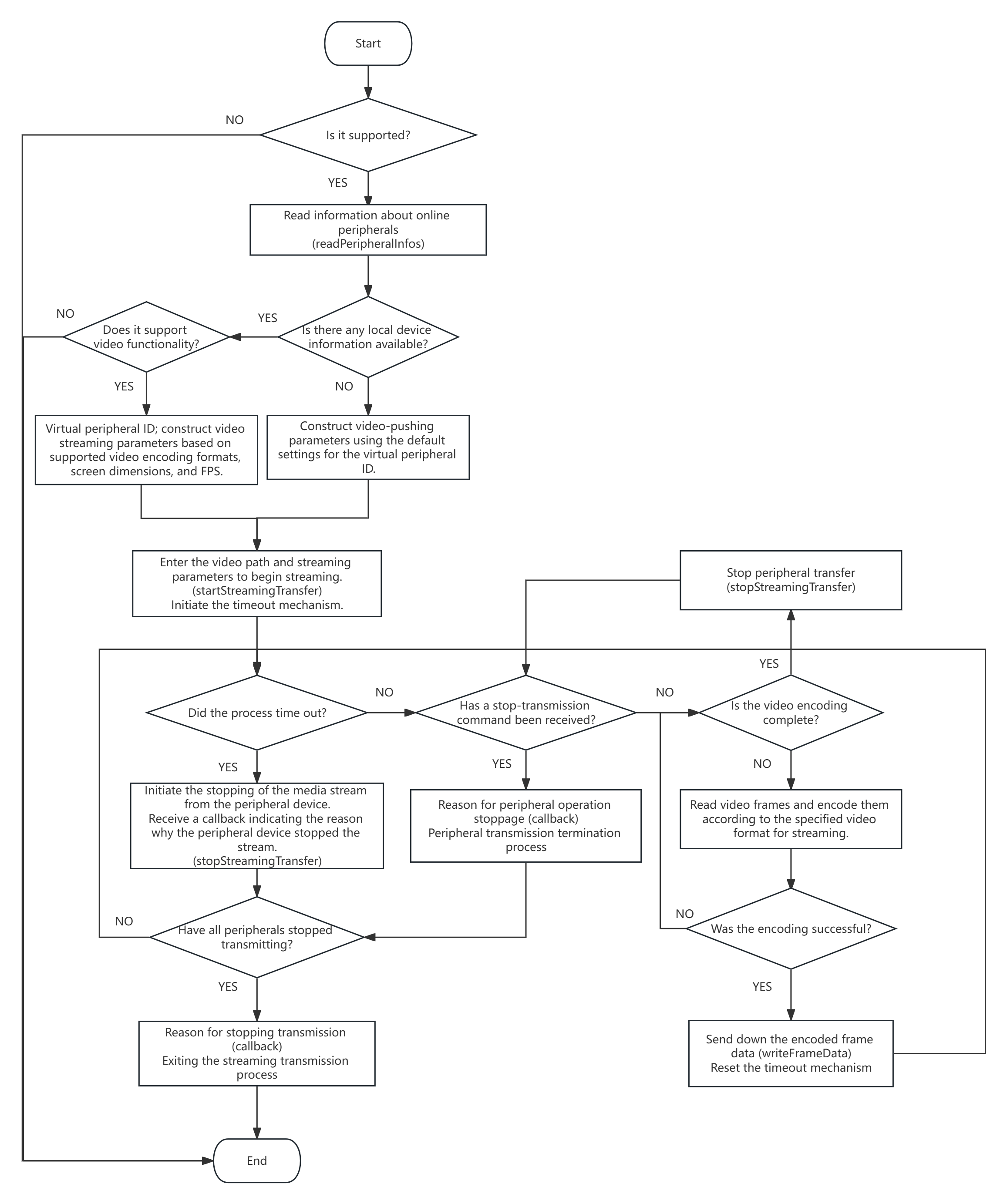
Push streaming media flow chart
27.1. Initialization
//WatchManager is a subclass of WatchOpImpl, must configure sdk in 1.3
WatchManager watchManager = WatchManager.getInstance();
//Must ensure the device has completed RCSP protocol initialization and the Bluetooth manager is initialized
if (!watchManager.isRcspInit() || !BluetoothCore.isInit()) return;
final BluetoothManager btManager = BluetoothManager.getInstance(); // Can be replaced with your own Bluetooth library
/// Initialize the streaming media transfer function implementation class
// WatchOpImpl is a subclass of RcspOpImpl, can be passed in directly
// RcspOpImpl is the base class of the RCSP protocol implementation
// IStreamingDataProxy streaming data proxy interface, because a strategy of separating command interaction and data interaction is adopted, streaming data must be implemented here
mStreamingTransfer = StreamingTransferImpl.instance(watchManager, new IStreamingDataProxy() {
    @Override
    public BluetoothDevice getDevice() {
        // This function implements obtaining the currently connected device, the operation device
        return btManager.getConnectedBtDevice();
    }

    @Override
    public void setOnStreamingDataListener(OnStreamingDataListener listener) {
        // This function implements streaming data listening; received streaming data must be called back through the listener
        // The following is a sample implementation
        mStreamingDataListener = listener;
    }

    @Override
    public void writeStreamingData(BluetoothDevice device, byte[] data, OnOperationCallback<Boolean> callback) {
        // This function implements streaming data sending and must be implemented by yourself
        // The following is a sample implementation
        btManager.writeDataByBleAsync(new BleSendParam(device, UUID_SERVICE,
                UUID_DATA_WRITE, data,
                (device1, serviceUUID, characteristicUUID, result, data1) -> {
                    if (null != callback) callback.onSuccess(result);
                }));
    }
});
// Register Bluetooth event listener
btManager.registerBluetoothCallback(btEventCallback);

// Check whether the device supports the streaming media transfer function
if (!mStreamingTransfer.isSupportStreamTransfer()) {
   //The device does not support the streaming media transfer function
    destroy();
    return;
}
// Initialization succeeded
// Register streaming state listener
mStreamingTransfer.addOnStreamingStateCallback(streamingStateCallback);
Note
For using an independent SPP channel for streaming media, refer to Independent SPP Channel for Streaming Media
27.1.1. Streaming Data Proxy
public interface IStreamingDataProxy {

    /**
     * Get the operation device object
     *
     * @return Operation device object
     */
    BluetoothDevice getDevice();

    /**
     * Set data listener
     *
     * @param listener Data listener
     */
    void setOnStreamingDataListener(OnStreamingDataListener listener);

    /**
     * Write data to the device
     *
     * @param device   Bluetooth device
     * @param data     Raw data
     * @param callback Operation result
     */
    void writeStreamingData(BluetoothDevice device, byte[] data, OnOperationCallback<Boolean> callback);
}
27.1.2. Streaming Media Data Listener
public interface OnStreamingDataListener {

    /**
     * Callback for received stream data
     *
     * @param device Bluetooth device
     * @param data   Stream data
     */
    void onStreamingData(BluetoothDevice device, byte[] data);

}
27.1.3. Bluetooth Event Callback
private final BluetoothEventCallback btEventCallback = new BluetoothEventCallback() {
    @Override
    public void onBleDataNotification(BluetoothDevice device, UUID serviceUuid, UUID characteristicsUuid, byte[] data) {
        if (!BluetoothUtil.deviceEquals(bluetoothHelper.getConnectedBtDevice(), device)) return;
        if (!UuidUtil.equalUUID(UUID_SERVICE, serviceUuid) ||
                !UuidUtil.equalUUID(UUID_DATA_NOTIFICATION, characteristicsUuid))
            return;
        // Streaming data received, call back to the streaming media transfer implementation class through the streaming data listener
        if (null != mStreamingDataListener) {
            mStreamingDataListener.onStreamingData(device, data);
        }
    }
};
27.1.4. Independent SPP Channel for Streaming Media
Starting from V1.15.0, streaming media data can be transmitted through an independent SPP channel instead of sharing the primary SPP channel with RCSP commands. The independent SPP channel is suitable for audio and video streaming scenarios with higher bitrates and larger data volumes.
Prerequisites
When initializing the Bluetooth connection library, add the streaming SPP channel UUID via
BluetoothOption#addSppUUIDAfter the device is connected, connect this SPP channel
//Streaming SPP channel UUID; the actual value is defined by the device firmware
public static final UUID UUID_SPP_STREAMING = UUID.fromString("fe020001-1234-5678-abcd-00805f9b34fb");

//Add the streaming SPP channel when initializing the Bluetooth connection library
BluetoothOption option = BluetoothOption.createDefaultOption()
        .addSppUUID(UUID_SPP_STREAMING);

//Connect the streaming SPP channel (called after the device is connected)
//It is recommended to use the SPP connection parameters configured in the Bluetooth library;
//the SDK will connect the primary channel and the configured secondary channels
boolean ret = bluetoothOp.connectSPPDevice(device);
//You can also specify connection parameters
// boolean ret = bluetoothOp.connectSPPDevice(device, new SppConnectParam()
//         .addSppUUID(UUID_SPP_STREAMING));
Implement the Streaming Data Proxy
When the streaming SPP channel is connected, prefer SPP; otherwise fall back to BLE.
@Override
public void writeStreamingData(BluetoothDevice device, byte[] data, OnOperationCallback<Boolean> callback) {
    //Prefer SPP when the streaming SPP channel is connected
    if (isStreamingSppConnected(device)) {
        if (bluetoothOp.writeDataToSppDevice(device, UUID_SPP_STREAMING, data)) {
            if (null != callback) callback.onSuccess(true);
        } else if (null != callback) {
            callback.onFailed(new BaseError(WatchError.ERR_IO_EXCEPTION,
                    "Failed to write streaming data by SPP."));
        }
        return;
    }
    //Fall back to BLE
    bluetoothOp.writeDataByBleAsync(new BleSendParam(device, UUID_SERVICE,
            UUID_DATA_WRITE, data,
            (device1, serviceUUID, characteristicUUID, result, data1) -> {
                if (null != callback) callback.onSuccess(result);
            }));
}

/**
 * Whether the streaming SPP channel is connected
 */
private boolean isStreamingSppConnected(BluetoothDevice device) {
    return null != device && bluetoothOp.isConnectedSppDevice(device, UUID_SPP_STREAMING);
}
Receive Data from the Streaming SPP Channel
private final BluetoothEventCallback btEventCallback = new BluetoothEventCallback() {

    @Override
    public void onSppDataNotification(BluetoothDevice device, UUID sppUUID, byte[] data) {
        if (null == data || data.length == 0 || null == device) return;
        if (!BluetoothUtil.deviceEquals(bluetoothHelper.getConnectedBtDevice(), device)) return;
        if (!UuidUtil.equalUUID(UUID_SPP_STREAMING, sppUUID)) return;
        //Received streaming SPP channel data; forward it to the streaming transfer implementation
        if (null != mStreamingDataListener) {
            mStreamingDataListener.onStreamingData(device, data);
        }
    }

    @Override
    public void onSppChannelStatus(BluetoothDevice device, UUID sppUUID, int status) {
        if (null == device || null == sppUUID) return;
        if (!UuidUtil.equalUUID(UUID_SPP_STREAMING, sppUUID)) return;
        //Streaming SPP channel connection state changed
        //status: BluetoothConstant.CONNECT_STATE_DISCONNECT / CONNECTING / CONNECTED
    }
};
Important
When the streaming SPP channel is connected, streaming data on the BLE channel should be ignored to avoid mixed parsing of data from the two channels
Disconnection of the streaming SPP channel does not mean the device is disconnected; the service layer needs to decide whether to reconnect
27.1.5. Streaming State Callback
private final OnStreamingStateCallback streamingStateCallback = new OnStreamingStateCallback() {
    @Override
    public void onPeripheralInfoChange(List<PeripheralInfo> peripheralInfos) {
        // Callback peripheral information
        // peripheralInfos : Peripheral information list
    }

    @Override
    public void onStartTransfer(int reason, List<PeripheralParam> params) {
        // Callback streaming media transfer start
        // reason : Reason code, used to distinguish whether triggered by the SDK side or the device side
        //   - OnStreamingStateCallback.REASON_SDK  --- Triggered by SDK side
        //   - OnStreamingStateCallback.REASON_REMOTE --- Triggered by device side
        // params : Peripheral parameter list
    }

    @Override
    public void onReceiveFrame(FrameData frameData) {
        // Callback for received frame data (always triggered by the device side)
        // frameData : Frame data
        // Note: Called back on a child thread, thread scheduling is removed to speed up frame data processing
    }

    @Override
    public void onFrameLost(int reason, FrameError frameError) {
        // Callback frame data loss
        // reason : Reason code, used to distinguish whether triggered by the SDK side or the device side
        //   - OnStreamingStateCallback.REASON_SDK  --- Triggered by SDK side
        //   - OnStreamingStateCallback.REASON_REMOTE --- Triggered by device side
        // frameError : Frame data error information
        //   - reason : Error reason
        //   -- StreamingCtrlCmd. --- Header information lost
        //   -- StreamingCtrlCmd.REASON_DATA_CORRUPTION --- Data corruption
        //   -- StreamingCtrlCmd.REASON_CRC_ERROR --- CRC check error
    }

    @Override
    public void onStopTransfer(int reason, boolean isFinish, List<PeripheralResult> results) {
        // Callback streaming media transfer end
        // reason : Reason code, used to distinguish whether triggered by the SDK side or the device side
        //   - OnStreamingStateCallback.REASON_SDK  --- Triggered by SDK side
        //   - OnStreamingStateCallback.REASON_REMOTE --- Triggered by device side
        // isFinish : Whether stopping the streaming media transfer is finished
        // results : Result list
    }
};
Note
27.1.5.1. Reason Code Reference Table
Code Value |
Constant |
Description |
|---|---|---|
1 |
StreamingCtrlCmd.REASON_MISSING_HEADER_DATA |
Missing header data |
2 |
StreamingCtrlCmd.REASON_DATA_CORRUPTION |
Data corruption |
3 |
StreamingCtrlCmd.REASON_CRC_ERROR |
CRC check failed |
Note
An exception for the same frame is reported only once through
onFrameLostto avoid duplicate notificationsWhen the device continuously sends abnormal frames, the SDK limits the frequency of exception reporting (at most once per second for the same peripheral session), but the
onFrameLostcallback is not affected
27.2. Read Online Peripheral Information List
if (null == mStreamingTransfer) {
    // Please initialize first
    return;
}
// Read peripheral information
mStreamingTransfer.readPeripheralInfos(new OnOperationCallback<List<PeripheralInfo>>() {
    @Override
    public void onSuccess(List<PeripheralInfo> result) {
        // Callback operation success result
        // result - Peripheral information list

        // The result is also called back via OnStreamingStateCallback#onPeripheralInfoChange(peripheralInfos)
    }

    @Override
    public void onFailed(BaseError error) {
        // Callback operation failure result
        // error - Error information
    }
});
27.2.1. Peripheral Information
public class PeripheralInfo extends LtvBean {

    /**
     * Number
     */
    private int number;
    /**
     * Valid data
     */
    private byte[] payload;
    /**
     * Most recent session ID
     */
    private int index = -1;
}
27.2.1.1. Subclass Reference Table
Device Type Constant |
Type Description |
Subclass Model |
|---|---|---|
RcspConstant.DEVICE_TYPE_MIC |
Microphone |
|
RcspConstant.DEVICE_TYPE_CAMERA |
Camera |
|
RcspConstant.DEVICE_TYPE_LOCAL |
Local device |
27.2.2. Microphone Information
public class MicInfo extends PeripheralInfo {

    /**
     * List of supported encoding formats
     */
    private int[] audioTypes;
    /**
     * List of supported sampling rates
     */
    private int[] sampleRates;
}
27.2.3. Camera Information
public class CameraInfo extends PeripheralInfo {

    /**
     * List of supported encoding formats
     */
    private int[] codecs;
    /**
     * Width
     */
    private int width;
    /**
     * Height
     */
    private int height;
    /**
     * Maximum frame rate
     */
    private int maxFps;
}
27.2.4. Local Device Information
public class LocalDeviceInfo extends PeripheralInfo {

    /**
     * Video configuration
     */
    private VideoConfiguration videoCfg;
    /**
     * Audio configuration
     */
    private AudioConfiguration audioCfg;
}
27.2.4.1. Video Configuration
public static class VideoConfiguration implements IDataOp, Parcelable {
    /**
     * Supported encoding formats
     */
    private int[] codecs;
    /**
     * Resolution - width
     */
    private int width;
    /**
     * Resolution - height
     */
    private int height;
    /**
     * Maximum frame rate
     */
    private int fps;
}
27.2.4.2. Audio Configuration
public static class AudioConfiguration implements IDataOp, Parcelable {
    /**
     * Supported audio encoding formats
     */
    private int[] codecs;
    /**
     * Supported sampling rates
     */
    private int[] sampleRates;
    /**
     * Supported channel counts
     */
    private int[] channels;
}
27.2.5. Audio Format Reference Table
Constant |
Description |
|---|---|
RcspConstant.AUDIO_TYPE_PCM |
PCM audio format |
RcspConstant.AUDIO_TYPE_SPEEX |
SPEEX audio format |
RcspConstant.AUDIO_TYPE_OPUS |
OPUS audio format |
RcspConstant.AUDIO_TYPE_M_SBC |
mSBC audio format |
RcspConstant.AUDIO_TYPE_JLA_V2 |
JLA_V2 audio format |
27.2.6. Video Encoding Reference Table
Constant |
Description |
|---|---|
RcspConstant.VIDEO_TYPE_JPEG |
JPEG format |
RcspConstant.VIDEO_TYPE_H264 |
H264 format |
27.2.7. Sampling Rate Reference Table
Identifier |
Sampling Rate |
|---|---|
0x01 |
8000Hz |
0x02 |
11025Hz |
0x03 |
12000Hz |
0x04 |
16000Hz |
0x05 |
22050Hz |
0x06 |
24000Hz |
0x07 |
32000Hz |
0x08 |
44100Hz |
0x09 |
48000Hz |
27.3. Transfer Method
Constant |
Description |
|---|---|
StreamingCtrlCmd.WAY_REQUEST_DATA |
SDK requests streaming media data from the remote device (DEVICE –> SDK) |
StreamingCtrlCmd.WAY_PUSH_DATA |
SDK requests to push streaming media data to DEVICE (SDK –> DEVICE) |
27.4. Start Requesting Streaming Media Transfer (DEVICE –> SDK)
if (null == mStreamingTransfer) {
    // Please initialize first
    return;
}
// Obtained via readPeripheralInfos
// Here the peripheral information cached by the SDK is read
List<PeripheralInfo> peripheralInfos = mStreamingTransfer.getPeripheralInfos();
if (peripheralInfos.isEmpty()) {
    //No peripheral information available for operation
    return;
}
PeripheralInfo info = peripheralInfos.get(0); //The user can choose the peripheral information; the first one is selected by default here
PeripheralParam param = null;
int sessionId = Math.min(1, 255); //Session ID, user-defined, range: [1, 255],
// Record every transfer session of the peripheral; uniqueness must be guaranteed
switch (info.getType()) {
    case RcspConstant.DEVICE_TYPE_MIC: { //Microphone
        MicInfo micInfo = (MicInfo) info;
        micInfo.getAudioTypes(); //List of audio formats supported by the peripheral
        micInfo.getSampleRates(); //List of audio sampling rates supported by the peripheral
        int audioType = RcspConstant.AUDIO_TYPE_PCM; //Choose according to the list of audio formats supported by the peripheral; PCM is used by default here
        int sampleRate = 16000; //Choose according to the list of audio sampling rates supported by the peripheral; 16K is used by default here
        param = new MicParam(sessionId, info.getNumber(), audioType, sampleRate);
        break;
    }
    case RcspConstant.DEVICE_TYPE_CAMERA: { //Camera
        CameraInfo cameraInfo = (CameraInfo) info;
        cameraInfo.getCodecs(); //List of encoding formats supported by the peripheral
        int maxFps = cameraInfo.getMaxFps(); //Maximum frame rate supported by the peripheral
        int codec = RcspConstant.VIDEO_TYPE_JPEG; //Choose according to the list of encoding formats supported by the peripheral; JPEG is used by default here
        int fps = Math.min(10, maxFps); //The frame rate cannot exceed the maximum frame rate supported by the peripheral; it is recommended to choose an appropriate frame rate.
        param = new CameraParam(sessionId, info.getNumber(), codec, fps, cameraInfo.getWidth(), cameraInfo.getHeight());
        break;
    }
}
if (null == param) {
    //Unsupported peripheral type
    return;
}
List<PeripheralParam> params = new ArrayList<>();
params.add(param);
mStreamingTransfer.startStreamingTransfer(params, new OnOperationCallback<List<PeripheralResult>>() {
    @Override
    public void onSuccess(List<PeripheralResult> result) {
        // Callback operation success result
        // result - Peripheral result list

        // The result is also called back via OnStreamingStateCallback#onStartTransfer(reason, params)
        // Note: If all peripheral operations fail, the OnStreamingStateCallback#onStopTransfer(reason, isFinish, results) callback will be returned
    }

    @Override
    public void onFailed(BaseError error) {
        // Callback operation failure result
        // error - Error information
    }
});
Note
To obtain local device information, refer to Read Online Peripheral Information List
Local Device Information , describes the device’s audio and video capability configuration
Different peripherals can join the transfer process by calling this interface
27.4.1. Peripheral Transfer Parameters
public class PeripheralParam extends LtvBean {

    /**
     * Transfer session ID
     */
    private int index;
    /**
     * Device number
     */
    private int number;
    /**
     * Valid data
     */
    private byte[] payload;
}
Important
indexis the transfer session ID, value range: [0, 255]; must be uniquenumberis the peripheral number. Related to Peripheral Information
27.4.1.1. Subclass Reference Table
Device Type Constant |
Type Description |
Subclass Model |
|---|---|---|
RcspConstant.DEVICE_TYPE_MIC |
Microphone |
|
RcspConstant.DEVICE_TYPE_CAMERA |
Camera |
27.4.2. Microphone Transfer Parameters
public class MicParam extends PeripheralParam {

    /**
     * Encoding format
     */
    private int audioType;
    /**
     * Sampling rate index
     */
    private int sampleRate;
}
27.4.3. Camera Transfer Parameters
public class CameraParam extends PeripheralParam {

    /**
     * Encoding format
     */
    private int codec;
    /**
     * Frame rate
     */
    private int fps;
    /**
     * Resolution width
     */
    private int width;
    /**
     * Resolution height
     */
    private int height;
}
27.4.4. Peripheral Transfer Result
public class PeripheralResult extends LtvBean {

    /**
     * Peripheral session sequence number
     */
    private int index;
    /**
     * Result code
     */
    private int code;
    /**
     * Extra data
     */
    private byte[] payload;
}
27.4.4.1. Subclass Reference Table
Device Type Constant |
Type Description |
Subclass Model |
|---|---|---|
RcspConstant.DEVICE_TYPE_MIC |
Microphone |
|
RcspConstant.DEVICE_TYPE_CAMERA |
Camera |
27.4.4.2. Error Code Reference Table
Code Value |
Constant |
Description |
|---|---|---|
0 |
StreamingCtrlCmd.ERR_NONE |
Operation succeeded |
1 |
StreamingCtrlCmd.ERR_DEVICE_BUSY |
Device busy / start failed |
2 |
StreamingCtrlCmd.ERR_INVALID_PARAM |
Parameter error |
27.4.5. Microphone Transfer Result
public class MicResult extends PeripheralResult {

    /**
     * Audio format
     */
    private int audioType;
    /**
     * Sampling rate
     */
    private int sampleRate;
}
Note
The corresponding fields may not have valid values; it depends on whether the device side responds
27.4.6. Camera Transfer Result
public class CameraResult extends PeripheralResult {

    /**
     * Encoding format
     */
    private int codec;
    /**
     * Frame rate
     */
    private int fps;
    /**
     * Resolution width
     */
    private int width;
    /**
     * Resolution height
     */
    private int height;
}
Note
The corresponding fields may not have valid values; it depends on whether the device side responds
27.5. Start Pushing Streaming Media (SDK –> DEVICE)
if (null == streamingTransfer) return; //Initialization not completed
List<PeripheralInfo> peripheralInfos = streamingTransfer.getPeripheralInfos();
int codec = RcspConstant.VIDEO_TYPE_JPEG;
int fps = 15;
int width = 240;
int height = 320;
if (!peripheralInfos.isEmpty()) { //If the device does not return local device information, test with the default parameters
    for (PeripheralInfo info : peripheralInfos) {
        if (info.getType() == RcspConstant.DEVICE_TYPE_LOCAL) { //Local device
            LocalDeviceInfo localDeviceInfo = (LocalDeviceInfo) info;
            LocalDeviceInfo.VideoConfiguration videoCfg = localDeviceInfo.getVideoCfg();
            if (null == videoCfg) return;
            //H264 is preferred, followed by JPEG
            codec = (RcspConstant.findArrayIndex(videoCfg.getCodecs(), RcspConstant.VIDEO_TYPE_H264) != -1)
                    ? RcspConstant.VIDEO_TYPE_H264 : RcspConstant.VIDEO_TYPE_JPEG; //Get supported video formats
            fps = videoCfg.getFps(); //Maximum frame rate
            width = videoCfg.getWidth(); //Resolution - width
            height = videoCfg.getHeight(); //Resolution - height
            break;
        }
    }
}
String videoPath = "Path of the video to push";
List<PeripheralParam> params = new ArrayList<>();
sessionId++;
int pushStreamingDeviceNum = 0x81; //Virtual push streaming device number
params.add(new CameraParam(sessionId, pushStreamingDeviceNum, codec, fps, width, height));
//Set the transfer method to push data
streamingTransfer.startStreamingTransfer(StreamingCtrlCmd.WAY_PUSH_DATA, params, new OnOperationCallback<List<PeripheralResult>>() {
    @Override
    public void onSuccess(List<PeripheralResult> result) {
        // Callback operation succeeded
        // result - Peripheral result list
        PeripheralResult opResult = result.get(0); //Because only one peripheral parameter is pushed, the first one is taken here
        int code = StreamingCtrlCmd.code2Error(opResult.getCode()); //Convert to a common error code
        if (code != WatchError.ERR_NONE) return; //Start failed
        // Start succeeded
        // Start sending streaming media data in a loop
        if (opResult.getType() == RcspConstant.DEVICE_TYPE_CAMERA) {
            CameraResult cameraResult = (CameraResult) opResult;
            handlerPeripheralResult(videoPath, cameraResult.getCodec(), cameraResult.getFps(),
                    cameraResult.getWidth(), cameraResult.getHeight());
        }
    }

    @Override
    public void onFailed(BaseError error) {
        // Callback operation failed
        // error - Error information
    }
});


// Handle peripheral push streaming result
private void handlerPeripheralResult(String videoPath, int codec, int fps, int width, int height) {
    //Only H264 processing is demonstrated below
    String fileName = AppUtil.getFileNameByPath(videoPath);
    String fileNameNoSuffix = WatchFileUtil.getNameNoSuffix(fileName);
    String tempDirPath = "Folder path for saving the output file";
    String outMp4Path = tempDirPath + File.separator + fileNameNoSuffix + ".mp4";
    FFmpegUtil.ConvertMp4Param param = new FFmpegUtil.ConvertMp4Param(videoPath, outMp4Path, width, height, fps,
            FFmpegUtil.EFFECT_CENTER_CROP, FFmpegUtil.DEFAULT_VIDEO_QUALITY);
    frameSeq = 0;
    sendFrameCount = 0;
    isStartCheck = false;
    // Encode H264 frame data
    FFmpegUtil.processVideoToH264(param, new FFmpegUtil.OnH264StreamCallback() {
        @Override
        public void onTranscodeStart() {

        }

        @Override
        public void onH264Data(byte[] data, boolean isKeyFrame) {
            handleH264Stream(data, isKeyFrame);
        }

        @Override
        public void onTranscodeEnd(String filePath, int resultCode, String message) {
            BaseError error = resultCode == WatchError.ERR_NONE ? new BaseError(WatchError.ERR_NONE)
                    : RcspErrorCode.buildJsonError(Command.CMD_STREAMING_CTRL, 0,
                    RcspErrorCode.ERR_RESPONSE_BAD_RESULT, resultCode, message);
            if (resultCode != WatchError.ERR_NONE) { //Transcoding failed
                return;
            }
            //This is only the end of transcoding; must wait for frame data sending to finish
            isStartCheck = true;
            checkPushStreamingStop("h264", false);
        }
    });
}

// Push H264 frame data
private void handleH264Stream(byte[] data, boolean isKeyFrame) {
    if (null == streamingTransfer) return;
    if (null == data || data.length == 0) { //Data invalid
        return;
    }
    List<PeripheralParam> params = streamingTransfer.getPeripheralParams(null);
    if (null == params || params.isEmpty()) { //Not in the transfer process
        return;
    }
    PeripheralParam param = params.get(0);
    int seq = frameSeq;
    frameSeq = seq + 1;
    final FrameData frameData = new FrameData()
            .setPeripheral(param)
            .setDataType(StreamingData.DATA_TYPE_FRAME)
            .setSeq(frameSeq)
            .setFrameSize(data.length)
            .setTimestamp(System.currentTimeMillis())
            .setData(data)
            .setCrc(CryptoUtil.CRC16(data, (short) 0));
    //Send frame data
    streamingTransfer.writeFrameData(frameData, new OnOperationCallback<Boolean>() {
        @Override
        public void onSuccess(Boolean result) {
            checkPushStreamingStop("h264");
        }

        @Override
        public void onFailed(BaseError error) {
            FrameError frameError = new FrameError()
                    .setFrameData(frameData)
                    .setReason(error.getCode());
            // Callback frame data exception
            // Check whether frame data pushing is finished
            checkPushStreamingStop("h264");
        }
    });
}

private void checkPushStreamingStop(String format) {
    checkPushStreamingStop(format, true);
}

private void checkPushStreamingStop(String format, boolean isAddCount) {
    if (isAddCount) {
        int count = sendFrameCount;
        sendFrameCount = count + 1;
    }
    if (isStartCheck && sendFrameCount == frameSeq) { //Check whether the sent data meets the requirement
        String log = RcspUtil.formatString("Push %s streaming success.", format);
        callbackPushStreamingStop("checkPushStreamingStop", new BaseError(WatchError.ERR_NONE, log));
    }
}

private void callbackPushStreamingStop(String method, BaseError error) {
    callbackPushStreamingStop(method, error, false);
}

private void callbackPushStreamingStop(String method, BaseError error, boolean isSkipStopPush) {
    FFmpegUtil.cancelAllSessions();
    if (null != convertMp4Param) {
        FileUtil.deleteFile(convertMp4Param.outputMp4Path);
        convertMp4Param = null;
    }
    frameSeq = 0;
    sendFrameCount = 0;
    isStartCheck = false;
    if (streamingTransfer.isTransferring() && !isSkipStopPush) {
        stopStreamingTransfer();
    }
}
Note
To obtain local device information, refer to Read Online Peripheral Information List
Local Device Information , describes the device’s audio and video capability configuration
27.5.1. Frame Data
public class FrameData implements Parcelable {
    /**
     * Peripheral parameters
     */
    private PeripheralParam peripheral;

    /**
     * Data type
     */
    private int dataType;

    /**
     * Frame sequence number
     */
    private int seq;

    /**
     * Frame size
     */
    private int frameSize;

    /**
     * Timestamp
     */
    private long timestamp;

    /**
     * Data CRC
     */
    private short crc;

    /**
     * Data
     */
    private byte[] data;
}
27.6. Stop Streaming Media Transfer
if (null == mStreamingTransfer) {
    // Please initialize first
    return;
}
if (!streamingTransfer.isTransferring()) return; //Not in streaming media transfer
//Get peripheral parameters
// Passing null is treated as getting all peripheral parameters
// Passing specified peripheral information gets only the specified peripheral parameters
List<PeripheralParam> params = streamingTransfer.getPeripheralParams(null);
if (params.isEmpty()) return; //No parameters currently being transferred
// Execute the stop streaming media transfer command
mStreamingTransfer.stopStreamingTransfer(params, new OnOperationCallback<Boolean>() {
    @Override
    public void onSuccess(Boolean result) {
        // Callback operation success result
        // result - Whether successful, always true

        // The result is also called back via OnStreamingStateCallback#onStopTransfer(reason, isFinish, results)
    }

    @Override
    public void onFailed(BaseError error) {
        // Callback operation failure result
        // error - Error information
    }
});
Important
All peripherals currently being transferred must be stopped before the SDK considers the entire transfer process finished
27.7. Unregister Streaming Media Control Class
//When the streaming media function is no longer used, remember to release the streaming media function implementation to avoid memory leaks
bluetoothHelper.getBluetoothOp().unregisterBluetoothCallback(btEventCallback);
if (null != mStreamingTransfer) {
    mStreamingTransfer.destroy();
    mStreamingTransfer = null;
}