FAQ
This records common questions that customers frequently encounter. Through categorization and organization, we provide answers to help customers quickly search for solutions.
Customers can first search for
existing questionsthat match your problem; if found, congratulations, you’ve found the answer.If it’s a new question, please follow these steps to ask, and we will respond as soon as possible.
Describe the situation and test environment, please refer to [Question Format](#question_format)
Provide print logs, output method please refer to Testing and Debugging
Best to provide screenshots or videos of the phenomenon
1. Question Format
Problem Description: XXXXXX
Test Environment: Firmware: AC695N_watch_SDK_Vxxx or JL701N_watch_SDK_Vxxx  Software: JieLi_Health_SDK_Android_Vxxx
Problem Tags: SDK Integration  Dial Operation  File Transfer   Health Data/Sports Data   Resource Update(Firmware Upgrade)  Other
Reproduction Steps: 1. xxxx 2. xxxx 3.xxxx
Reproduction Probability: Always, 1/20, n/m
Does Public Demo Reproduce: Yes, No
Time Period When Problem Occurred: yyyy/MM/dd hh:mm - yyyy/MM/dd hh:mm For example: 2022/05/28 17:00 - 2022/05/28 17:02
Remarks: xxxx
Important
Before development, please read JieLi Health SDK Development Document
2. Common Problems
2.1 Integration Issues
2.1.1 Device connected successfully, but keeps returning “Device not connected”
Problem Description: Self-implemented Bluetooth proxy part, when using JieLi Health SDK, the device is clearly connected successfully, but keeps returning device not connected error
Test Environment: Firmware: AC695N_watch_SDK_Vxxx or JL701N_watch_SDK_Vxxx  Software: JieLi_Health_SDK_Android_Vxxx
Problem Tags: SDK Integration
Remarks: None
Answer: This situation can be troubleshooted according to the following:
Passing device connection status incorrectly, need to convert to
connection status defined in the librarypublic class StateCode { /*--------------------------------------------------------------------- *Connection Status * ---------------------------------------------------------------------*/ public final static int CONNECTION_OK = 1; // Connection successful public final static int CONNECTION_FAILED = 2;// Connection failed public final static int CONNECTION_DISCONNECT = 0;// Disconnected public final static int CONNECTION_CONNECTING = 3;// Connecting ... }
Implementation of
getConnectedDevicemethod has problems, returning null.Confirm whether device authentication has been passed
2.1.2 Calling WatchManager interface has no callback
Problem Description: After device connection success, calling WatchManager's query list interface has no callback
Test Environment: Firmware: AC695N_watch_SDK_Vxxx or JL701N_watch_SDK_Vxxx  Software: JieLi_Health_SDK_Android_Vxxx
Problem Tags: SDK Integration
Remarks: None
WatchManager implementation has problems, causing device connection success but library initialization hasn’t started yet. Refer specifically to 2.1.1 Device connected successfully, but keeps returning “Device not connected”
Didn’t wait for JieLi Health Library initialization completion before calling interface
 isSystemInit = false;
// Initialize watch function object
demo = new WatchManagerDemo();
//          demo.isWatchSystemOk(); // Check if watch management object is initialized
// Register event listener
demo.registerOnWatchCallback(new OnWatchCallback() {
   @Override
   public void onWatchSystemInit(int code) {
      super.onWatchSystemInit(code); //TODO: System initialization result callback
      isSystemInit = code == 0;
      if (isSystemInit) {// System initialization successful
          //TODO: Can perform other operations, refer to testWatchOp
      } else { // System initialization failed

      }
   }
});
Note
Users need to wait for JieLi Health SDK to return initialization result before operating its interface.
2.1.3 How to trigger JieLi Health SDK initialization process?
Problem Description: JieLi Health SDK needs to wait for initialization result before operating interface, how to trigger JieLi Health SDK initialization process?
Test Environment: Firmware: AC695N_watch_SDK_Vxxx or JL701N_watch_SDK_Vxxx  Software: JieLi_Health_SDK_Android_Vxxx
Problem Tags: SDK Integration
Remarks: None
Answer: JieLi Health SDK processes based on device status transmitted by user. When user transmits device connected status, it triggers JieLi Health SDK initialization process.
SDK requires users to ensure accuracy of transmitted device status
Cannot repeatedly transmit the same device status
Pay attention to consistency of device status, connect -> disconnect. * For example: When device disconnects, need to transmit device disconnected status. Because SDK lacks disconnection status, it will miss handling device disconnection, causing anomalies in next device connection. * Device connected status can be called back after user completes device connection process. For example: If device requires device authentication, need to pass device authentication process after connection success, then call back device connected status
Device status value conversion needs to be passed according to
connection status defined in the library
For specific initialization process, refer to 1.3.4 SDK Initialization Flow
2.1.4 Important considerations for implementing a Bluetooth data transmission interface using BLE.
Problem Description: Important considerations for implementing a Bluetooth data transmission interface using BLE.
Test Environment: Firmware: AC695N_watch_SDK_Vxxx or JL701N_watch_SDK_Vxxx  Software: JieLi_Health_SDK_Android_Vxxx
Problem Tags: SDK Integration
Remarks: None
Answer: JieLi Health SDK uses proxy approach for Bluetooth processing, handing over Bluetooth functions to external implementation. Users need to implement Bluetooth proxy part to complete JieLi Health SDK construction.
Refer specifically to 1. SDK Framework
For sending data interface, if implemented via BLE, pay attention to MTU packetization and queue-based transmission
- BLE MTU packetization: BLE connections negotiate MTU values, values exceeding MTU are discarded by system.To avoid data loss, please send according to MTU size. If sent data length exceeds MTU, MTU packetization is required.
- BLE transmission - queue-based transmission: Concurrent BLE transmission easily causes phone system BLE low-level protocol stack to freeze.Suggest sending data and then performing queue-based transmission processing based on status returned by
BluetoothGattCallback#onCharacteristicWritecallback
2.2 Dial Operation Issues
2.2.1 Inserting dial returns error code: WatchError#ERR_VERSION_NOT_MATCH
Problem Description: When inserting dial watch6, returns error code:WatchError#ERR_VERSION_NOT_MATCH, always unsuccessful
Test Environment: Firmware: AC695N_watch_SDK_Vxxx or JL701N_watch_SDK_Vxxx  Software: JieLi_Health_SDK_Android_Vxxx
Problem Tags: Dial Operation
Remarks: None
Answer: Error code: WatchError#ERR_VERSION_NOT_MATCH, indicates dial version mismatch.
This situation can be troubleshooted according to following steps:
Dial file renamed, highest probability
In print logs, search for “PackResFormat” keyword, can see decompression file situation

Current version, dial files do not support renaming or other modifications
Dial file doesn’t have packed watchxxx.json file or watchxxx.json content is incorrect, second highest probability
watchxxx.json format as follows:

JSON content can be extended, but above fields must be retained, position cannot change
Device program doesn’t support dial version, lowest probability
Can query print logs to determine device’s watch system information

2.2.2 Inserting dial returns error code: WatchError#ERR_FAT_TOO_BIG
Problem Description: Inserting dial returns error code: WatchError#ERR_FAT_TOO_BIG, File size exceeds free space
Test Environment: Firmware: AC695N_watch_SDK_Vxxx or JL701N_watch_SDK_Vxxx  Software: JieLi_Health_SDK_Android_Vxxx
Problem Tags: Dial Operation
Remarks: None
Inserted dial file is incorrect
Watch built-in Flash insufficient
2.2.3 Inserting custom dial background causes device to freeze
Problem Description: After inserting custom dial background, device froze.
Test Environment: Firmware: JL701N_watch_SDK_Vxxx  Software: JieLi_Health_SDK_Android_Vxxx
Problem Tags: Dial Operation
Remarks: None
Answer: This situation is likely due to problems with custom dial background, please troubleshoot as follows
Whether correct conversion method was used
Image conversion example, refer to Image Conversion
Whether original image dimensions exceed device screen limits
Confirm device screen width and height

Get cached watch system information
final WatchManager watchManager = WatchManager.getInstance();
// Get cached watch system information
ExternalFlashMsgResponse watchSysInfo = watchManager.getExtFlashMsg(watchManager.getConnectedDevice());
if(null == watchSysInfo) return;
int screenWidth = watchSysInfo.getScreenWidth();    // Watch screen width
int screenHeight = watchSysInfo.getScreenHeight();  // Watch screen height
Whether
skip file validationwas selected//WatchManager is subclass of WatchOpImpl, must configure sdk in 1.3 final WatchManager watchManager = WatchManager.getInstance(); // Execute insert custom dial background file operation and wait for result callback // Whether to skip file validation option -- must be true watchManager.createWatchFile(bgFilePath, true, listener);
2.2.4 Browse watch file list, callback list empty or dial file info duplicated
Problem Description: After SDK initialization success, execute browse watch file list interface, occasionally callback file list empty or dial file info duplicated
Test Environment: Firmware: JL701N_watch_SDK_Vxxx  Software: JieLi_Health_SDK_Android_Vxxx
Problem Tags: Dial Operation
Remarks: SPP communication method
2.2.5 Inserting dial fails, device stuck at file transfer interface
Problem Description: Inserting dial fails, device stuck at "file transfer" interface
Test Environment: Firmware: AC695N_watch_SDK_Vxxx  Software: JieLi_Health_SDK_Android_Vxxx
Problem Tags: Dial Operation
Remarks: None
Customer needs to connect device via APP and perform system recovery operation. After system recovery success and device restart, normal usage can resume. Refer to System Recovery
Customer can flash device firmware via wire. Note, wire flashing requires adding parameter,
-format allor-format vm.
2.2.6 If want to display different dial names, how to implement?
Problem Description: If want to display different dial names, how to implement?
Test Environment: Firmware: AC695N_watch_SDK_Vxxx or JL701N_watch_SDK_Vxxx  Software: JieLi_Health_SDK_Android_Vxxx
Problem Tags: Dial Operation
Remarks: None
Answer: Provide two approaches:
Local extension: Can extend via dial’s json file, add corresponding field identifiers for dial info, thereby increasing dial nickname.
Server extension: Can query dial info on server via uuid in
prj_uuidfield, thus obtaining dial nickname.
2.3 File Transfer Issues
2.3.1 Can files be transferred to Flash?
Problem Description: Can files be transferred to Flash?
Test Environment: Firmware: AC695N_watch_SDK_Vxxx or JL701N_watch_SDK_Vxxx  Software: JieLi_Health_SDK_Android_Vxxx
Problem Tags: File Transfer
Remarks: None
Answer: Yes, but requires firmware support
To transfer files to Flash, filename must be short filename (8+3 structure). For example: watch001. Refer to File Download (APP -> Device)
To transfer files to Flash2 or Flash3 and other memory, firmware partitions Flash, specifically for storing resource files
Selected device handler must be Flash type. Refer to TransferTask.Param
WatchManager watchManager = WatchManager.getInstance();
TransferTask.Param param = new TransferTask.Param();
param.devHandler = getOnlineFlash().getDevHandler();    // Set device handler -- Flash handler
param.useFlash = true;                                  // Set to use Flash
mTask = new TransferTask(watchManager, filePath, param);
mTask.setListener(this);
mTask.start();
2.3.2 File transfer filename length issue explanation
Problem Description: File transfer filename length issue explanation
Test Environment: Firmware: AC695N_watch_SDK_Vxxx or JL701N_watch_SDK_Vxxx  Software: JieLi_Health_SDK_Android_Vxxx
Problem Tags: File Transfer
Remarks: None
Answer: File transfer filename length depends on transmission medium.
SD card, USB drive, etc.: Support long and short filenames
Built-in Flash, external Flash, etc.: Support short filenames
2.4 Health Data/Sports Data Issues
2.5 Resource Update Issues
Important
For OTA issues, please go to JieLi OTA External Library Development Document (Android)
2.5.1 Updating resources returns error code: WatchError#ERR_SPACE_TO_UPDATE
Problem Description: Updating watch resources failed, returns error code: WatchError#ERR_SPACE_TO_UPDATE, Insufficient space for upgrade resources
Test Environment: Firmware: AC695N_watch_SDK_Vxxx or JL701N_watch_SDK_Vxxx  Software: JieLi_Health_SDK_Android_Vxxx
Problem Tags: Resource Update
Remarks: None
Resource exists, but same as resource to be updated, no processing.
Resource exists, but different from resource to be updated, replacement processing
Resource doesn’t exist, insert needed update resource
2.5.2 Difference between resource update and firmware upgrade
Problem Description: Difference between resource update and firmware upgrade
Test Environment: Firmware: AC695N_watch_SDK_Vxxx or JL701N_watch_SDK_Vxxx  Software: JieLi_Health_SDK_Android_Vxxx
Problem Tags: Resource Update
Remarks: None
Structure of upgrade.zip
├ res.ori — Folder, mainly stores content for resource updates└ update.ufw — Firmware upgrade fileResource update strategy:
Both res.ori and update.ufw exist: Update resources –> Firmware upgrade
res.ori exists, update.ufw doesn’t exist: Update resources
res.ori doesn’t exist, update.ufw exists: Firmware upgrade
To update resources, refer to Resource Update
2.5.3 Resource update failed, device stays at “file transfer” interface
Problem Description: Resource update failed, device stays at "file transfer" interface
Test Environment: Firmware: AC695N_watch_SDK_Vxxx or JL701N_watch_SDK_Vxxx  Software: JieLi_Health_SDK_Android_Vxxx
Problem Tags: Resource Update
Remarks: Device condition as shown below
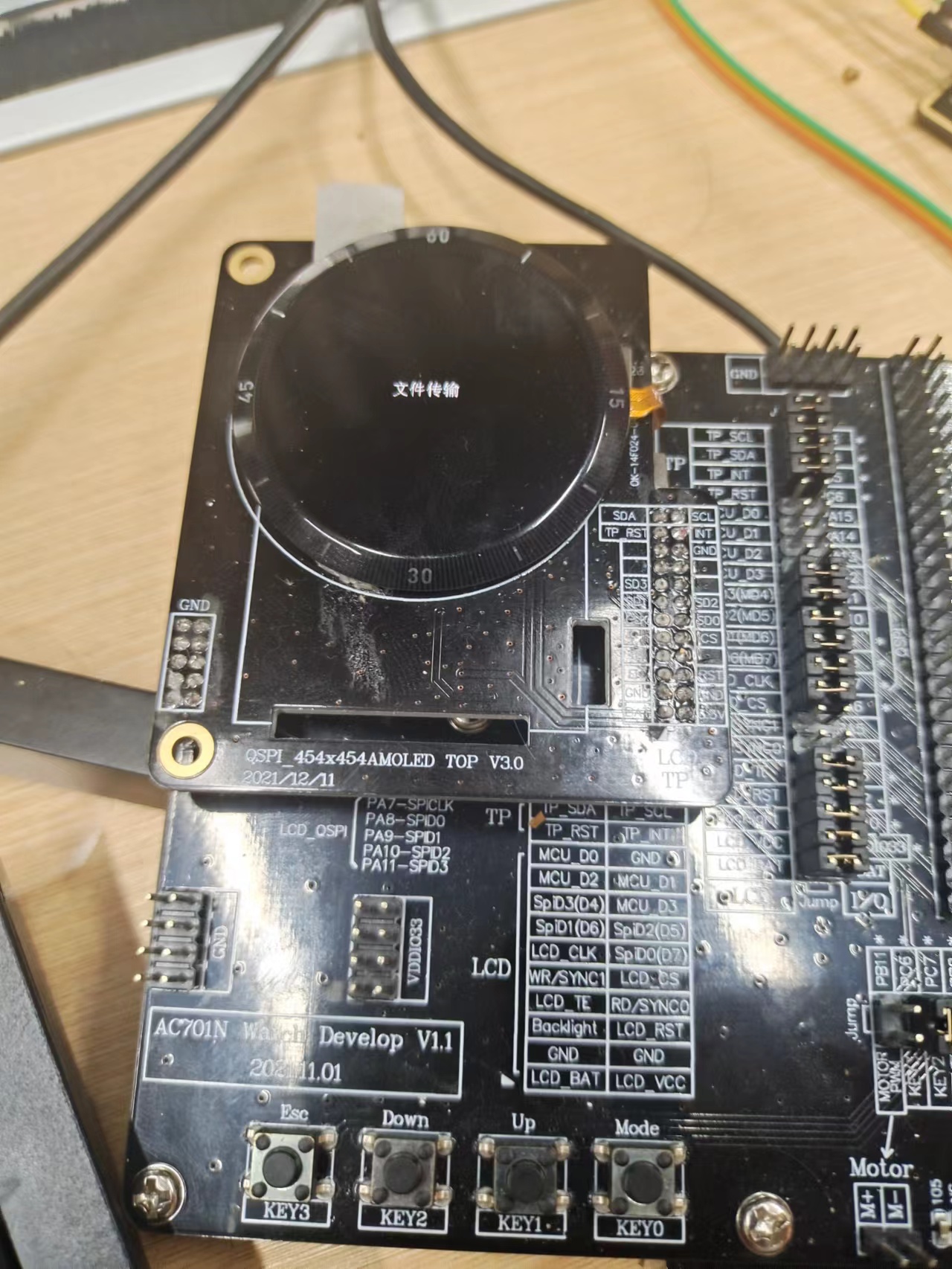
Customer needs to connect device via APP and continue completing resource update process. After resource update completion and device restart, normal usage can resume
Customer can flash device firmware via wire. Note, wire flashing requires adding parameter,
-format allor-format vm.
2.6 Other Issues
2.6.1 Dual mode same address supports CTKD (one-click connection), classic Bluetooth connection issues
Problem Description: Dual mode same address supporting CTKD (one-click connection) device, if classic Bluetooth paired first, then connecting BLE, connection normal; but connecting BLE first then classic Bluetooth, classic Bluetooth won't connect
Test Environment: Firmware: JL701N_watch_SDK_Vxxx  Software: JieLi_Health_SDK_Android_Vxxx
Problem Tags: Other Issues
Remarks: None
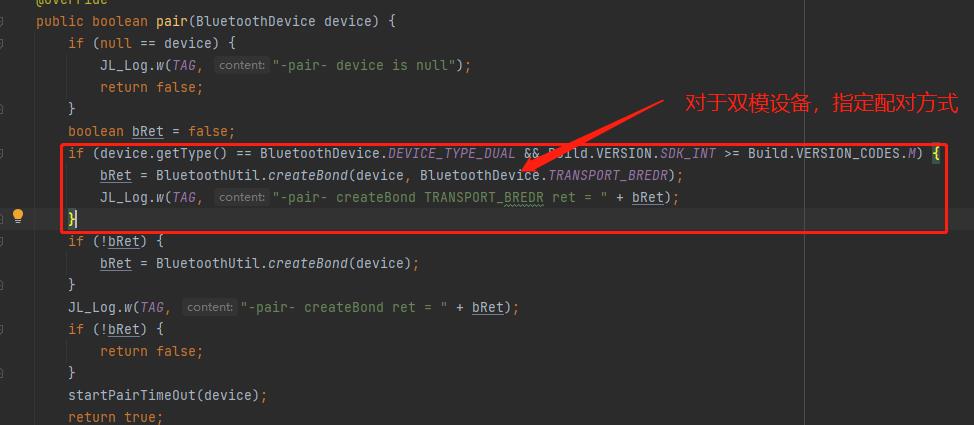
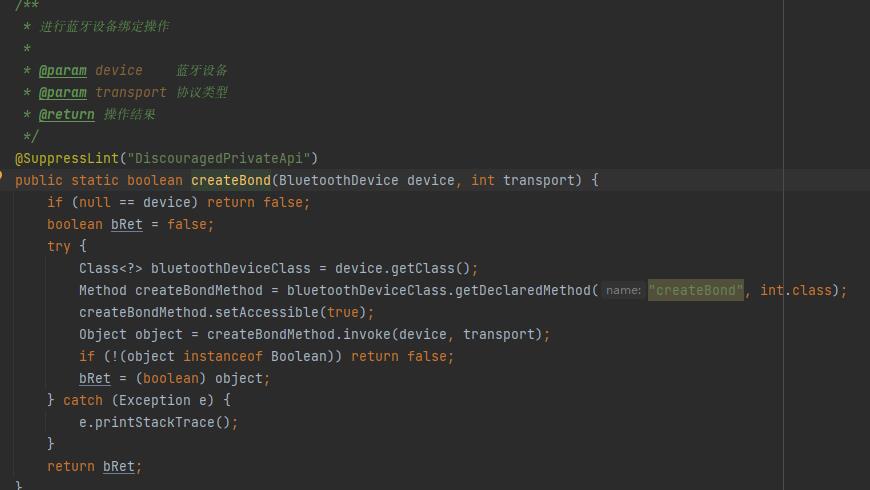
If customer uses JieLi Bluetooth connection library to implement Bluetooth processing part functions, replace with
jl_bluetooth_connect_V1.0.8+library for developmentIf customer implements Bluetooth processing part functions themselves, need to specify dual mode device pairing method. Reference code as follows
2.6.2 Dual mode same address supports CTKD (one-click connection), does it support HID?
Problem Description: Dual mode same address supports CTKD (one-click connection), does it support HID
Test Environment: Firmware: AC6971N_watch_SDK_Vxxx  Software: JL_Health_SDK_Vxxx
Problem Tags: Other Issues
Remarks: None
2.6.1 .2.6.1 method, will cause HID to not be connected.