1 Integration Process
1.1 Supported Environments
Environment |
Compatibility Range |
Notes |
|---|---|---|
Software System |
Target Version: Android API 36
Minimum Version: Android API 21
|
Supports BLE functionality |
Firmware SDK |
AC695N-watch-SDK,
JL701N-watch-SDK,
AC707N-watch-SDK, etc.
|
Suggest consulting SDK lead |
Development Tools |
Android Studio |
Suggest using latest version |
1.2 Library Import
1.2.1 Dependencies
Important
XXX represents version number, please refer to latest release version
jl_bluetooth_connect_Vxxx-release.aar :Bluetooth connection related, refer to JieLi Connection Development Document (Android)
jldecryption_vxxx-release.aar : Encryption related
JL_Watch_Vxxx-release.aar : Health functions related
jl_rcsp_Vxxx-release.aar : Basic protocol related
BmpConvert_Vxxx-release.aar : Image conversion, refer to Image Conversion
jl_bt_ota_Vxxx-release.aar : JieLi Bluetooth upgrade related, refer to JieLi OTA External Library Development Document (Android)
1.2.2 Import Libraries
<-- 1. Place the aar files from 1.2.1 into the lib folder of the corresponding module in your project directory --!>
<-- 2. Add to module's build.gradle --!>
implementation fileTree(include: ['*.aar'], dir: 'libs')
1.2.3 Required Permissions
<-- Use Bluetooth permissions --!>
<uses-permission android:name="android.permission.BLUETOOTH"/>
<uses-permission android:name="android.permission.BLUETOOTH_ADMIN"/>
    <-- Location permissions, official requirement for Bluetooth or network development requires location information --!>
<uses-permission android:name="android.permission.ACCESS_COARSE_LOCATION"/>
    <uses-permission android:name="android.permission.ACCESS_FINE_LOCATION" />
<-- Android 12+ requires additional Bluetooth connection permission --!>
<uses-permission android:name="android.permission.BLUETOOTH_CONNECT" />
1.2.4 Proguard Configuration
# Keep public and protected methods within library
-keep class com.jieli.** {
    public *;
    protected *;
}

# Keep data models unchanged
-keep class com.jieli.jl_filebrowse.bean.** {
    *;
}
-keep class com.jieli.jl_rcsp.model.** {
    *;
}
-keep class com.jieli.jl_fatfs.model.** {
    *;
}

#Keep RcspAuth class
-keep class com.jieli.jl_rcsp.impl.RcspAuth  { *; }

#Keep RcspOpImpl class
-keep class com.jieli.jl_rcsp.impl.RcspOpImpl { *; }
-keepclassmembernames class com.jieli.jl_rcsp.impl.RcspOpImpl { *; }
1.3 SDK Configuration
1.3.1 Inherit Parent Class
//Implement health management class
public class WatchManager extends WatchOpImpl{

   private BluetoothDevice mTargetDevice;

   public static WatchManager getInstance() {
       if (null == instance) {
           synchronized (WatchManager.class) {
              if (null == instance) {
                  instance = new WatchManager(FUNC_WATCH);
               }
            }
        }
        return instance;
   }

   //func FUNC_WATCH: watch function
   //FUNC_RCSP:only use rcsp protocol
   //FUNC_FILE_BROWSE:use rcsp protocol and directory browsing function
    public WatchManager(int func) {
        super(func);
    }
     /**
      * Get currently connected device, SDK operations are based on this device
      * @return target device
      */
    @Override
    public BluetoothDevice getConnectedDevice() {
        //TODO: Customer override implementation
         return mTargetDevice;
    }

            /**
     * SDK notifies external to send data
     * @param device Bluetooth device object
     * @param data   data packet byte array
     * @return false: send failed  true: send successful
     */
    @Override
    public boolean sendDataToDevice(BluetoothDevice device, byte[] data) {
        //TODO: Customer override implementation
         return false;
    }
}
1.3.2 External Status and Data Synchronization
WatchManager mWatchManager = WatchManager.getInstance();
//1. Notify SDK Bluetooth device status
//targetDevice : target device
//connection status : connection status
//Note: connection status needs to be converted to StateCode connection status
mWatchManager.notifyBtDeviceConnection(targetDevice, StateCode.CONNECTION_OK);
//2. Notify SDK to receive data
//targetDevice: target device
//data:byte array, received target data from device
mWatchManager.notifyReceiveDeviceData(targetDevice,data);
//3. SDK notifies external to send data (implemented in subclass override method)
//device: target device
//data: send data
sendDataToDevice(BluetoothDevice device, byte[] data);
Important
Transparent connection status needs to convert library-defined connection status
If device requires authentication process, please connect successfully and complete device authentication before callback success status
Send data interface, if BLE implementation, pay attention to
MTU packetizationandqueued data sending- BLE MTU packetization: BLE connections negotiate MTU values, values exceeding MTU are discarded by system.To avoid data loss, please send according to MTU size. If sent data length exceeds MTU, MTU packetization is required
- BLE transmission - queued data: Concurrent BLE transmission easily causes phone system BLE low-level protocol stack to freeze.Suggest sending data and then performing queued data transmission processing based on status returned by
BluetoothGattCallback#onCharacteristicWritecallback
1.3.3 SDK Status Data Callback
WatchManager mWatchManager =   WatchManager.getInstance();

//1.Watch dial related callbacks
mWatchManager.registerOnWatchCallback(new OnWatchCallback() {
    //Refer to section 3.2 description

    /**
     * RCSP protocol initialization status callback
     *
     */
    @Override
    public void onRcspInit(BluetoothDevice device, boolean isInit) {
       //1. Whether RCSP protocol initialization is successful
       //2. When condition 1 is met, will check if watch function is supported
       //3. When condition 2 is met, will initialize watch protocol
    }

    /**
     * Watch system initialization status callback
     *
     * @param code Initialization status
     *             <p>
     *             If 0, initialization successful; other values are error codes
     *             </p>
     */
    public void onWatchSystemInit(int code) {
            //code is 0 means library initialization completed, can perform functional operations
        //code is error code means need to disconnect device
    }
});

//2. Device-initiated push event callbacks
mWatchManager.registerOnRcspEventListener(new OnRcspEventListener() {
    //Refer to section 3.3 description
});
Important
onWatchSystemIniterror codes can refer to 3.13 Error Code Definition
1.3.4 SDK Initialization Flow
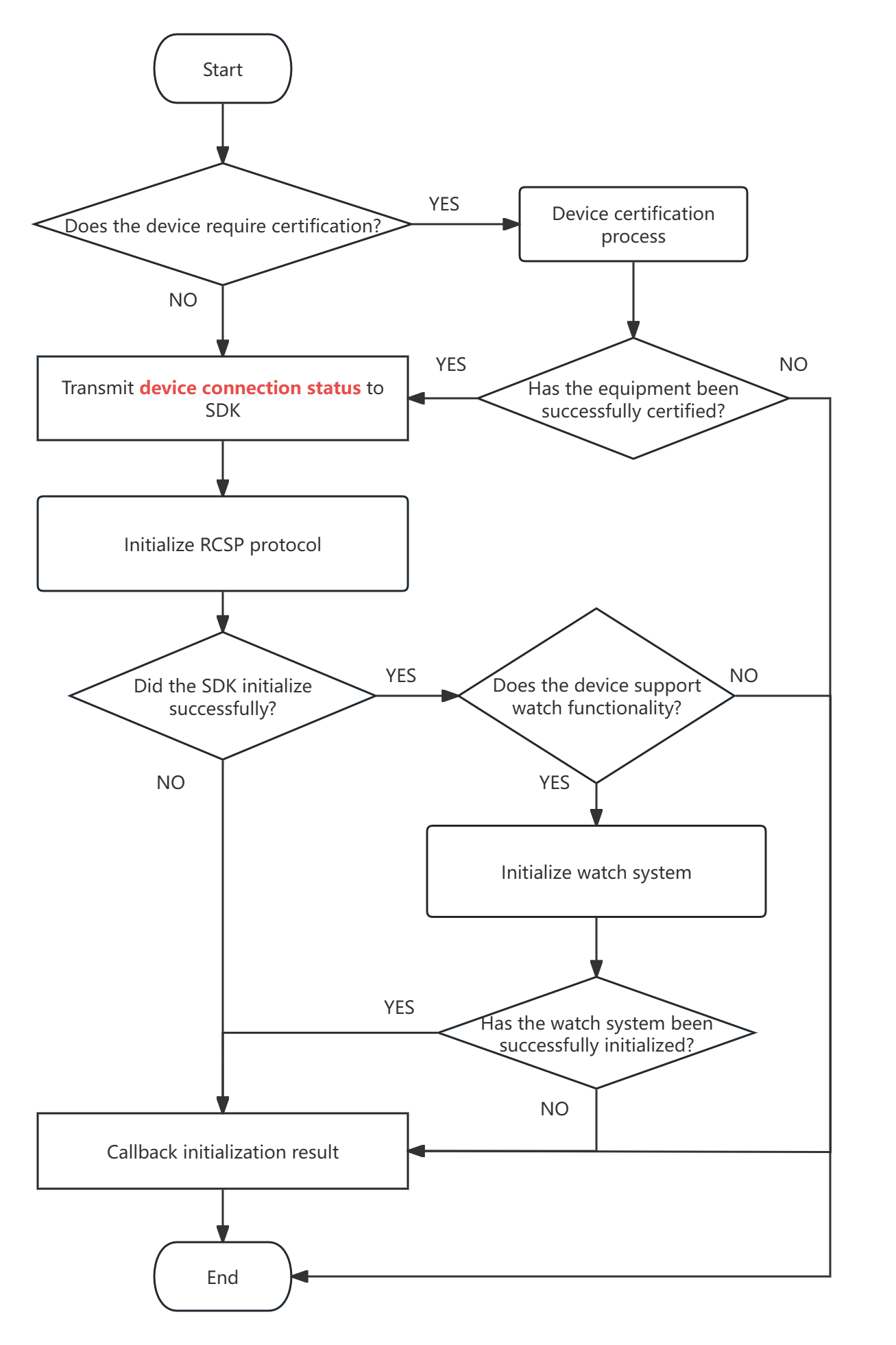
1.3.5 Exception Handling
Exception status is the status returned when firmware system has exceptions. Users must handle firmware exceptions to use device normally.
1.3.5.1 Monitor exception status
//WatchManager is subclass of WatchOpImpl, must configure SDK in section 1.3
WatchManager mWatchManager = WatchManager.getInstance();
final OnWatchCallback watchCallback = new OnWatchCallback() {
    @Override
    public void onRcspInit(BluetoothDevice device, boolean isInit) {
        super.onRcspInit(device, isInit);
        //Callback RCSP protocol initialization status
        //First initialize RCSP protocol
        //If RCSP initialization fails, troubleshoot according to following:
        //1. Whether device authentication was not passed
        //2. Whether data sending is abnormal
    }

    @Override
    public void onWatchSystemInit(int code) {
        super.onWatchSystemInit(code);
        //Callback watch system initialization status
        //Detecting watch function support, will perform watch system initialization
        //If watch system initialization fails, troubleshoot according to following:
        //1. Whether device is offline
        //2. Whether device supports watch function
        //3. Whether watch system sent exception
    }

    @Override
    public void onWatchSystemException(BluetoothDevice device, int sysStatus) {
        super.onWatchSystemException(device, sysStatus);
        //Callback watch system exception
        //AC695N_WATCH_SDK may callback system exception, need to perform system recovery operation, only after successful recovery can watch function be used normally.
        //AC701N_WATCH_SDK generally doesn't callback system exception, handled internally.
    }

    @Override
    public void onMandatoryUpgrade(BluetoothDevice device) {
        super.onMandatoryUpgrade(device);
        //Callback device requires mandatory upgrade
        //This situation usually occurs after single backup upgrade exception. Causes device to enter mandatory upgrade state.
        //At this time device only has BLE, and BLE only supports OTA function. Only after mandatory upgrade succeeds, can it be used normally
    }

    @Override
    public void onResourceUpdateUnfinished(BluetoothDevice device) {
        super.onResourceUpdateUnfinished(device);
        //Callback device resources not updated completely
        //This situation usually occurs after resource update failure, causing device to enter correction resource state.
        //In this situation watch system can run, but some resources are damaged, need to complete resource update to use normally.
        //Using function forcibly with damaged resources may cause device to freeze.
    }

    @Override
    public void onNetworkModuleException(BluetoothDevice device, NetworkInfo info) {
        super.onNetworkModuleException(device, info);
        //Callback network module sent exception
        //This situation usually occurs after network module upgrade failure, device detects network module (4G module) exception
        //In this situation suggest mandatory network module upgrade, only after network module upgrade completion can network function be used normally.
    }
};
//Register watch event listener
mWatchManager.registerOnWatchCallback(watchCallback);

//When not needed, unregister callback
//mWatchManager.unregisterOnWatchCallback(watchCallback);
1.3.5.2 Get Exception Status
Besides monitoring, users can query device exception status through SDK interface
Mandatory upgrade status
//WatchManager is subclass of WatchOpImpl, must configure SDK in section 1.3
WatchManager watchManager = WatchManager.getInstance();
final DeviceInfo deviceInfo = watchManager.getDeviceInfo();
if(null == deviceInfo) return; //Device not finished initializing
deviceInfo.isMandatoryUpgrade(); //Whether device needs mandatory upgrade
Watch system exception status
//WatchManager is subclass of WatchOpImpl, must configure SDK in section 1.3
WatchManager watchManager = WatchManager.getInstance();
//Get external Flash information
final ExternalFlashMsgResponse externalFlashMsg = watchManager.getExternalFlashMsg(watchManager.getConnectedDevice());
if(null == externalFlashMsg) return; //Device doesn't support watch function
boolean isSysException = externalFlashMsg.getSysStatus() != 0; //Check if watch system is exceptional, 0 is normal, other values are exceptions
Resource update incomplete status
//WatchManager is subclass of WatchOpImpl, must configure SDK in section 1.3
WatchManager watchManager = WatchManager.getInstance();
 final DeviceInfo deviceInfo = watchManager.getDeviceInfo();
 if (null == deviceInfo) return; //Device not finished initializing
 //Check if device is in resource update mode
 //0 for normal mode, 1 for resource update mode
 boolean isUpdateResource = deviceInfo.getExpandMode() == WatchConstant.EXPAND_MODE_RES_OTA;
Network module upgrade exception status
//WatchManager is subclass of WatchOpImpl, must configure SDK in section 1.3
 WatchManager watchManager = WatchManager.getInstance();
 final DeviceInfo deviceInfo = watchManager.getDeviceInfo();
 if (null == deviceInfo) return; //Device not finished initializing
 //Get network module information
 final NetworkInfo networkInfo = deviceInfo.getNetworkInfo();
 if(null == networkInfo){//Device doesn't support network module function
     //Need to wait for onWatchSystemInit callback success before querying
     return;
 }
 boolean isNetworkModeException = networkInfo.isMandatoryOTA(); //Whether network module needs mandatory upgrade
1.3.5.3 Handle Exception Status
Solution for firmware exception status
Firmware mandatory upgrade status
Resolve through
upgrading firmwaremethod. Specific operation refer to JieLi OTA External Library Development Document (Android)Watch system exception status
Resolve through
restoring systemmethod. Refer to System RecoveryResource update incomplete status
Resolve through
resource updatemethod. Refer to Resource UpdateNetwork module upgrade exception status
Resolve through
network module upgrademethod. Refer to Start Network Module OTA
1.3.6 Device Authentication
Whether device authentication is needed, need to confirm with firmware engineer. Public version firmware SDK defaults to enable device authentication.
//1. Initialize RcspAuth object, need to implement send data interface and set data listener
RcspAuth mRcspAuth = new RcspAuth(new RcspAuth.IRcspAuthOp() {
        @Override
        public boolean sendAuthDataToDevice(BluetoothDevice device, byte[] data) {
            return sendDataToDevice(device, data);
        }
    }, mRcspAuthListener);
//2. When device connects successfully, start device authentication
mRcspAuth.stopAuth(device, false); //Clear old device authentication
boolean ret = mRcspAuth.startAuth(device); //Start device authentication, result is operation result
//3. At receive device data callback, perform device authentication data processing
if (!isAuthDevice(device)) {
    mRcspAuth.handleAuthData(device, rawData);
} else {
    //TODO: Other data processing
}
//4. Authentication results will callback through listener
//5. When not using device authentication function, please destroy RcspAuth object
//mRcspAuth.destroy();
● Send Interface
public interface IRcspAuthOp {
    /**
     * Send authentication data to Bluetooth device
     *
     * @param device Bluetooth device object
     * @param data   data packet
     * @return operation result
     */
    boolean sendAuthDataToDevice(BluetoothDevice device, byte[] data);
}
● Authentication Event Listener
/**
 * Rcsp authentication listener
 */
public interface OnRcspAuthListener {
    /**
     * Initialization result callback
     *
     * @param result Result
     */
    void onInitResult(boolean result);

    /**
     * Device authentication success callback
     *
     * @param device Bluetooth device
     */
    void onAuthSuccess(BluetoothDevice device);

    /**
     * Device authentication failure callback
     *
     * @param device  Bluetooth device
     * @param code    Error code
     * @param message Error message
     */
    void onAuthFailed(BluetoothDevice device, int code, String message);
}
1.4 Bluetooth Implementation
1.4.1 JieLi Bluetooth Connection Library Implementation
1.4.1.1 Import Bluetooth Library
Place in libs folder
jl_bluetooth_connect_Vxxx-release.aar
jldecryption_vxxx-release.aar
Configure in build.gradle
implementation fileTree(include: ['*.aar'], dir: 'libs')

//Room persistence library
implementation "androidx.room:room-runtime:2.3.0"
annotationProcessor "androidx.room:room-compiler:2.3.0"
Configure permissions in AndroidManifest.xml
<uses-permission android:name="android.permission.BLUETOOTH" />
<uses-permission android:name="android.permission.BLUETOOTH_ADMIN" />
<uses-permission android:name="android.permission.ACCESS_COARSE_LOCATION" />
<uses-permission android:name="android.permission.ACCESS_FINE_LOCATION" />

<uses-permission android:name="android.permission.BLUETOOTH_CONNECT"/>
<uses-permission android:name="android.permission.BLUETOOTH_SCAN"/>
1.4.1.2 Watch Operation Implementation
class WatchManagerByJL extends WatchOpImpl {

    /**
     * Whether to use device authentication process
     */
    public static final boolean IS_USE_DEVICE_AUTH = true;

    /**
     * JieLi Bluetooth connection library initialization
     */
    private final BluetoothHelper jlBtOp = BluetoothHelper.getInstance();
    /**
     * Device authentication helper class
     */
    private final RcspAuth rcspAuth;
    /**
     * Whether device authentication passed
     */
    public final Map<String, Boolean> authResultMap = new HashMap<>();

    private final BluetoothEventListener btEventListener = new BluetoothEventListener() {
        @Override
        public void onConnection(BluetoothDevice device, int status) {
            if (null == device) return;
            //Remove device authentication flag
            authResultMap.remove(device.getAddress());
            if (status == BluetoothConstant.CONNECT_STATE_CONNECTED) { //Connection successful
                if (!isAuthPass(device)) {//Device needs authentication but hasn't passed
                    //Start device authentication
                    rcspAuth.stopAuth(device, false);
                    rcspAuth.startAuth(device);
                    return;
                }
            }
            //TODO: Pass through device authentication status
            //TODO: Connection status needs to be converted to jl_watch library connection status,
            /**
             * {@link StateCode#CONNECTION_DISCONNECT}    --- Not connected
             * {@link StateCode#CONNECTION_OK}            --- Connection successful
             * {@link StateCode#CONNECTION_CONNECTING}    --- Connecting
             * {@link StateCode#CONNECTION_FAILED}        --- Connection failed
             */
            int newStatus = RcspUtil.changeConnectStatus(status);
            System.out.printf(Locale.ENGLISH, "Original connection status: %d ==> Converted connection status: %d%n", status, newStatus);
            notifyBtDeviceConnection(device, newStatus);
        }

        @Override
        public void onReceiveData(BluetoothDevice device, byte[] data) {
            //Callback received data
            if (!isAuthPass(device)) { //Device hasn't passed device authentication
                //TODO: Pass through data to RcspAuth
                rcspAuth.handleAuthData(device, data);
                return;
            }
            //TODO: Pass through data to JieLi Health SDK
            notifyReceiveDeviceData(device, data);
        }
    };

    //func FUNC_WATCH: watch function
    //FUNC_RCSP:only use rcsp protocol
    //FUNC_FILE_BROWSE:use rcsp protocol and directory browsing function
    public WatchManagerByJL() {
        super(FUNC_WATCH);
        //Initialize RCSP authentication class
        rcspAuth = new RcspAuth(this::sendDataToDevice, new RcspAuth.OnRcspAuthListener() {
            @Override
            public void onInitResult(boolean result) {

            }

            @Override
            public void onAuthSuccess(BluetoothDevice device) {
                if (null == device) return;
                //Device authentication passed
                authResultMap.put(device.getAddress(), true);
                //Device connected successfully
                btEventListener.onConnection(device, BluetoothConstant.CONNECT_STATE_CONNECTED);
            }

            @Override
            public void onAuthFailed(BluetoothDevice device, int code, String message) {
                if (null == device) return;
                //Device authentication failed
                //code --- error code
                //message --- error description
                authResultMap.put(device.getAddress(), false);
                //Disconnect device
                jlBtOp.disconnectDevice(device);
            }
        });
        //Add Bluetooth event listener
        jlBtOp.addBluetoothEventListener(btEventListener);
    }

    public boolean isAuthPass(BluetoothDevice device) {
        if (null == device) return false;
        if (!IS_USE_DEVICE_AUTH) return true; //No device authentication needed
        Boolean result = authResultMap.get(device.getAddress());
        return result != null && result;
    }

    @Override
    public BluetoothDevice getConnectedDevice() {
        //TODO: Device object during operation
        return jlBtOp.getConnectedBtDevice();
    }

    @Override
    public boolean sendDataToDevice(BluetoothDevice device, byte[] data) {
        //TODO: Implement Bluetooth send function
        //If BLE send, pay attention to MTU packetization and linear sending; because sending data exceeding BLE MTU, system may discard some data.
        return jlBtOp.sendDataToDevice(device, data);
    }

    @Override
    public void release() {
        super.release();
        authResultMap.clear();
        jlBtOp.removeBluetoothEventListener(btEventListener);
        rcspAuth.destroy();
    }
}
1.4.2 Self-Implemented Bluetooth Proxy
1.4.2.1 Watch Operation Implementation
class WatchManagerByCustom extends WatchOpImpl {
    private static final String TAG = WatchManagerByCustom.class.getSimpleName();
    /**
     * Whether to use device authentication process
     */
    public static final boolean IS_USE_DEVICE_AUTH = true;
    /**
     * Singleton object
     */
    private static volatile WatchManagerByCustom instance;

    public static WatchManagerByCustom getInstance() {
        if (null == instance) {
            synchronized (WatchManagerByCustom.class) {
                if (null == instance) {
                    instance = new WatchManagerByCustom();
                }
            }
        }
        return instance;
    }

    /**
     * Bluetooth implementation initialization
     */
    //FIXME: Replace with your connection implementation
    public BleManager mBleManager = BleManager.getInstance();
    /**
     * Device authentication helper class
     */
    private final RcspAuth rcspAuth;
    /**
     * Whether device authentication passed
     */
    public final Map<String, Boolean> authResultMap = new HashMap<>();

    private final OnWatchCallback onWatchCallback = new OnWatchCallback() {

        @Override
        public void onRcspInit(BluetoothDevice device, boolean isInit) {
            //Callback RCSP protocol initialization status
            //First initialize RCSP protocol
            //If RCSP initialization fails, troubleshoot according to following:
            //1. Whether device authentication was not passed
            //2. Whether data sending is abnormal
        }

        @Override
        public void onWatchSystemInit(int code) {
            //Callback watch system initialization status
            //Detecting watch function support, will perform watch system initialization
            //If watch system initialization fails, troubleshoot according to following:
            //1. Whether device is offline
            //2. Whether device supports watch function
            //3. Whether watch system sent exception
        }

        @Override
        public void onWatchSystemException(BluetoothDevice device, int sysStatus) {
            //Callback watch system exception
            //AC695N_WATCH_SDK may callback system exception, need to perform system recovery operation, only after successful recovery can watch function be used normally.
            //AC701N_WATCH_SDK generally doesn't callback system exception, handled internally.
        }

        @Override
        public void onMandatoryUpgrade(BluetoothDevice device) {
            //Callback device requires mandatory upgrade
            //This situation usually occurs after single backup upgrade exception. Causes device to enter mandatory upgrade state.
            //At this time device only has BLE, and BLE only supports OTA function. Only after mandatory upgrade succeeds, can it be used normally
        }

        @Override
        public void onResourceUpdateUnfinished(BluetoothDevice device) {
            //Callback device resources not updated completely
            //This situation usually occurs after resource update failure, causing device to enter correction resource state.
            //In this situation watch system can run, but some resources are damaged, need to complete resource update to use normally.
            //Using function forcibly with damaged resources may cause device to freeze.
        }

        @Override
        public void onNetworkModuleException(BluetoothDevice device, NetworkInfo info) {
            //Callback network module sent exception
            //This situation usually occurs after network module upgrade failure, device detects network module (4G module) exception
            //In this situation suggest mandatory network module upgrade, only after network module upgrade completion can network function be used normally.
        }
    };

    //func FUNC_WATCH: watch function
    //FUNC_RCSP:only use rcsp protocol
    //FUNC_FILE_BROWSE:use rcsp protocol and directory browsing function
    private WatchManagerByCustom() {
        super(WatchOpImpl.FUNC_WATCH);  //Initialize watch function
        //TODO:Set data callback
        mBleManager.setOnBleEventListener(new BleManager.OnBleEventListener() {
            @Override
            public void onConnect(BluetoothDevice device, int status) {
                System.out.printf(Locale.ENGLISH, "Device[%s] connection status: %d\n", device, status);
                //Remove device authentication flag
                authResultMap.remove(device.getAddress());
                if (status == BluetoothProfile.STATE_CONNECTED) { //Connection success callback
                    if (!isAuthPass(device)) {
                        //Start device authentication
                        rcspAuth.stopAuth(device, false);
                        rcspAuth.startAuth(device);
                        return;
                    }
                }
                //TODO: Pass through device authentication status
                //TODO: Connection status needs to be converted to jl_watch library connection status

                /*
                 * {@link StateCode#CONNECTION_DISCONNECT}    --- Not connected
                 * {@link StateCode#CONNECTION_OK}            --- Connection successful
                 * {@link StateCode#CONNECTION_CONNECTING}    --- Connecting
                 * {@link StateCode#CONNECTION_FAILED}        --- Connection failed
                 */
                int newStatus = RcspUtil.changeConnectStatus(status);
                System.out.printf(Locale.ENGLISH, "Original connection status: %d ==> Converted connection status: %d\n", status, newStatus);
                notifyBtDeviceConnection(device, newStatus);
            }

            @Override
            public void onReceiveData(BluetoothDevice device, byte[] data) {
                boolean isAuthPass = isAuthPass(device);
                System.out.printf(Locale.ENGLISH, "Whether authenticated: %s,\nReceived device[%s] data[%s]\n", isAuthPass, device, CHexConver.byte2HexStr(data));
                if (!isAuthPass) { //Not yet passed device authentication
                    //TODO: Pass through data to RcspAuth
                    rcspAuth.handleAuthData(device, data);
                    return;
                }
                //Already passed device authentication
                //TODO: Pass through data to JieLi Health SDK
                notifyReceiveDeviceData(device, data); //Pass through device obtained data
            }
        });

        //Implement device authentication process
        rcspAuth = new RcspAuth(this::sendDataToDevice, new RcspAuth.OnRcspAuthListener() {
            @Override
            public void onInitResult(boolean result) {

            }

            @Override
            public void onAuthSuccess(BluetoothDevice device) {
                if (null == device) return;
                //Device authentication passed
                authResultMap.put(device.getAddress(), true);
                //Device connected successfully
                notifyBtDeviceConnection(device, StateCode.CONNECTION_OK);
            }

            @Override
            public void onAuthFailed(BluetoothDevice device, int code, String message) {
                if (null == device) return;
                //Device authentication failed
                //code --- error code
                //message --- error description
                authResultMap.put(device.getAddress(), false);
                //Disconnect device
                mBleManager.disconnect(); //Disconnect
            }
        });
        //Add RCSP event listener
        registerOnWatchCallback(onWatchCallback);
    }

    public boolean isAuthPass(BluetoothDevice device) {
        if (null == device) return false;
        if (!IS_USE_DEVICE_AUTH) return true; //No device authentication needed
        Boolean result = authResultMap.get(device.getAddress());
        return result != null && result;
    }

    @Override
    public BluetoothDevice getConnectedDevice() {
        //TODO: Implement connected device object return
        return mBleManager.getConnectedDevice();
    }

    @Override
    public boolean sendDataToDevice(BluetoothDevice device, byte[] data) {
        //TODO: Implement raw data sending
        //Note, BLE implementation sending data, data may exceed BLE MTU limit.
        //Need to do MTU packetization and queued data transmission processing
        JL_Log.d(TAG, "sendDataToDevice", "device : " + device + ", data = " + CHexConver.byte2HexStr(data));
        return mBleManager.sendBleData(data);
    }

    @Override
    public void release() {
        super.release();
        unregisterOnWatchCallback(onWatchCallback);
        mBleManager.setOnBleEventListener(null); //Remove callback
        rcspAuth.destroy();
        instance = null;
    }
}
1.4.2.2 BLE Bluetooth Implementation (Example)
Important
Code cannot be used directly, and not verified, only for explaining implementation steps
More complete BLE implementation can refer to JieLi OTA (Android) Bluetooth Implementation
class BleManager {
    private static volatile BleManager instance;

    public static BleManager getInstance() {
        if (null == instance) {
            synchronized (BleManager.class) {
                if (null == instance) {
                    instance = new BleManager();
                }
            }
        }
        return instance;
    }

    private final Context mContext;

    private BluetoothGatt mBluetoothGatt;
    private OnBleEventListener mOnBleEventListener;

    private final UUID serviceUUID = UUID.fromString("your service UUID");
    private final UUID writeUUID = UUID.fromString("your write characteristic UUID");
    private final UUID notifyUUID = UUID.fromString("your notification characteristic UUID");

    private int connection = BluetoothProfile.STATE_DISCONNECTED;
    private int bleMtu = 20;
    private boolean isSending;
    private final LinkedBlockingQueue<byte[]> sendQueue = new LinkedBlockingQueue<>();

    //FIXME:BluetoothGatt callback processing, reference code, incomplete
    private final BluetoothGattCallback mBluetoothGattCallback = new BluetoothGattCallback() {
        @Override
        public void onConnectionStateChange(BluetoothGatt gatt, int status, int newState) {
            super.onConnectionStateChange(gatt, status, newState);
            final BluetoothDevice device = gatt.getDevice();
            if (null == device) return;
            //TODO:callback connection status
            if (status == 0 && newState == BluetoothProfile.STATE_CONNECTED) {
                mBluetoothGatt = gatt;
            } else if (newState == BluetoothProfile.STATE_DISCONNECTED) {
                mBluetoothGatt = null;
                gatt.close();
            }
            //Can callback after connection success, or after completing your library connection success sync information then callback connection success status
            onConnection(device, newState);
        }

        @Override
        public void onCharacteristicWrite(BluetoothGatt gatt, BluetoothGattCharacteristic characteristic, int status) {
            super.onCharacteristicWrite(gatt, characteristic, status);
            //TODO:callback send data status
            if (writeUUID.equals(characteristic.getUuid())) {
                isSending = false;
                if (status == 0) {
                    if (sendQueue.isEmpty()) {
                        //TODO: Send data completed
                        return;
                    }
                    if (!writeDataToBle()) {
                        //TODO: Send failed
                    }
                } else {
                    //TODO: Send failed, can try resend
                    sendQueue.clear();
                }
            }
        }

        @Override
        public void onCharacteristicChanged(BluetoothGatt gatt, BluetoothGattCharacteristic characteristic) {
            super.onCharacteristicChanged(gatt, characteristic);
            //TODO:callback received raw data
            if (notifyUUID.equals(characteristic.getUuid())) {
                //Directly return received raw data
                if (mOnBleEventListener != null) {
                    mOnBleEventListener.onReceiveData(gatt.getDevice(), characteristic.getValue());
                }
            }
        }

        @Override
        public void onMtuChanged(BluetoothGatt gatt, int mtu, int status) {
            super.onMtuChanged(gatt, mtu, status);
            //TODO:callback MTU changed
            if (status == 0 && (mtu - 3) != bleMtu) {
                bleMtu = mtu - 3;
            }
        }
    };

    private BleManager() {
        mContext = HealthApplication.getAppViewModel().getApplication();
    }

    public int getBleMtu() {
        return bleMtu;
    }

    public BluetoothGatt getBluetoothGatt() {
        return mBluetoothGatt;
    }

    public BluetoothDevice getConnectedDevice() {
        if (null == mBluetoothGatt || connection != BluetoothProfile.STATE_CONNECTED) return null;
        return mBluetoothGatt.getDevice();
    }

    public void setOnBleEventListener(OnBleEventListener onBleEventListener) {
        mOnBleEventListener = onBleEventListener;
    }

    public void connect(BluetoothDevice device) {
        if (null == device || !ConnectUtil.isHasConnectPermission(mContext)) return;
        BluetoothDevice connectedDevice = getConnectedDevice();
        if (null != connectedDevice) {
            if (connectedDevice.getAddress().equalsIgnoreCase(device.getAddress())) {
                if (mOnBleEventListener != null) {
                    mOnBleEventListener.onConnect(device, BluetoothProfile.STATE_CONNECTED);
                }
                return;
            }
            disconnect();
            SystemClock.sleep(500); //Delay 500 milliseconds
        }
        if (Build.VERSION.SDK_INT >= Build.VERSION_CODES.M) {
            mBluetoothGatt = device.connectGatt(mContext, false, mBluetoothGattCallback, BluetoothDevice.TRANSPORT_LE);
        } else {
            mBluetoothGatt = device.connectGatt(mContext, false, mBluetoothGattCallback);
        }
        onConnection(device, null != mBluetoothGatt ? BluetoothProfile.STATE_CONNECTING : BluetoothProfile.STATE_DISCONNECTED);
    }

    public void disconnect() {
        if (null == mBluetoothGatt) return;
        if (connection == BluetoothProfile.STATE_CONNECTED) {
            mBluetoothGatt.disconnect();
            return;
        }
        final BluetoothDevice device = mBluetoothGatt.getDevice();
        mBluetoothGatt.close();
        mBluetoothGatt = null;
        onConnection(device, BluetoothProfile.STATE_DISCONNECTED);
    }

    //FIXME: Reference send data implementation, incomplete. Please replace your library's send data implementation
    public boolean sendBleData(byte[] data) {
        int offset = 0;
        while (offset < data.length) {
            int left = data.length - offset;
            int packetLen = Math.min(left, bleMtu); //MTU packetization
            byte[] packet = Arrays.copyOfRange(data, offset, offset + packetLen);
            try {
                sendQueue.add(packet); //Add to send queue
            } catch (Exception e) {
                e.printStackTrace();
                return false;
            }
            offset += packetLen;
        }
        return writeDataToBle();
    }

    public void destroy() {
        isSending = false;
        sendQueue.clear();
        bleMtu = 20;
        setOnBleEventListener(null);
        disconnect();
        instance = null;
    }

    private void onConnection(BluetoothDevice device, int state) {
        connection = state;
        if (mOnBleEventListener != null) {
            mOnBleEventListener.onConnect(device, state);
        }
    }

    private boolean writeDataToBle() {
        boolean ret = isSending;
        if (!ret) {
            if (mBluetoothGatt == null || sendQueue.isEmpty()) return false;
            byte[] data = sendQueue.poll();
            if (data == null) return false;
            //Suggest queued MTU packetized data sending
            BluetoothGattCharacteristic characteristic = mBluetoothGatt.getService(serviceUUID).getCharacteristic(writeUUID);
            if (null == characteristic) return false;
            characteristic.setValue(data);
            isSending = mBluetoothGatt.writeCharacteristic(characteristic);
            ret = isSending;
        }
        if (!ret) sendQueue.clear();
        return ret;
    }

    interface OnBleEventListener {

        void onConnect(BluetoothDevice device, int status);

        void onReceiveData(BluetoothDevice device, byte[] data);
    }
}