3. Dial Operations
Dial functionality management, including: traversing file lists, adding dials, deleting dials, getting dials, getting current dial information, switching dials, setting custom dial backgrounds, etc.
3.1. Traverse File List
Get dial related file list
Sample Code
//WatchManager is a subclass of WatchOpImpl, must configure sdk in 1.3
WatchManager watchManager = WatchManager.getInstance();
watchManager.listWatchList(new OnWatchOpCallback<ArrayList<FatFile>>() {
    @Override
    public void onSuccess(ArrayList<FatFile> result) {
        //Success callback
        //result is the result, files prefixed with (watch or WATCH) are dial files, files prefixed with (bgp_w or BGP_W) are custom background files
        //Can filter to get all Watch files
    }

    @Override
    public void onFailed(BaseError error) {
       //Failure callback
    }
});
Note
3.1.1. FatFile
public class FatFile implements Parcelable {
    //File size
    private long size;
    //File name
    private String name;
    //Is directory (if false, then it's a file)
    private boolean isDir;
    //Modification time [format: YYYY/MM/DD hh:mm:ss]
    private String modifyTime;
    //Absolute path
    private String path;

    //Is file
    private boolean file;
    //Is unicode encoded
    private boolean unicode;
    //Cluster number
    private int cluster;
    //File number
    private short fileNum;
    //Device driver index
    private byte devIndex;
}
3.2. Insert Dial
Insert new dial file
Sample Code
//WatchManager is a subclass of WatchOpImpl, must configure sdk in 1.3
WatchManager watchManager = WatchManager.getInstance();
//filePath is dial file path, must exist
//isNoNeedCheck: whether to skip file verification
// - false: dial file needs file verification
// - true: custom background file doesn't need file verification, but needs conversion tool for algorithm conversion
//OnFatFileProgressListener: progress listener
watchManager.createWatchFile(filePath, false, new OnFatFileProgressListener() {
    @Override
    public void onStart(String filePath) {
        //Callback start
    }

    @Override
    public void onProgress(float progress) {
        //Callback progress
    }

    @Override
    public void onStop(int result) {
        //Callback end
        //result : 0 --- Success Non-zero is error code, refer to WatchError
    }
});
Warning
Dial file is prefixed with
WATCH_Custom dial background file is prefixed with
BGP_W
Important
File path must exist
Custom dial background must be converted through conversion tool, see Image Conversion
3.3. Delete Dial
Delete existing dial file
Sample Code
//WatchManager is a subclass of WatchOpImpl, must configure sdk in 1.3
WatchManager watchManager = WatchManager.getInstance();
//watchPath: existing dial file path on device
//OnFatFileProgressListener: progress listener
watchManager.deleteWatchFile(watchPath, new OnFatFileProgressListener() {
    @Override
    public void onStart(String filePath) {
        //Callback start
    }

    @Override
    public void onProgress(float progress) {
        //Callback progress
    }

    @Override
    public void onStop(int result) {
        //Callback end
        //result : 0 --- Success Non-zero is error code, refer to WatchError
    }
});
Important
Dial file path must exist on device
Error codes reference 3.13 Error Code Definition
3.4. Get Current Dial Information
Get information of currently used dial
Sample Code
//WatchManager is a subclass of WatchOpImpl, must configure sdk in 1.3
WatchManager watchManager = WatchManager.getInstance();
watchManager.getCurrentWatchInfo(new OnWatchOpCallback<FatFile>() {
    @Override
    public void onSuccess(FatFile result) {
        //Success callback - FatFile is dial information
    }

    @Override
    public void onFailed(BaseError error) {
        //Failure callback
    }
});
Note
3.5. Get Dial Extended Information
Get extended information of dial file, such as version, UUID corresponding to server, etc.
Sample Code
//WatchManager is a subclass of WatchOpImpl, must configure sdk in 1.3
WatchManager watchManager = WatchManager.getInstance();
//watchPath: path of dial file on device
watchManager.getWatchMessage(watchPath, new OnWatchOpCallback<String>() {
    @Override
    public void onSuccess(String result) {
        //Success callback, result is dial extended information
        //Format: [version],[uuid],
    }

    @Override
    public void onFailed(BaseError error) {
        //Failure callback
    }
});
3.6. Set Current Used Dial
Set current used dial. Switch dials through this function
Sample Code
//WatchManager is a subclass of WatchOpImpl, must configure sdk in 1.3
WatchManager watchManager = WatchManager.getInstance();
// watchPath: must be existing dial file path on device
watchManager.setCurrentWatchInfo(watchPath, new OnWatchOpCallback<FatFile>() {
    @Override
    public void onSuccess(FatFile result) {
        //Success callback - FatFile is dial information
    }

    @Override
    public void onFailed(BaseError error) {
        //Failure callback
    }
});
Note
3.7. Get Custom Background Information for Dial
Get custom background information corresponding to specified dial
Sample Code
//WatchManager is a subclass of WatchOpImpl, must configure sdk in 1.3
WatchManager watchManager = WatchManager.getInstance();
//watchPath: path of dial file on device
watchManager.getCustomWatchBgInfo(watchPath, new OnWatchOpCallback<String>() {
    @Override
    public void onSuccess(String result) {
        //Success callback, result is background file path
        //If result is "null", it means empty path, no custom background exists
        //If result is not "null", it's the background file path
    }

    @Override
    public void onFailed(BaseError error) {
        //Failure callback
    }
});
Important
If result is
null, it means no custom background existsIf result is not
null, it’s the background file path
3.8. Enable Dial Custom Background
Enable specified custom background for current used dial
Sample Code
 //WatchManager is a subclass of WatchOpImpl, must configure sdk in 1.3
WatchManager watchManager = WatchManager.getInstance();
//watchBgPath: dial background path
//If watchBgPath is "/null", it's considered as clearing custom background binding for current dial
//If watchBgPath is not "/null", it binds custom background for current dial
watchManager.enableCustomWatchBg(watchBgPath, new OnWatchOpCallback<FatFile>() {
    @Override
    public void onSuccess(FatFile result) {
        //Success callback - FatFile is custom background file information
    }

    @Override
    public void onFailed(BaseError error) {
        //Failure callback
    }
});
Important
If dial background path is
/null, it’s considered as clearing custom background binding for current dialIf dial background path is not
/null, it binds custom background for current dial
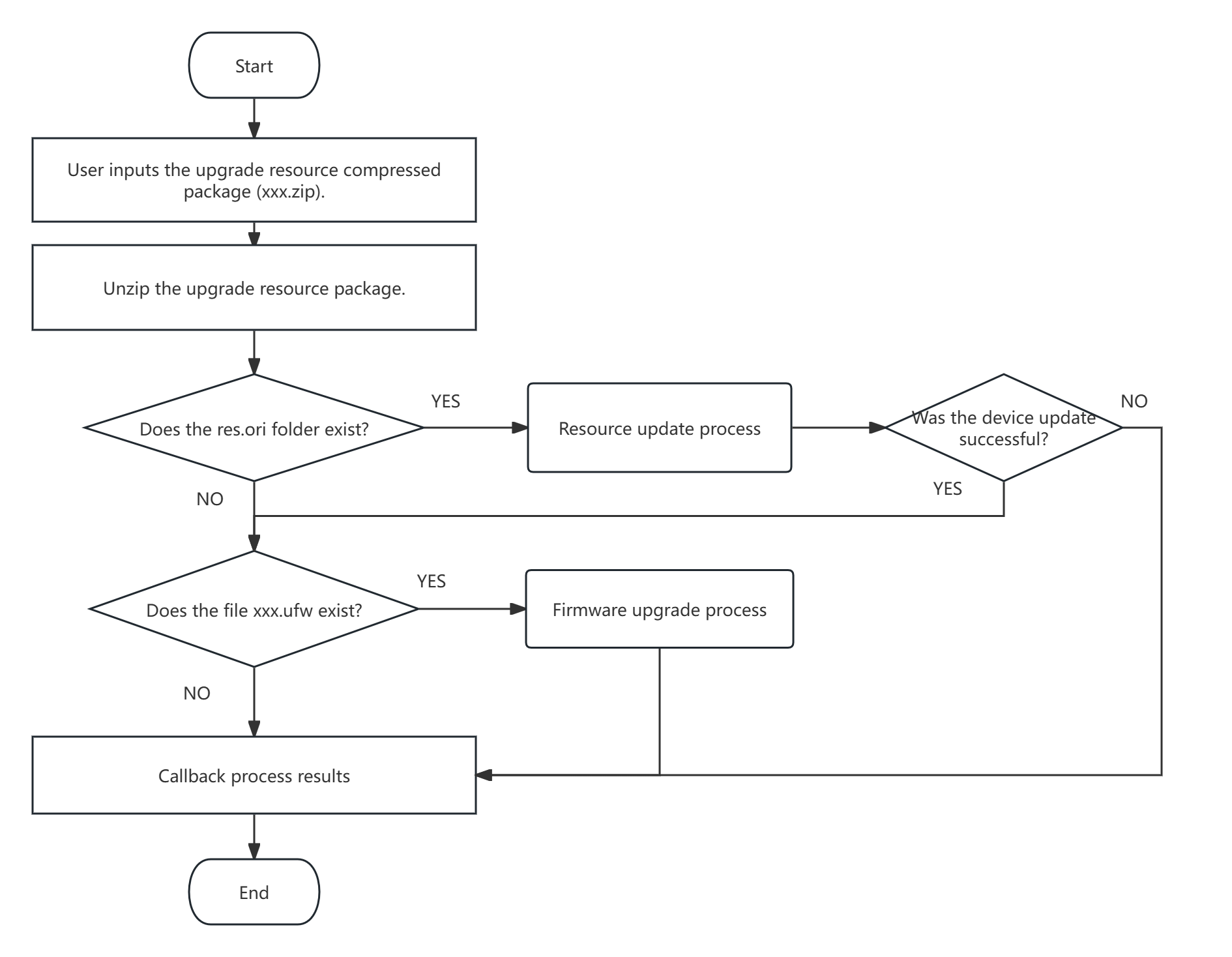
3.9. Resource Update
Update device resource files
Sample Code
//WatchManager is a subclass of WatchOpImpl, must configure sdk in 1.3
WatchManager watchManager = WatchManager.getInstance();
//resourcePath: resource path (zip archive)
//OnUpdateResourceCallback: update resource progress listener
watchManager.updateWatchResource(resourcePath, new OnUpdateResourceCallback() {
    @Override
    public void onStart(String filePath, int total) {
        //Callback start
        //filePath -- resource file path
        //total -- total number of updated files
    }

    @Override
    public void onProgress(int index, String filePath, float progress) {
        //Callback progress
        //index -- sequence number (starting from 0)
        //filePath -- resource file path
        //progress -- update progress
    }

    @Override
    public void onStop(String otaFilePath) {
        //Callback update end
        //otaFilePath: firmware upgrade file path
        //If firmware upgrade file is not null, it means OTA upgrade is needed
    }

    @Override
    public void onError(int code, String message) {
        //Callback error event
        //code -- error code (refer to WatchError)
        //message -- error message
    }
});
Important
Ensure archive file is normal and complete
If OTA file path is returned, OTA firmware function needs to be executed. Refer to Jieli OTA External Library Development Document (Android)
3.9.1. Flow Chart
3.10. System Recovery
Used to recover system when system exception occurs
Sample Code
//WatchManager is a subclass of WatchOpImpl, must configure sdk in 1.3
final WatchManager watchManager = WatchManager.getInstance();
//Register watch event callback
watchManager.registerOnWatchCallback(new OnWatchCallback() {
    //System exception callback
    @Override
    public void onWatchSystemException(BluetoothDevice device, int sysStatus) {
        if(sysStatus != 0){ //System status not 0, then system exception
            //Listen to system exception, only then call this method to recover system
            //Under normal circumstances, prohibit calling this method
            watchManager.restoreWatchSystem(new OnFatFileProgressListener() {
                @Override
                public void onStart(String filePath) {
                    //Callback start
                }

                @Override
                public void onProgress(float progress) {
                    //Callback progress
                }

                @Override
                public void onStop(int result) {
                    //Callback result
                    //result : 0 --- Success Non-zero is error code, refer to WatchError
                }
            });
        }
    }
});
Important
Prohibit using this interface when system runs normally
Error codes reference 3.13 Error Code Definition
3.11. Dial Operation Flow
3.11.1. Add Dial File
//WatchManager is a subclass of WatchOpImpl, must configure sdk in 1.3
final WatchManager watchManager = WatchManager.getInstance();
//Execute insert dial operation and wait for result callback
watchManager.createWatchFile(watchFilePath, false, new OnFatFileProgressListener() {
    @Override
    public void onStart(String filePath) {
        //Callback start of inserting dial
    }

    @Override
    public void onProgress(float progress) {
        //Callback inserting dial progress
    }

    @Override
    public void onStop(int result) {
        //Callback inserting dial result
        if (result == 0) { //Insert dial successful
            //Set current dial to inserted dial
            watchManager.setCurrentWatchInfo(FatUtil.getFatFilePath(watchFilePath), new OnWatchOpCallback<FatFile>() {
                @Override
                public void onSuccess(FatFile result) {
                    //Set current dial successful
                }

                @Override
                public void onFailed(BaseError error) {
                    //Operation failed
                }
            });
        } else {
            //Insert file failed
        }
    }
});
3.11.2. Add Dial Background File
//WatchManager is a subclass of WatchOpImpl, must configure sdk in 1.3
final WatchManager watchManager = WatchManager.getInstance();
//Execute insert custom dial background file operation and wait for result callback
watchManager.createWatchFile(bgFilePath, true, new OnFatFileProgressListener() {
    @Override
    public void onStart(String filePath) {
        //Callback start of inserting dial background file
    }

    @Override
    public void onProgress(float progress) {
        //Callback inserting dial background file progress
    }

    @Override
    public void onStop(int result) {
        //Callback inserting dial background file result
        if (result == 0) { //Insert dial background file successful
            //Set dial background file as custom background for current dial
            watchManager.enableCustomWatchBg(FatUtil.getFatFilePath(bgFilePath), new OnWatchOpCallback<FatFile>() {
                @Override
                public void onSuccess(FatFile result) {
                    //Activate custom background successful
                }

                @Override
                public void onFailed(BaseError error) {
                    //Operation failed
                }
            });
        }else{
            //Insert file failed
        }
    }
});
Note
Other file insertion can refer to Add Dial Background File implementation
3.11.3. Query All Information of Current Dial
//WatchManager is a subclass of WatchOpImpl, must configure sdk in 1.3
final WatchManager watchManager = WatchManager.getInstance();
//Query current dial information
watchManager.getCurrentWatchInfo(new OnWatchOpCallback<FatFile>() {
    @Override
    public void onSuccess(FatFile result) {
        //Callback current dial information
        //Query custom background information for current dial
        watchManager.getCustomWatchBgInfo(result.getPath(), new OnWatchOpCallback<String>() {
            @Override
            public void onSuccess(String result) {
                //result if null, is default background
                //result if not null, is custom background file path
            }

            @Override
            public void onFailed(BaseError error) {
                //Operation failed
            }
        });
    }

    @Override
    public void onFailed(BaseError error) {
        //Operation failed
    }
});
3.12. Get Remaining Space Size of Watch System
Get remaining space size of watch system
Sample Code
//WatchManager is a subclass of WatchOpImpl, must configure sdk in 1.3
final WatchManager watchManager = WatchManager.getInstance();
//Get watch system remaining space
watchManager.getWatchSysLeftSize(new OnWatchOpCallback<Long>() {
    @Override
    public void onSuccess(Long result) {
        //Watch remaining space
    }

    @Override
    public void onFailed(BaseError error) {
        //Error information
    }
});
Important
Pay attention to calling timing, must call after watch system initialization completes
3.13. Get Size of Dial File
Get size of dial file
Sample Code
//WatchManager is a subclass of WatchOpImpl, must configure sdk in 1.3
final WatchManager watchManager = WatchManager.getInstance();
//fatFilePath : dial file path (must exist)
//Get size of dial file
watchManager.getWatchFileSize(fatFilePath, new OnWatchOpCallback<WatchFileContent>() {
    @Override
    public void onSuccess(WatchFileContent result) {
        result.getFileSize(); //Size of dial file
        result.getCrc();      //CRC of dial file (invalid for AC695X SDK)
    }

    @Override
    public void onFailed(BaseError error) {
        //Error information
    }
});
Important
Dial file path must exist on device
CRC field is invalid for AC695X watch SDK, valid for AC701X watch SDK