26. Gatt Over BR/EDR Connection
Gatt Over BR/EDR uses Classic Bluetooth (BR/EDR) as the underlying transport of GATT,
so that dual-mode devices supporting both BLE and Classic Bluetooth can complete GATT service discovery
and data communication over the Classic Bluetooth link.
Compared with the traditional BLE connection, Gatt Over BR/EDR can provide a higher connection success rate and a more stable data channel on some phone systems, in complex RF environments, and in scenarios where BLE advertising is not available. It is the third connection method besides BLE and SPP.
Important
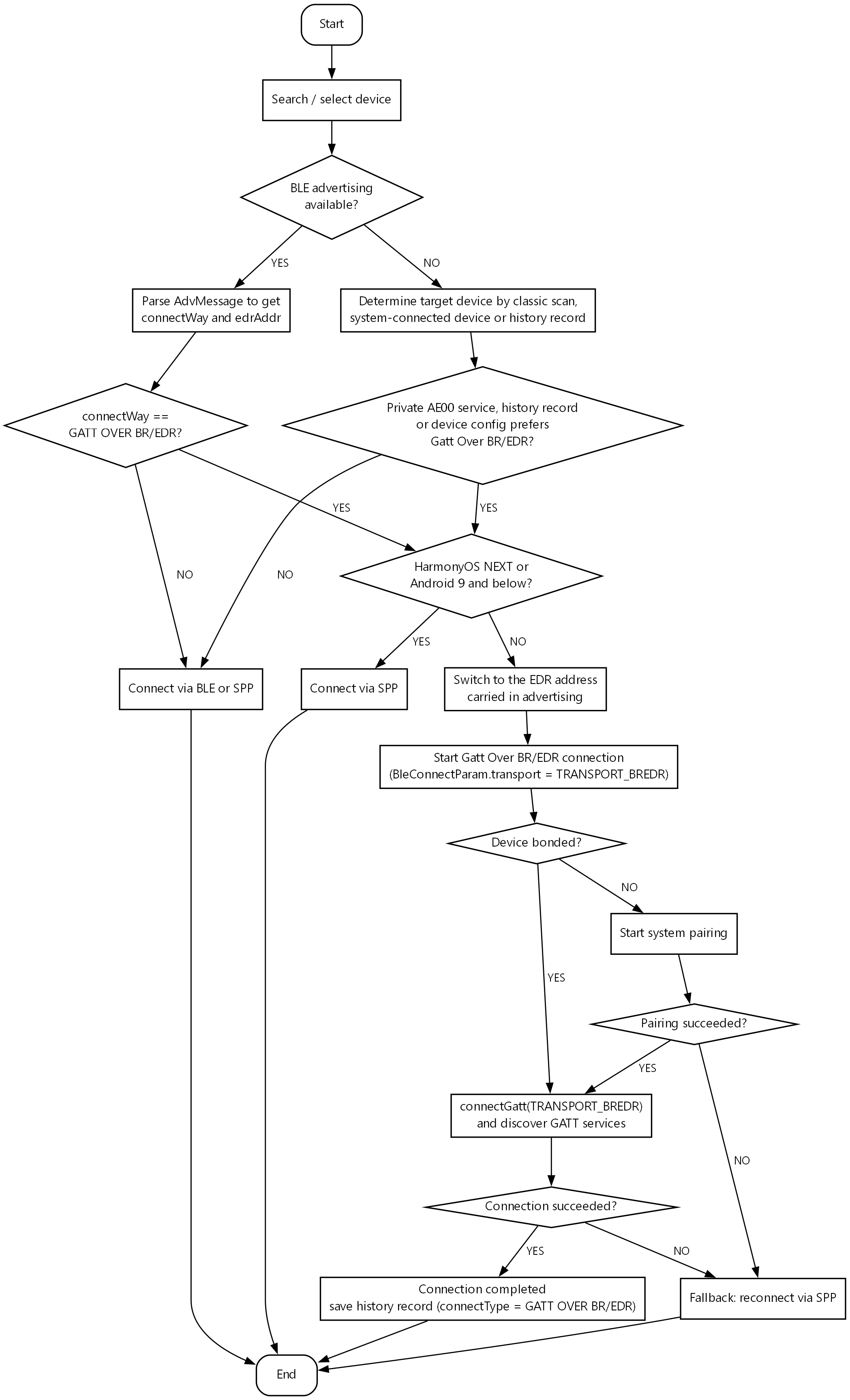
Before using Gatt Over BR/EDR, confirm that the device supports this connection method. It can be determined by the connection method in the advertisement packet, the device configuration
ClassicBtInfo, or the history record.HarmonyOS NEXT and Android 9 and below have compatibility issues, and the reference project connects via SPP directly.
When Gatt Over BR/EDR connection fails, reconnect via SPP.
Gatt Over BR/EDR does not support MTU adjustment. The MTU in
BleConnectParam.requestMtuis used by default.
Flow Chart
26.1. Connection Method Constants
Constant |
Value |
Description |
|
0 |
BLE connection method |
|
1 |
SPP connection method |
|
2 |
Classic Bluetooth connection method |
|
3 |
Gatt Over BR/EDR connection method |
|
0 |
Select the transport automatically for GATT connection |
|
1 |
Use Classic Bluetooth (BR/EDR) as the GATT transport |
|
2 |
Use BLE as the GATT transport |
Note
All the constants above are defined in BluetoothConstant.
26.2. Connection Schemes
Depending on whether the device sends BLE advertising, there are two schemes for Gatt Over BR/EDR:
Scheme |
Criteria |
Connection Method |
With BLE advertising |
Advertisement carries the EDR address and recommended connection method (connectWay) |
Parse BleScanMessage, switch to the EDR address and connect |
Without BLE advertising |
Device does not send BLE advertising |
Determine the target device by classic scan, system-connected device or history record, then connect |
With BLE advertising
The device carries the Classic Bluetooth address (EDR address) and the recommended connection method (connectWay)
in the BLE advertisement packet. After parsing BleScanMessage and identifying that connectWay is
PROTOCOL_TYPE_GATT_OVER_BR_EDR, the APP switches the target device to the EDR address in the advertisement
packet and then connects in Gatt Over BR/EDR mode.
Without BLE advertising
When the device does not send BLE advertising, the APP determines the target device through classic Bluetooth
scan, system-connected devices or history records, and connects directly in Gatt Over BR/EDR mode according to
whether the device has the private AE00 service, the previous connection method and the device configuration.
Note
The private AE00 service (UUID: 0000ae00-0000-1000-8000-00805f9b34fc) is used to determine whether
a system-connected Classic Bluetooth device supports the JieLi private protocol.
26.3. Connection Method in Advertisement Packet
For watch devices, the recommended connection method is indicated by the actionValue field in the BLE advertisement packet:
Bit |
Meaning |
Description |
bit7 |
Connection way: 1-SPP, 0-BLE |
Combined with bit6 to determine the connection method |
bit6 |
Gatt Over BR/EDR: 1-yes |
Use Gatt Over BR/EDR when bit6 is 1 |
bit3~bit0 |
Device action/state |
action, value range 0~15 |
Note
The field position differs among advertisement versions. For example, when version is 5, the high 4 bits of
cfg1indicate the recommended connection method (0-BLE, 1-SPP, 2-Gatt Over BR/EDR); when version is 6 or above, bit3~bit1 ofcfg1indicate the recommended connection method.When the advertisement version is 1 or bit1 of version is 1, the firmware adopts the strategy of “connecting BLE first and then switching to SPP”, and the connection method is fixed to BLE.
26.4. Device Capability Check
When the BLE advertisement of the device is unavailable, the device configuration can be used to determine whether Gatt Over BR/EDR is supported:
//WatchManager is a subclass of WatchOpImpl, must configure sdk in 1.3
final WatchManager watchManager = WatchManager.getInstance();
//Get the device configuration (DeviceInfo extends TargetInfoResponse)
final DeviceInfo deviceInfo = watchManager.getDeviceInfo(device);
if (null != deviceInfo) {
    //Whether the device supports Gatt Over BR/EDR
    final boolean isSupport = deviceInfo.isSupportGattOverBrEDR();
    //Whether the device prefers Gatt Over BR/EDR for connection
    final boolean isPriority = deviceInfo.isPriorityConnectGattOverBrEDR();
    if (isSupport && isPriority) {
        //Connect in Gatt Over BR/EDR mode first
    }
}
Note
isSupportGattOverBrEDR indicates whether the device supports Gatt Over BR/EDR;
isPriorityConnectGattOverBrEDR indicates whether the device prefers Gatt Over BR/EDR.
The reference project selects the connection method in WatchManager#getConnectWay based on these two fields.
26.5. Start a Gatt Over BR/EDR Connection
1. With BLE advertising
final BluetoothManager btManager = BluetoothManager.getInstance();
//Register the Bluetooth event listener
btManager.registerBluetoothCallback(new BluetoothEventCallback() {
    @Override
    public void onDiscovery(BluetoothDevice device, BleScanMessage bleScanMessage) {
        if (null == device || null == bleScanMessage) return;
        //The connection method recommended by the device
        final int connectWay = bleScanMessage.getConnectWay();
        if (connectWay != BluetoothConstant.PROTOCOL_TYPE_GATT_OVER_BR_EDR) return;
        //Get the Classic Bluetooth address in the advertisement packet
        final String edrAddr = bleScanMessage.getEdrAddr();
        final BluetoothDevice edrDevice = BluetoothUtil.getRemoteDevice(edrAddr);
        if (null == edrDevice) return;
        //Stop scanning
        btManager.stopBLEScan();
        //Connect the Gatt Over BR/EDR device (the target device is the Classic Bluetooth address)
        btManager.connectBtDevice(edrDevice, BluetoothConstant.PROTOCOL_TYPE_GATT_OVER_BR_EDR);
    }
});
2. Without BLE advertising
final BluetoothManager btManager = BluetoothManager.getInstance();
//Determine the target device by classic scan, system-connected devices or history records
final BluetoothDevice targetDevice = getTargetClassicDevice();
if (null == targetDevice) return;
//Connect directly in Gatt Over BR/EDR mode
btManager.connectBtDevice(targetDevice, BluetoothConstant.PROTOCOL_TYPE_GATT_OVER_BR_EDR);
3. Custom connection parameters
connectBtDevice(device, connectWay) uses the default BleConnectParam and sets transport to
TRANSPORT_BREDR. If the connection parameters need to be modified, refer to the following code:
final BluetoothManager btManager = BluetoothManager.getInstance();
//Get the default BLE connection parameters and set the transport to BR/EDR
final BleConnectParam param = btManager.getBluetoothOption().getBleConnectParam()
        .cloneObj()
        .setTransport(BluetoothConstant.TRANSPORT_BREDR);
//Start the connection (equivalent to connectBtDevice(device, PROTOCOL_TYPE_GATT_OVER_BR_EDR))
btManager.connectBtDevice(edrDevice, param);
4. Get the current connection method of the device
final BluetoothManager btManager = BluetoothManager.getInstance();
if (btManager.isConnectedSppDevice(device)) {
    //SPP connection
} else if (btManager.isConnectedGattOverBrEdrDevice(device)) {
    //Gatt Over BR/EDR connection
} else if (btManager.isConnectedBLEDevice(device)) {
    //BLE connection
}
26.6. Fallback on Connection Failure
When the Gatt Over BR/EDR connection fails (pairing failure, connection timeout or service discovery failure),
reconnect via SPP. The reference project has implemented this logic in BluetoothHelper#connectDevice:
it monitors the connection state callback, and if the state is disconnected while the current connection method
is Gatt Over BR/EDR, changes the connection method to SPP and reconnects.
//mConnectWay is the current connection method cached by the APP
btManager.registerBluetoothCallback(new BluetoothEventCallback() {
    @Override
    public void onConnection(BluetoothDevice device, int status) {
        if (status != BluetoothConstant.CONNECT_STATE_DISCONNECT) return;
        if (mConnectWay != BluetoothConstant.PROTOCOL_TYPE_GATT_OVER_BR_EDR) return;
        //Gatt Over BR/EDR connection failed, switch to SPP and reconnect
        mConnectWay = BluetoothConstant.PROTOCOL_TYPE_SPP;
        btManager.connectBtDevice(device, BluetoothConstant.PROTOCOL_TYPE_SPP);
    }
});
Note
If the device is not bonded, SDK starts system pairing first and establishes the GATT connection after pairing succeeds. Pairing failure also triggers the connection failure callback, which can be handled by the fallback logic above.
26.7. System Compatibility
System |
Handling |
HarmonyOS NEXT |
Connect via SPP directly |
Android 9 and below (API 28 and below) |
Connect via SPP directly |
Other Android systems |
Use Gatt Over BR/EDR normally |
Note
The reference project checks the system compatibility before starting the connection to avoid invalid Gatt Over BR/EDR attempts.
26.8. History Record and Reconnection
After a successful connection, SDK saves the connection method in the connectType field of the history record
HistoryRecord, and the value of Gatt Over BR/EDR is
BluetoothConstant.PROTOCOL_TYPE_GATT_OVER_BR_EDR (3). Reconnection prefers the connection method that
succeeded last time to avoid repeated probing.
final BluetoothManager btManager = BluetoothManager.getInstance();
final HistoryRecord historyRecord = btManager.getHistoryRecord(device.getAddress());
if (null != historyRecord && historyRecord.isConnectGattOverBrEdr()) {
    //The device was connected in Gatt Over BR/EDR mode last time
}
26.9. Connection Sequence Diagram
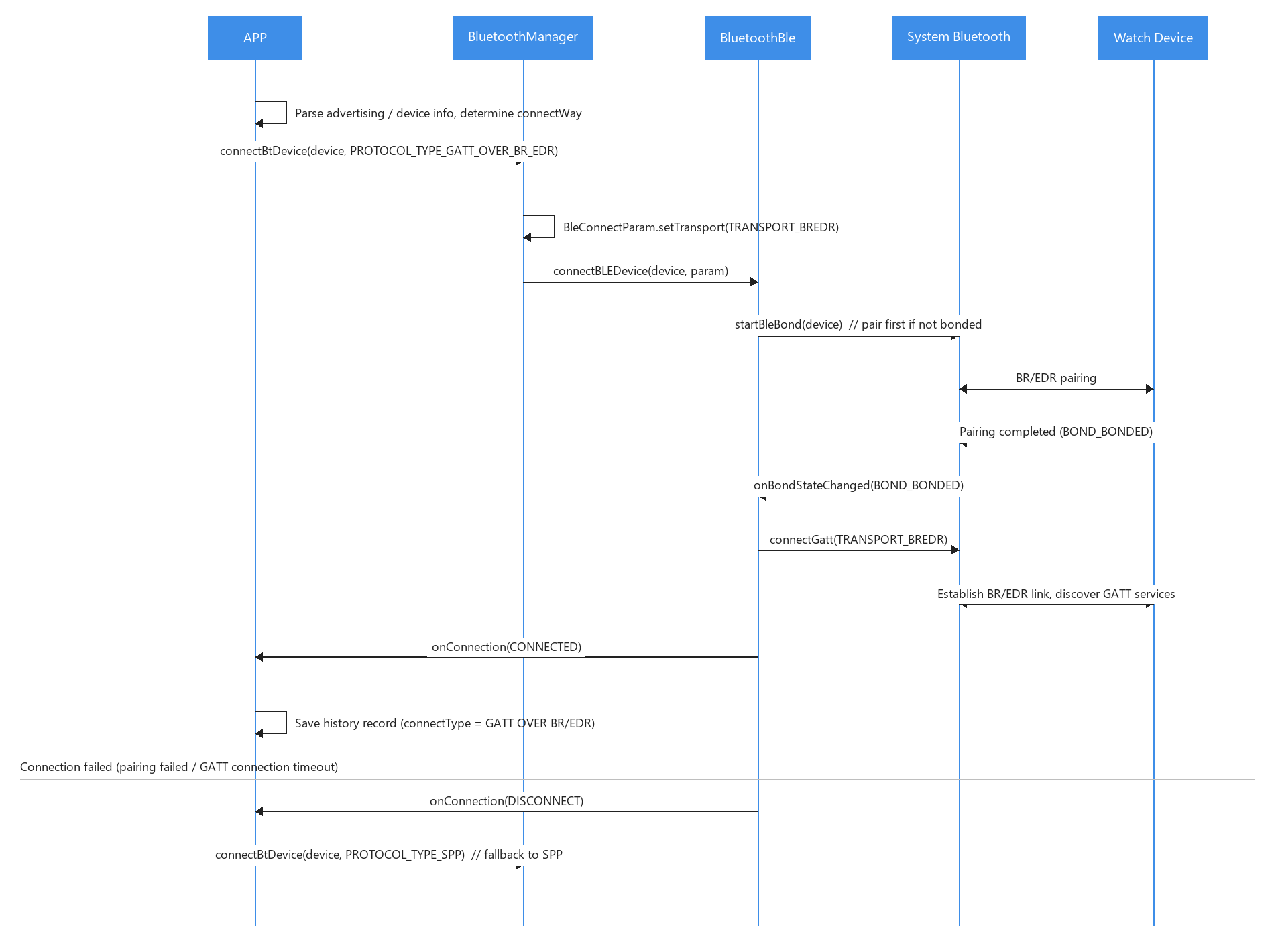
After the connection is completed, the upper layer obtains the result through the unified connection state callback; RCSP initialization and subsequent services do not need to be aware of whether the underlying transport is BLE, SPP or Gatt Over BR/EDR.