15. Obtain Exception Information
When the device sends an exception, you can obtain the device exception information after reconnecting.
Sample Code
//Create task
final ReadLogcatTask task = new ReadLogcatTask(mWatchManager);
//Set listener
task.setListener(new TaskListener() {
    @Override
    public void onBegin() {
        //Callback task start
    }

    @Override
    public void onProgress(int progress) {
        //Callback progress
    }

    @Override
    public void onFinish() {
        //Callback task completion
        JL_Log.i(tag, "ReadLogcatTask: onFinish : read logcat size = " + task.getResult().length);
        uploadLogFile(task.getResult());
    }

    @Override
    public void onError(int code, String msg) {
        //Callback task exception information
        JL_Log.w(tag, "ReadLogcatTask: onError : " + code + ", " + msg);
        if (null != finishListener) finishListener.onFinish();
    }

    @Override
    public void onCancel(int reason) {
        //Callback task cancellation, this task does not support cancellation operation
    }
});
//Execute task
task.start();
Note
Refer to 3.13 Error Code Definition for error codes
15.1. Flow Chart
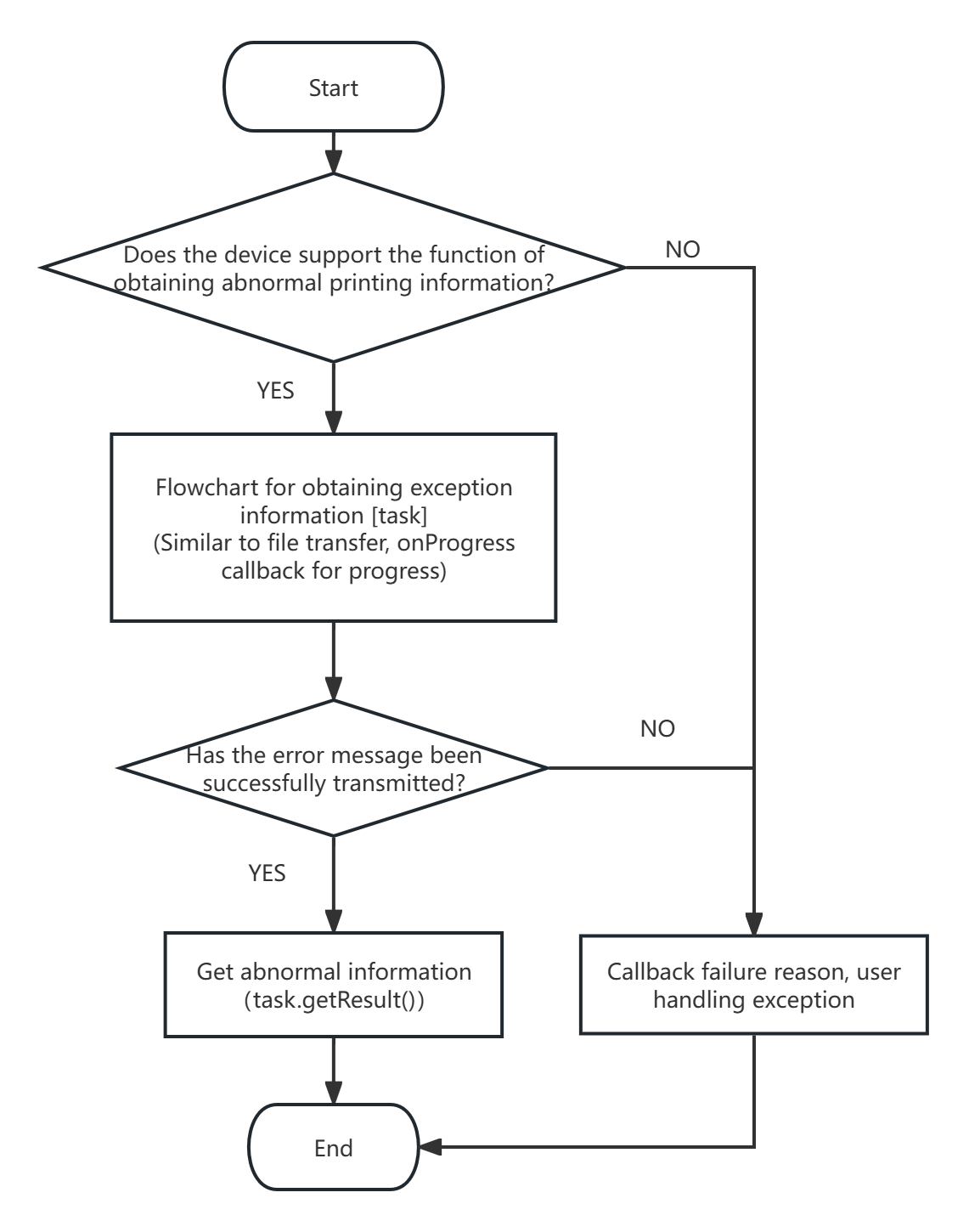
Important
Users can save the obtained exception information, or upload it to the server
For specific implementation, refer to
com.jieli.healthaide.tool.watch.synctask.DeviceLogcatSyncTask
15.2. Error Codes
Code Value |
Corresponding Constant |
Description |
|---|---|---|
WatchError#ERR_REMOTE_NOT_CONNECT |
TaskBase#ERR_DEVICE_NOT_CONNECT |
Device not connected |
WatchError#ERR_FUNC_NOT_SUPPORT |
TaskBase#ERR_FUNC_NOT_SUPPORT |
Function not supported |
WatchError#ERR_CRC_CHECK |
TaskBase#ERR_CRC_CHECK |
CRC check failed |
WatchError#ERR_IO_EXCEPTION |
TaskBase#ERR_IO_EXCEPTION |
IO exception |