3.4.4. APP - Bluetooth Dual-Mode Dongle
3.4.4.1. 概述
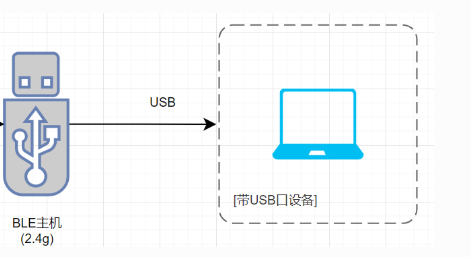
蓝牙dongle符合USB和BLE传输标准,具有即插即用,方便实用的特点。它可用于蓝牙设备之间的数据传输,让电脑能够和周边的蓝牙设备进行无线连接和数据的通讯,自动发现和管理远程蓝牙设备、资源和服务,实现蓝牙设备之间的绑定和自动连接。
蓝牙dongle支持BLE和2.4G两种连接模式;支持连接指定蓝牙名或mac地址;应用示例是连接杰理的鼠标。
3.4.4.2. 工程配置
APP选择,配置
app_config.h
apps/demo/transfer/include/app config.h
//apps example 选择,只能选1个,要配置对应的board_config.h
#define CONFIG_APP_LE_TRANS               0 /*!< LE's slave */
#define CONFIG_APP_MULTI                  0 /*!< AW33N暂仅支持主机, 待迭代. BLE多机应用,支持2.4g code,支持4主,3主1从,2主2从... */
#define CONFIG_APP_NONCONN_24G            0 /*!< 2.4G 非连接收发 */
#define CONFIG_APP_DONGLE                 1 /*!< usb + 蓝牙(ble 主机),PC hid设备, 使用需要配置板级CONFIG_BOARD_AW33N_DONGLE */
#define CONFIG_APP_AT_CHAR_COM            0 /*!< AT com 字符串格式命令 */
#define CONFIG_APP_CUSTOM_DB_UPDATE       0 /*!< 自定义双备份升级(串口传输方式), 可用于第三方升级协议接入 */
#define CONFIG_APP_FINDMY                 0 /*!< FINDMY, 使用需要配置板级CONFIG_BOARD_AW33N_FMY */
板级配置
board_config.h
apps/demo/transfer/board/bd57/board_config.h
// #define CONFIG_BOARD_AW33N_DEMO
#define CONFIG_BOARD_AW33N_DONGLE
// #define CONFIG_BOARD_AW33N_FMY
// #define CONFIG_BOARD_AW33N_FASTBOOT
// #define CONFIG_BOARD_AW33N_FHN
// #define CONFIG_BOARD_AW33N_FMY_FHN
配置BLE或者2.4G模式,若选择2.4G配对码必须跟对方的配对码一致,改成0则是普通的ble通用dongle
apps/demo/transfer/examples/dongle/app_dongle.h
//2.4G模式: 0---ble, 非0---2.4G配对码,2.4G配对码主从需要相同
// #define CFG_RF_24G_CODE_ID       (0) //32bits
#define CFG_RF_24G_CODE_ID       (0xAF9A9357) //32bits,可用void access_addr_generate(u8 *aa);生成
配置高回报率模式,用于2.4g模式鼠标1k回报率,如果需要做1k回报率无线鼠标方案需要打开,目前只支持1ms连接
apps/demo/transfer/include/app config.h
#elif CONFIG_APP_DONGLE  /* CONFIG_APP_DONGLE */
#define CONFIG_BLE_CONNECT_SLOT             1 /*!< BLE高回报率设置, 支持私有协议,所有周期单位为us,适配1k回报率鼠标需要开此宏 */

#if CONFIG_BLE_CONNECT_SLOT
#define CONFIG_CCE_PER_CHECK_ENABLE         1   /*!< AFH使能*/
#define HIGH_REPORT_RATE_1MS                1   /*!< 1ms,support dual conn */
#define HIGH_REPORT_RATE_2SLOT              0   /*!< 2slot,1.25ms,support dual conn */
#define HIGH_REPORT_RATE_4SLOT              0   /*!< 4slot,2.5ms,support dual conn */
#define HIGH_REPORT_RATE_500US              0   /*!< 500us,not support dual conn */
#endif /* CONFIG_BLE_CONNECT_SLOT */
配置搜索匹配连接设备
apps/demo/transfer/examples/dongle/ble_dg_central.c
//------!!!!注意:如果是OTA升级的话,这里名字修改还需要去ota_dg_central.c修改dg_ana_remoter_name1/2
static const uint8_t dg_central_test_remoter_name1[] = "AW33N(BLE)";//3模鼠标
/* static const uint8_t dg_central_test_remoter_name2[] = "AC897N_MX(BLE)";//鼠标 */
static const uint8_t dg_central_test_remoter_name2[] = "LOW_LATCY(BLE)";//低延时从机
static const client_match_cfg_t dg_central_match_device_table[] = {
    {
        .create_conn_mode = BIT(CLI_CREAT_BY_NAME),
        .compare_data_len = sizeof(dg_central_test_remoter_name1) - 1, /*!< 去结束符 */
        .compare_data = dg_central_test_remoter_name1,
        .filter_pdu_bitmap = 0,
    },
    {
        .create_conn_mode = BIT(CLI_CREAT_BY_NAME),
        .compare_data_len = sizeof(dg_central_test_remoter_name2) - 1, /*!< 去结束符 */
        .compare_data = dg_central_test_remoter_name2,
        .filter_pdu_bitmap = 0,
    }
};
默认上电3秒可配对新设备,超时之后只回连已配对设备。
apps/demo/transfer/examples/dongle/ble_dg_central.h
//dongle 上电开配对管理,设置上电允许按名字配对新设备的窗口,之后切换为只回连已配对设备
#define POWER_ON_RECONNECT_START   (0)   /*!< 上电先回连 */
#define POWER_ON_SWITCH_TIME       (3000)/*!< unit ms,上电允许按名字配对新设备的窗口时间, 之后切换为只回连已配对设备 */
#define MATCH_DEVICE_RSSI_LEVEL    (-50)  /*!< RSSI 阈值 */
3.4.4.3. 主要代码说明
蓝牙dongle实现文件 app_dongle.c和ble_dg_central.c,负责模块初始化、处理协议栈事件和命令数据控制发送等。
HID描述符, 描述为一个鼠标,report id1是鼠标的移动和按键控制报表,适配HID鼠标应用
//==========鼠标
static const u8 sHIDReportDesc_mouse[] = {
    0x05, 0x01,                    // Usage Page (Generic Desktop Ctrls) - 定义了后续字段的用途范畴,这里是通用桌面控制。
    0x09, 0x02,                    // Usage (Mouse) - 指定当前设备为鼠标。
    0xA1, 0x01,                    // Collection (Application) - 开始应用层集合,标志着一个应用集合的开始。
    0x85, MOUSE_REPORT_ID,         //   Report ID (1) - 报告ID为1。
    0x09, 0x01,                    //   Usage (Pointer) - 指明是一个指针设备(在这里,是个鼠标)。
    0xA1, 0x00,                    //   Collection (Physical) - 开始物理集合,表示这是个物理设备。
    // Buttons (5 buttons)
    0x95, 0x05,                    //     Report Count (5) - 报告包含5项数据。
    0x75, 0x01,                    //     Report Size (1) - 每项数据大小为1位。
    0x05, 0x09,                    //     Usage Page (Button) - 用途页面为按钮。
    0x19, 0x01,                    //     Usage Minimum (0x01) - 按钮的最小值为1(第一个按钮)。
    0x29, 0x05,                    //     Usage Maximum (0x05) - 按钮的最大值为5(第五个按钮)。
    0x15, 0x00,                    //     Logical Minimum (0) - 数据的逻辑最小值为0。
    0x25, 0x01,                    //     Logical Maximum (1) - 数据的逻辑最大值为1。
    0x81, 0x02,                    //     Input (Data,Var,Abs,No Wrap,Linear,Preferred State,No Null Position) - 输入类型,代表了按钮的状态。
    // Padding for the buttons - 3 bits
    0x95, 0x01,                    //     Report Count (1) - 一项填充数据。
    0x75, 0x03,                    //     Report Size (3) - 填充大小为3位,用于对齐字节。
    0x81, 0x01,                    //     Input (Const,Array,Abs,No Wrap,Linear,Preferred State,No Null Position) - 输入类型为常量,用于占位不使用。
    // Wheel (8 bits)
    0x75, 0x08,                    //     Report Size (8) - 滚轮数据的大小为8位。
    0x95, 0x01,                    //     Report Count (1) - 一项数据。
    0x05, 0x01,                    //     Usage Page (Generic Desktop Ctrls) - 同上。
    0x09, 0x38,                    //     Usage (Wheel) - 滚轮。
    0x15, 0x81,                    //     Logical Minimum (-127) - 滚轮数据的逻辑最小值为-127。
    0x25, 0x7F,                    //     Logical Maximum (127) - 滚轮数据的逻辑最大值为127。
    0x81, 0x06,                    //     Input (Data,Var,Rel,No Wrap,Linear,Preferred State,No Null Position) - 输入类型,代表了滚轮的滚动。
    // X and Y Axis (12 bits each)
#if (TCFG_OPTICAL_SENSOR_DATA_BITS_SELECT == OPTICAL_SENSOR_DATA_16BITS)
    0x75, 0x10,                    //     Report Size (16) - 每项数据的大小为16位。
#else /* (TCFG_OPTICAL_SENSOR_DATA_BITS_SELECT == OPTICAL_SENSOR_DATA_16BITS) */
    0x75, 0x0C,                    //     Report Size (12) - 每项数据的大小为12位。
#endif /* TCFG_OPTICAL_SENSOR_DATA_BITS_SELECT == OPTICAL_SENSOR_DATA_16BITS */
    0x95, 0x02,                    //     Report Count (16) - 两项数据(X轴和Y轴)。
    0x05, 0x01,                    //     Usage Page (Generic Desktop Ctrls) - 同上,指定用途页面为通用桌面控制。
    0x09, 0x30,                    //     Usage (X) - X轴。
    0x09, 0x31,                    //     Usage (Y) - Y轴。
#if (TCFG_OPTICAL_SENSOR_DATA_BITS_SELECT == OPTICAL_SENSOR_DATA_16BITS)
    0x16, 0x00, 0x80,              //     Logical Minimum (-32768) - X和Y轴数据的逻辑最小值为-32768。
    0x26, 0xFF, 0x7F,              //     Logical Maximum (32767) - X和Y轴数据的逻辑最大值为32767。
#else /* (TCFG_OPTICAL_SENSOR_DATA_BITS_SELECT == OPTICAL_SENSOR_DATA_16BITS) */
    0x16, 0x01, 0xF8,              //     Logical Minimum (-2048) - X和Y轴数据的逻辑最小值为-2048。
    0x26, 0xFF, 0x07,              //     Logical Maximum (2047) - X和Y轴数据的逻辑最大值为2047。
#endif /* TCFG_OPTICAL_SENSOR_DATA_BITS_SELECT == OPTICAL_SENSOR_DATA_16BITS */
    0x81, 0x06,                    //     Input (Data,Var,Rel,No Wrap,Linear,Preferred State,No Null Position) - 输入类型,代表了轴的移动。
    0xC0,                          /*!< End Collection - 结束当前集合 */
    0xC0,                           /*!< End Collection - 结束最外层的集合 */
};
使用指定的uuid与从机通信, 需要与从机配合, 省掉了搜索uuid的时间
//---------------------------------------------------------------------------
//指定搜索uuid
static const target_uuid_t  dg_central_search_uuid_table[] = {
    {
        .services_uuid16 = 0x1800,
        .characteristic_uuid16 = 0x2a00,
        .opt_type = ATT_PROPERTY_READ,
    },

    {
        .services_uuid16 = 0x180a,
        .characteristic_uuid16 = 0x2a50,
        .opt_type = ATT_PROPERTY_READ,
    },

    /* { */
    /* .services_uuid16 = 0x1812, */
    /* .characteristic_uuid16 = 0x2a4b, */
    /* .opt_type = ATT_PROPERTY_READ, */
    /* }, */

    {
        .services_uuid16 = 0x1812,
        .characteristic_uuid16 = 0x2a4b,
        .opt_type = ATT_PROPERTY_READ,
        .read_long_enable = 1,
    },

    {
        .services_uuid16 = 0x1812,
        .characteristic_uuid16 = 0x2a4d,
        .opt_type = ATT_PROPERTY_NOTIFY,
        .read_report_reference = 1,
    },

#if RCSP_BTMATE_EN //确保远端设备是否支持ota
    {
        .services_uuid16 = 0xae00,
        .characteristic_uuid16 = 0xae01,
        .opt_type = ATT_PROPERTY_WRITE_WITHOUT_RESPONSE,
    },

    {
        .services_uuid16 = 0xae00,
        .characteristic_uuid16 = 0xae02,
        .opt_type = ATT_PROPERTY_NOTIFY,
    },
#endif

    /* { */
    /* .services_uuid16 = 0x1812, */
    /* .characteristic_uuid16 = 0x2a33, */
    /* .opt_type = ATT_PROPERTY_NOTIFY, */
    /* }, */

    /* { */
    /* .services_uuid16 = 0x1801, */
    /* .characteristic_uuid16 = 0x2a05, */
    /* .opt_type = ATT_PROPERTY_INDICATE, */
    /* }, */

};
dongle睡眠行为,电脑休眠dongle进入suspend断开所有连接,仅保留scan
/*************************************************************************************************/
/*!
 *  \brief      USB状态变更回调
 *  \param      [in] NUll
 *
 *  \return
 *
 *  \note
 */
/*************************************************************************************************/
void dg_central_usb_status_handler(const usb_dev usb_id, usb_slave_status status)
{
    log_info("%s[status:%d]", __func__, status);
    /* PC进入睡眠模式,usb suspend,断开所有连接,只保留scan */
    if (status == USB_SLAVE_SUSPEND && dg_central_wait_usb_wakeup) {
        dg_central_disconnect_all();
    }
}
高回报率回调接口,用CONFIG_BLE_CONNECT_SLOT宏打开
/*************************************************************************************************/
/*!
 *  \brief      1. 基带接口接收数据接口
                2. 底层有事件触发后回调直接来上层拿数据发送,函数名不可修改,无需调用;
                3. 不可做耗时操作(需要在us级);
                4. 数据接收不会再走dg_central_event_packet_handler-GATT_COMM_EVENT_GATT_DATA_REPORT
 *
 *  \param      [in] NUll
 *
 *  \return
 *
 *  \note       1. 中断回调及所加函数中不能添加打印, 会影响cpu执行效率.
                   ps: 如加调试打印, 结束后请注释.
 */
/*************************************************************************************************/
#define MOUSE_1MS_CLEAR_WDT_CNT_MAX            2000   /*!< 鼠标1ms模式清看门狗计数上限 */
static uint32_t mouse_reset_cnt;
bool bb_le_rx_data_pdu_hook_get(void *priv, const u8 *data, u8 len)
{
    int ret = 0;
    uint16_t conn_handle = ll_vendor_get_link_handle(priv);
    if (!conn_handle) {
        log_info("conn_handle error , conn_handle = %d", conn_handle);
        return true;
    }
    mouse_reset_cnt++;
    if (mouse_reset_cnt > MOUSE_1MS_CLEAR_WDT_CNT_MAX) {
        wdt_clear();
        mouse_reset_cnt = 0;
        // log_info("len = %d",len);
        // put_buf((u8 *)data, len);
        // log_info("conn handle = %x",conn_handle);
    }

    uint8_t usb_status_ret = usb_slave_status_get();
    // log_info("conn usb_status_ret = %x",usb_status_ret);
    // log_info("dg_central_wait_usb_wakeup handle = %x",dg_central_wait_usb_wakeup);
    if (usb_status_ret == USB_SLAVE_RESUME) {
        ret = len;
        if (dg_central_wait_usb_wakeup) {
            wdt_clear();

            /*根据conn handle对应的appearance区分设备类型, 走不同的USB发数接口:
             * 键盘数据走键盘接口, 鼠标数据走鼠标接口*/
            uint16_t appearance = dg_central_get_conn_appearance(conn_handle);
            // log_info("appearance = %d",appearance);
            if (BLE_APPEARANCE_HID_KEYBOARD == appearance) {
                /*键盘设备: 走键盘USB发数接口*/
                if (len < KEYBOARD_USB_PACKET_LEN - 1) {
                    /*短包不拷贝, 避免越界读*/
                    log_info("recevie data len error");
                    return true;
                }
                uint8_t hid_keyboard_send_packet[KEYBOARD_USB_PACKET_LEN];
                hid_keyboard_send_packet[0] = HIDKEY_REPORT_ID;
                memcpy(&hid_keyboard_send_packet[1], data, KEYBOARD_USB_PACKET_LEN - 1);
                ret = dongle_second_ble_hid_input_handler(hid_keyboard_send_packet, KEYBOARD_USB_PACKET_LEN);
            } else {
                /*鼠标/其它设备: 走鼠标USB发数接口*/
                if (len < MOUSE_USB_PACKET_LEN - 1) {
                    /*短包不拷贝, 避免越界读*/
                    log_info("recevie data len error");
                    return true;
                }
                uint8_t hid_mouse_send_packet[MOUSE_USB_PACKET_LEN];
                hid_mouse_send_packet[0] = MOUSE_REPORT_ID;
                memcpy(&hid_mouse_send_packet[1], data, MOUSE_USB_PACKET_LEN - 1);
                ret = dongle_ble_hid_input_handler(hid_mouse_send_packet, MOUSE_USB_PACKET_LEN);
            }
            /* put_buf(hid_send_packet,MOUSE_USB_PACKET_LEN); */
        }
    } else if (usb_status_ret == USB_SLAVE_SUSPEND) {
        dg_central_wait_usb_wakeup = 0;
        // log_info("send remote_wakeup\n");
        usb_remote_wakeup(0);
        return true;
    }

    if (ret && dg_central_wait_usb_wakeup == 0) {
        dg_central_wait_usb_wakeup = 1;
    }
    return true;
}
ble->usb发数接口
//ble 接收设备数据
int dongle_ble_hid_input_handler(uint8_t *packet, uint16_t size)
{
    /* log_info("ble_hid_data_input:size=%d", size); */
    /* log_info_hexdump(packet, size); */

    /* rf_unpack_data(packet, size); */
#if (TCFG_PC_ENABLE)
    // 1ms高回报率时不开putchar,否则会影响收数
    /* putchar('&'); */
    return usb_hid_mouse_send_data(packet, size);
#else
    log_info("chl1 disable!!!\n");
    return 0;
#endif
}
3.4.4.4. case默认应用资源(默认使用AW33N DEMO开发板)
Note
demo默认占用外设资源如下,具体可以查看apps/demo/transfer/board/bd57/board_aw33n_dongle_cfg.h
I/O口占用情况
I/O |
默认占用情况 |
|---|---|
PA4 |
默认打印UART0引脚 |
PA1 |
adkey检测引脚 |
硬件定时器占用情况
定时器 |
默认占用情况 |
|---|---|
TIMER0 |
暂无使用 |
TIMER1 |
暂无使用 |
TIMER2 |
暂无使用 |
TIMER3 |
暂无使用 |
串口占用情况
串口 |
默认占用情况 |
|---|---|
UART0 |
SDK打印 |
UART1 |
暂无使用 |
UART2 |
暂无使用 |
USB占用情况
USB |
默认占用情况 |
|---|---|
USB0 |
默认使用 |
3.4.4.5. case默认应用功能现象
操作 |
现象结果 |
|---|---|
支持进入睡眠模式,usb suspend,蓝牙断开连接,只保留scan |
行为正常 |
能够成功绑定连接鼠标,实现电脑控制 |
行为正常 |
usb 唤醒pc 兼容性(win7/win8/win10/win11) |
行为正常 |