2 Development Notes
2.1 Initialize OTA Manager
2.1.1 Extend BluetoothOTAManager class
Users need to inherit the BluetoothOTAManager class, Implementing abstract interfaces、 Transparent device connection status and Transparent received data
//OTA Manager Implementation
public class OTAManager extends BluetoothOTAManager {
    /**
     * Bluetooth implementation, such as BLE connection implementation
     */
    private final BleManager bleManager = BleManager.getInstance();

    public OTAManager(Context context) {
        super(context);
            //TODO: Users complete the transmission of device connection status and received data
        //through the connection library objects implemented by themselves.
        bleManager.registerBleEventCallback(new BleEventCallback() {
            @Override
            public void onBleConnection(BluetoothDevice device, int status) {
                //TODO: Note: Transformed into the connection state of OTA library
                //Note: You need to enter the device connection status correctly.
                //Do not enter the same status repeatedly, Connecting-Connected-Disconnected or Connected-Disconnected
                int connectStatus = changeConnectStatus(status);
                //Passes the device's connection status
                onBtDeviceConnection(device, connectStatus);
            }

            @Override
            public void onBleDataNotification(BluetoothDevice device, UUID serviceUuid, UUID characteristicsUuid, byte[] data) {
                //Transmits the received data of the device
                onReceiveDeviceData(device, data);
            }

            @Override
            public void onBleDataBlockChanged(BluetoothDevice device, int block, int status) {
                //Communicate BLE MTU changes
                //Note: This is not necessary, and it is recommended that customers perform MTU negotiation when connecting to the device.
                onMtuChanged(getConnectedBluetoothGatt(), block, status);
            }
        });
    }

        /**
         * Get connected Bluetooth device object
         * <p>
         *  Notice:<br/>
         *  1. It is the Bluetooth device object corresponding to the communication method<br/>
         *  2. Reflects the connection status of the device in real time. It has a value when the device is connected and returns null when the device is disconnected.
         * </p>
         */
        @Override
    public BluetoothDevice getConnectedDevice() {
        //TODO: User-implemented
        return bleManager.getConnectedBtDevice();
    }

        /**
         * Get connected BluetoothGatt object
         * <p>
         * If you choose BLE OTA, you need to implement this method. Otherwise, you do not need to implement SPP.<br/>
         * If you do not need to adjust the BLE MTU within the SDK, you do not need to implement
         * </p>
         */
        @Override
    public BluetoothGatt getConnectedBluetoothGatt() {
        //TODO: User-implemented
        return bleManager.getConnectedBtGatt();
    }

    /**
         * Connecting Bluetooth device
         * <p>
         *  Notice:<br/>
         *  1. The current way to connect back is to connect back to the BLE device. You only need to implement the BLE of the device to connect back.<br/>
         *  2. This method is used for the device reconnection process. If the customer uses dual backup OTA or implements the reconnection process by himself, it is not necessary to implement
         * </p>
         * @param device Bluetooth Device
         */
    @Override
    public void connectBluetoothDevice(BluetoothDevice device) {
        //TODO: User-implemented
        bleManager.connectBleDevice(device);
    }

    /**
         * Disconnecting Bluetooth device
         *
         * @param device Bluetooth Device
         */
    @Override
    public void disconnectBluetoothDevice(BluetoothDevice device) {
        //TODO: User-implemented
        bleManager.disconnectBleDevice(device);
    }

    /**
         * Send data to Bluetooth device
         *<p>
         *  Notice:<br/>
         *  1. Need to achieve reliable large data transmission<br/>
         *  1.1 If BLE is used to send data, it needs to be divided into packets according to MTU, and then sent in a queue to ensure that the data is sent<br/>
         *  1.2 If BLE is sending data and the negotiated MTU is greater than 128, it is recommended to set the sending MTU = negotiated MTU - 6 for edge protection.<br/>
         *  2. This method is called back when sending data. The data sent is the assembled RCSP command. The general length is [10, 525]
         *</p>
         * @param device  Bluetooth Device
         * @param data Data Pack
         * @return Operation Results
         */
    @Override
    public boolean sendDataToDevice(BluetoothDevice device, byte[] data) {
        //TODO: Users can send data by themselves in BLE mode. They need to pay attention to MTU packetization and queue-based data transmission.
        bleManager.writeDataByBleAsync(device, BleManager.BLE_UUID_SERVICE, BleManager.BLE_UUID_WRITE, data, new OnWriteDataCallback() {
            @Override
            public void onBleResult(BluetoothDevice device, UUID serviceUUID, UUID characteristicUUID, boolean result, byte[] data) {
                //Return Results
            }
        });
        //You can also block and wait for the result
        return true;
    }

    /**
         * User notifies OTA library of error events
         * <p>
         * 1. For error codes, refer to Section 3.5 Error Code Definitions
         * </p>
         */
    @Override
    public void errorEventCallback(BaseError error) {

    }

        /**
         * Release Resources
         */
    @Override
    public void release() {
        super.release();
    }

    //Connection state transition
    private int changeConnectStatus(int status) {
        int changeStatus = StateCode.CONNECTION_DISCONNECT;
        switch (status) {
            case BluetoothProfile.STATE_DISCONNECTED:
            case BluetoothProfile.STATE_DISCONNECTING: {
                 changeStatus = StateCode.CONNECTION_DISCONNECT;
                 break;
            }
            case BluetoothProfile.STATE_CONNECTED:
                 changeStatus = StateCode.CONNECTION_OK;
                 break;
            case BluetoothProfile.STATE_CONNECTING:
                 changeStatus = StateCode.CONNECTION_CONNECTING;
                break;
        }
        return changeStatus;
    }
}
2.1.2 Implementing Abstract Interfaces
2.1.2.1 Required Interfaces
Send Data Interface
/**
     * Send data to Bluetooth device
     *<p>
     *  Notice:<br/>
     *  1. Need to achieve reliable large data transmission<br/>
     *  1.1 If BLE is used to send data, it needs to be divided into packets according to MTU, and then sent in a queue to ensure that the data is sent<br/>
     *  1.2 If BLE is sending data and the negotiated MTU is greater than 128, it is recommended to set the sending MTU = negotiated MTU - 6 for edge protection.<br/>
     *  2. This method is called back when sending data. The data sent is the assembled RCSP command. The general length is [10, 525]
     *</p>
     * @param device  Bluetooth Device
     * @param data Data Pack
     * @return Operation Results
     */
@Override
public boolean sendDataToDevice(BluetoothDevice device, byte[] data) {
    //TODO: Users can send data by themselves in BLE mode. They need to pay attention to MTU packetization and queue-based data transmission.
    //You can also block and wait for the result
    return false;
}
Get connected Bluetooth device object
Used to determine whether the device is connected
/**
     * Get connected Bluetooth device object
     * <p>
     *  Notice:<br/>
     *  1. It is the Bluetooth device object corresponding to the communication method<br/>
     *  2. Reflects the connection status of the device in real time. It has a value when the device is connected and returns null when the device is disconnected.
     * </p>
     */
    @Override
public BluetoothDevice getConnectedDevice() {
    //TODO: User-implemented
    return null;
}
2.1.2.2 Optional Implementation Interfaces
Get connected BluetoothGatt object
Used to adjust MTU within the SDK. It is recommended that
Adjust MTU Operationbe implemented by the user/** * Get connected BluetoothGatt object * <p> * If you choose BLE OTA, you need to implement this method. Otherwise, you do not need to implement SPP.<br/> * If you do not need to adjust the BLE MTU within the SDK, you do not need to implement * </p> */ @Override public BluetoothGatt getConnectedBluetoothGatt() { //TODO: User-implemented return null; }
Connecting Bluetooth Device
Device connection flow for
Single Backup OTA/** * Connecting Bluetooth Device * <p> * Notice:<br/> * 1. The current way to connect back is to connect back to the BLE device. You only need to implement the BLE of the device to connect back.<br/> * 2. This method is used for the device reconnection process. If the customer uses dual backup OTA or implements the reconnection process by himself, it is not necessary to implement * </p> * @param device Bluetooth Device */ @Override public void connectBluetoothDevice(BluetoothDevice device) { //TODO: User-implemented }
Disconnecting Bluetooth Device
Device connection flow for
Single Backup OTA/** * Disconnecting Bluetooth device * * @param device Bluetooth Device */ @Override public void disconnectBluetoothDevice(BluetoothDevice device) { //TODO: User-implemented }
2.1.3 User passes device connection status and data
2.1.3.1 Passing device connection status
Important
Call
BluetoothOTAManager#onBtDeviceConnection(device, connection)to pass the device connection statusThe user must call the interface to pass the device connection status
final OTAManager manager = new OTAManager();
//TODO: Users complete the transfer of device connection status through self-implemented connection library objects
BleManager.getInstance().registerBleEventCallback(new BleEventCallback() {

    @Override
    public void onBleConnection(BluetoothDevice device, int status) {
        //TODO: Note: Transformed into the connection state of OTA library
        //Note: You need to enter the device connection status correctly. Do not enter the same status repeatedly,
        //Connecting-Connected-Disconnected or Connected-Disconnected
        int connectStatus = changeConnectStatus(status);
        //Passes the device's connection status
        manager.onBtDeviceConnection(device, connectStatus);
    }
});

//Connection state transition
private int changeConnectStatus(int status) {
    int changeStatus = StateCode.CONNECTION_DISCONNECT;
    switch (status) {
        case BluetoothProfile.STATE_DISCONNECTED:
        case BluetoothProfile.STATE_DISCONNECTING: {
             changeStatus = StateCode.CONNECTION_DISCONNECT;
             break;
        }
        case BluetoothProfile.STATE_CONNECTED:
             changeStatus = StateCode.CONNECTION_OK;
             break;
        case BluetoothProfile.STATE_CONNECTING:
             changeStatus = StateCode.CONNECTION_CONNECTING;
             break;
    }
    return changeStatus;
}
2.1.3.2 Passing received Bluetooth data
Important
Call
BluetoothOTAManager#onReceiveDeviceData(device, data)to pass the device connection statusThe user must call the interface to pass the received Bluetooth data
final OTAManager manager = new OTAManager();
//TODO: The user completes the transmission of received data through the connection library object implemented by himself
BleManager.getInstance().registerBleEventCallback(new BleEventCallback() {

    @Override
    public void onBleDataNotification(BluetoothDevice device, UUID serviceUuid, UUID characteristicsUuid, byte[] data) {
        //Transmits the received data of the device
        manager.onReceiveDeviceData(device, data);
    }
});
2.1.3.3 Transmit BLE MTU change value
Important
Call
BluetoothOTAManager#onMtuChanged(device, mtu, status)to pass the MTU valueNot necessary, users can choose to implement it.
Used to adjust MTU internally in SDK. If the customer has adjusted MTU externally, no need to call
final OTAManager manager = new OTAManager();
//TODO: Users can change the MTU of BLE by implementing their own connection library objects.
BleManager.getInstance().registerBleEventCallback(new BleEventCallback() {

    @Override
    public void onBleDataBlockChanged(BluetoothDevice device, int block, int status) {
        //Communicate BLE MTU changes
        manager.onMtuChanged(getConnectedBluetoothGatt(), block, status);
    }
});
2.2 Configuring OTA Parameters
OTAManager otaManager = new OTAManager();
BluetoothOTAConfigure bluetoothOption = BluetoothOTAConfigure.createDefault();
bluetoothOption.setPriority(BluetoothOTAConfigure.PREFER_BLE) //Please select according to project needs
            .setUseAuthDevice(true) //Specific selection depends on the firmware configuration
            .setBleIntervalMs(500) //The default is 500 milliseconds.
            .setTimeoutMs(3000) //Command Timeout
            .setMtu(500) //The MTU value of BLE underlying communication will affect the rate at which BLE transmits data. It is recommended to use 500 or 270. This MTU value will cause the OTA library to change the MTU during BLE connection, so the user SDK needs to handle this.
            .setNeedChangeMtu(false) //There is no need to adjust the MTU. It is recommended that customers adjust the BLE MTU when connecting.
            .setUseReconnect(false); //Whether to customize the connection method. The default value is false, and the SDK default connection method is used. Customers can change it according to their needs.
bluetoothOption.setFirmwareFilePath(firmwarePath); //Set the path for local storage of OTA files
//        bluetoothOption.setFirmwareFileData(firmwareData);//Set the local storage OTA file data, and setFirmwareFilePath, choose one of the two
otaManager.configure(bluetoothOption); //Setting OTA Parameters
2.2.1 BluetoothOTAConfigure
Bluetooth OTA library configuration
Property Name |
Type |
Description |
|---|---|---|
priority |
int |
OTA communication method
0 - BluetoothOTAConfigure#PREFER_BLE (default)
1 - BluetoothOTAConfigure#PREFER_SPP
|
isUseReconnect |
boolean |
Whether to use custom reconnection method
Default is false, not used
|
isUseAuthDevice |
boolean |
Whether to enable device authentication
Default is true, enable device authentication
|
|
String |
Firmware upgrade file storage path
Default is empty; must be set before upgrade |
|
byte[] |
Firmware upgrade file data
Default is empty; must be set before upgradeSame as firmwareFilePath, choose one
|
mtu |
int |
Adjusted BLE MTU value
Range: [20, 509], default is 20
|
isNeedChangeMtu |
boolean |
Whether MTU adjustment is needed
Default is false, do not adjust MTU
|
bleScanMode |
int |
BLE scan mode
0 — Low power mode
1 — Balanced mode (default)
2 — Low latency mode (high power, foreground only)
|
snGenerator |
Command SN generator
If null, use default SN generator, suitable for JieLi multi-library joint use
|
|
isPriorityCallbackOtaFinish |
boolean |
Whether to prioritize OTA finish status callback
Default is false; OTA finish status will be called back after device restart.
|
bleConnectParam |
BleConnectParam |
BLE connection parameters
Set parameters for automatic BLE reconnection; default is null, disable automatic BLE connection function
Note: 1. If isUseReconnect is
true, this field does not take effect2. If isUseReconnect is
false and this field is not null, OTA library automatically reconnects3. If isUseReconnect is
false but this field is null,then the user must implement the
connectBluetoothDevice interface |
Note
BluetoothOTAConfigure must be configured before OTA to take effect.
2.2.2 Request to adjust MTU configuration
BluetoothOTAConfigure bluetoothOption = BluetoothOTAConfigure.createDefault();
//The MTU value of BLE underlying communication will affect the rate at which BLE transmits data.
//It is recommended to use 500 or 270. This MTU value will cause the OTA library to change the MTU during BLE connection, so the user SDK needs to handle this.
bluetoothOption.setMtu(500)
         .setNeedChangeMtu(true); //There is no need to adjust the MTU. It is recommended that customers adjust the BLE MTU when connecting.
Note
Not Recommended, it is recommended that customers adjust the BLE MTU when connecting to BLENeed to implement interface:
BluetoothOTAManager#getConnectedBluetoothGatt()Need to call the interface:
BluetoothOTAManager#onMtuChanged(device, mtu, status)
2.2.3 Customize the device policy configuration
// Build the OTA manager object
OtaManager otaManager = new OtaManager();
// Build the Bluetooth OTA library configuration
BluetoothOTAConfigure bluetoothOption = BluetoothOTAConfigure.createDefault();
// Enable custom device reconnection feature
bluetoothOption.setUseReconnect(true);
// Set OTA parameters; must be configured before starting OTA to take effect
otaManager.configure(bluetoothOption);
Note
Need to implement the interface:
BluetoothOTAManager#disconnectBluetoothDevice(device)(not mandatory for BLE mode, mandatory for SPP mode)Note the implementation of
getConnectedDevice(), which returns null when disconnected; it is recommended to use a variable to remember theupgraded device objectWhen it is necessary to reconnect to the device,
IUpgradeCallback#onNeedReconnectwill be called back, and then thereconnect deviceoperation will be performed.When reconnecting to the device, notify the OTA library of the device’s connection status by
BluetoothOTAManager#onBtDeviceConnection(device, connection). The library will determine whether to proceed with the OTA process based on the device’s connection status.
2.2.4 Automatic BLE Reconnection Strategy Configuration
// Create the OTA manager object
OtaManager otaManager = new OtaManager();
// Create the Bluetooth OTA library configuration
BluetoothOTAConfigure bluetoothOption = BluetoothOTAConfigure.createDefault();
// Enable automatic BLE device reconnection feature
bluetoothOption.setUseReconnect(false)
        // Configure BLE reconnection parameters
        .setBleConnectParam(new BleConnectParam());
// Set OTA parameters; must be configured before starting OTA to take effect
otaManager.configure(bluetoothOption);
Note
Pay attention to how the automatic reconnection strategy affects the original device reconnection flow.
If an OTA process is ongoing (determined via the
isOTA()API), it is recommended to stop the original device reconnection logic to avoid interference with device scanning.
2.2.4.1 BleConnectParam
BLE Connection Parameters
public class BleConnectParam {

    /**
     * Connection timeout in milliseconds. Default: 40 seconds.
     */
    private final long timeout;

    /**
     * Whether auto-reconnection is allowed.
     * <p>
     * The auto-reconnection mechanism triggers under the following conditions:<br/>
     * 1. BLE connection is abnormally disconnected, and the error is neither "unreachable" nor has exceeded 30 seconds.<br/>
     * 2. BLE was connected but disconnected unexpectedly; attempt to reconnect.
     * </p>
     */
    private boolean reconnect;

    /**
     * Whether to change the BLE MTU.
     */
    private boolean isNeedChangeBleMtu;

    /**
     * Requested MTU value for BLE.
     * <p>
     * Note: This field only takes effect if {@link #isNeedChangeBleMtu} is set to true.
     * </p>
     */
    private int requestMtu;

    /**
     * Preferred PHY.
     */
    private int preferredPhy;

    /**
     * Preferred transport for GATT connection to dual-mode devices.
     */
    private int transport;

    /**
     * Maximum number of reconnection attempts allowed.
     */
    private int retryLimit;

    /**
     * Current number of reconnection attempts made.
     */
    private int retryCount;

    /**
     * Delay between reconnection attempts (in milliseconds).
     */
    private long retryDelay;

    /**
     * List of BLE characteristics to enable.
     */
    private final List<BleCharacteristic> bleCharacteristicList;
}
2.2.4.2 BleCharacteristic
BLE Characteristic
public class BleCharacteristic {
    private static final int RETRY_LIMIT = 2;
    /**
     * Service UUID
     */
    @NonNull
    private final UUID serviceUUID;
    /**
     * Characteristic UUID
     */
    @NonNull
    private final UUID characteristicUUID;
    /**
     * Required property for the characteristic (e.g., READ, NOTIFY, etc.)
     */
    private final int requiredProperty;
    /**
     * Retry limit count
     */
    private final int retryLimit;
    /**
     * Whether this characteristic is enabled
     */
    private boolean enable = true;
    /**
     * Number of retries attempted
     */
    private int retryCount;
}
2.3 Listening to OTA initialization result callback
//1.Build OTAManager object
OTAManager otaManager = new OTAManager();
//2.Registering event listeners
otaManager.registerBluetoothCallback(new BtEventCallback() {
    @Override
    public void onConnection(BluetoothDevice device, int status) {
        //You must wait for the library callback connection to succeed before you can start the OTA library operation
        if (status == StateCode.CONNECTION_OK) { //initialization successful
            //The interface that users can use to upgrade objects
        }
    }
});
2.4 Upgrade Operation Instructions
Important
Users need to wait for the OTA library to be initialized successfully before calling the operation interface
Otherwise, OTA abnormalities may occur or OTA may fail to start.
//OTAManager extends BluetoothOTAManager and implements corresponding methods
public class OTAManager extends BluetoothOTAManager{
    ...
}

//How to use
//1. Build OTAManager object
OTAManager otaManager = new OTAManager();
//2. Registering event listeners
otaManager.registerBluetoothCallback(new BtEventCallback() {
    @Override
    public void onConnection(BluetoothDevice device, int status) {
        //You must wait for the library callback connection to succeed before you can start the OTA operation
        if (status == StateCode.CONNECTION_OK) { //initialization successful
            if(otaManager.isOTA()) return; //If OTA is in progress, no processing is required
            //1.You can check whether a mandatory upgrade is required.
            otaManager.queryMandatoryUpdate(new IActionCallback<TargetInfoResponse>() {
                @Override
                public void onSuccess(TargetInfoResponse deviceInfo) {
                    //The device is in forced upgrade mode. Please jump to the OTA interface to guide the user to upgrade the firmware.
                    deviceInfo.getVersionCode(); //Device Version Number
                    deviceInfo.getVersionName(); //Device Version Name
                    deviceInfo.getProjectCode(); //Device product ID (default is 0, may change if device supports it)
                    //Need to see if the firmware supports
                    deviceInfo.getUid();  //Customer ID
                    deviceInfo.getPid();  //Product ID
                    //Proceed to step 2
                }

                @Override
                public void onError(BaseError baseError) {
                    //There is no error, the device is in normal mode, and device information can be obtained
                    if (baseError.getCode() == ErrorCode.ERR_NONE && baseError.getSubCode() == ErrorCode.ERR_NONE){
                        TargetInfoResponse deviceInfo = otaManager.getDeviceInfo();
                        deviceInfo.getVersionCode(); //Device Version Number
                        deviceInfo.getVersionName(); //Device Version Name
                        deviceInfo.getProjectCode(); //Device product ID (default is 0, may change if device supports it)
                        //Need to see if the firmware supports
                        deviceInfo.getUid();  //Customer ID
                        deviceInfo.getPid();  //Product ID
                        //Proceed to step 2
                    }
                }
            });
            //2.Perform OTA update
            //* You need to set the upgrade file path first - filePath
            otaManager.getBluetoothOption().setFirmwareFilePath(filePath);
            //* Perform OTA upgrade and then update the UI based on the callback
            otaManager.startOTA(new IUpgradeCallback() {
                @Override
                public void onStartOTA() {
                    //Callback to start OTA
                }

                @Override
                public void onNeedReconnect(String addr, boolean isNewReconnectWay) {
                    //Callback the device address that needs to be connected back
                    //If the customer sets BluetoothOTAConfigure#setUseReconnect() to true, you need to call back here to customize the device reconnection process
                    if(otaManager.getBluetoothOption().isUseReconnect()) {
                        //2-1 Customizing the reconnection process
                    }
                }

                @Override
                public void onProgress(int type, float progress) {
                    //Callback OTA progress
                    //type : 0 --- Download Resources  1 --- Upgrading Firmware
                }

                @Override
                public void onStopOTA() {
                    //Callback OTA upgrade completed
                }

                @Override
                public void onCancelOTA() {
                    //Callback OTA upgrade is canceled
                    //Only dual backup OTA allows the OTA process to be canceled
                }

                @Override
                public void onError(BaseError error) {
                    //Callback of error events that occurred during OTA upgrade
                }
            });
        }
    }
});
Note
The response structure of queryMandatoryUpdate can be referenced 2.4.1 TargetInfoResponse
Forced upgrade mode means that the device cannot be used normally and needs to be upgraded before it can be used normally.
2.4.1 TargetInfoResponse
Device Information
public class TargetInfoResponse {

    private String versionName;     //Device Version Name
    private int versionCode;        //Device Version Number
    private String protocolVersion; //Protocol Version

    //Classic Bluetooth related information
    private String edrAddr;    //Classic Bluetooth Address
    private int edrStatus = 0; //Classic Bluetooth connection status
    private int edrProfile = 0;//Protocols supported by Classic Bluetooth

    //BLE related information
    private String bleAddr;   //BLE Address
    private boolean bleOnly;  //Whether to connect only to BLE devices

    //SysInfo Properties
    private int volume;      // Device Volume
    private int maxVol;      // Maximum volume of the device
    private int quantity;    // Device Power
    private int functionMask;// Feature support mask
    private byte curFunction;// Current Mode
    private int sdkType;     // SDK Type

    private String name;                   // Name
    private int pid;                       // Product ID
    private int vid;                       // Manufacturer ID
    private int uid;                       // Customer ID
    private int mandatoryUpgradeFlag;      // Forced upgrade flag
    private int requestOtaFlag;            // Request upgrade flag
    private int ubootVersionCode;          // uboot version number
    private String ubootVersionName;       // uboot version name
    private boolean isSupportDoubleBackup; // Whether to support dual backup upgrade (single backup [false], need to disconnect and reconnect; dual backup [true], no need to disconnect and reconnect)
    private boolean isNeedBootLoader;      // Do I need to download the boot loader?
    private int singleBackupOtaWay;        // Single backup OTA connection method(00 -- Disable 01 -- BLE  02 -- SPP)
    // Extension Mode
    // 0: Disable
    // 1: Upgrade Resource Mode
    private int expandMode;

    private int allowConnectFlag; // Is the connection allowed? 0 -- allow 1 -- Not allowed

    //Used for server verification of product information
    private String authKey;     // Authentication Key
    private String projectCode; // Project Identification Code

    //For custom version informatio
    private String customVersionMsg;

    private boolean isSupportMD5;  // Whether to support MD5 reading
    private boolean isGameMode;    // Whether game mode

    private int communicationMtu;  //Communication MTU
    private int receiveMtu;        //Receive Data MTU
}
2.4.2 Things to note
In order to prevent the firmware from being unusable due to upgrade failure, the firmware will enter forced upgrade mode after the upgrade fails.
Because the device status is unknown when the device is not connected, the device upgrade status needs to be queried first after the library is initialized successfully.
The user SDK or APP should have the function of reconnecting to the last connected Bluetooth device, which can be used to automatically reconnect to the device when forced to upgrade, and then update the firmware through OTA upgrade
Single backup solution, after entering the loader, A2DP and HFP will not exist. Therefore, the return connection method cannot be returned to the classic Bluetooth
Double backup solution, no need to reconnect, start the upgrade process directly
2.5 Release Resources
Note
No longer use OTA function, you can release the OTAManager object
//Initialize OTAManager
OTAManager otaManager = new OTAManager();
// ...
//After the OTA operation is completed, you need to unregister the event listener and release resources
//        otaManager.unregisterBluetoothCallback(this);
otaManager.release();
2.6 Workflow Diagram
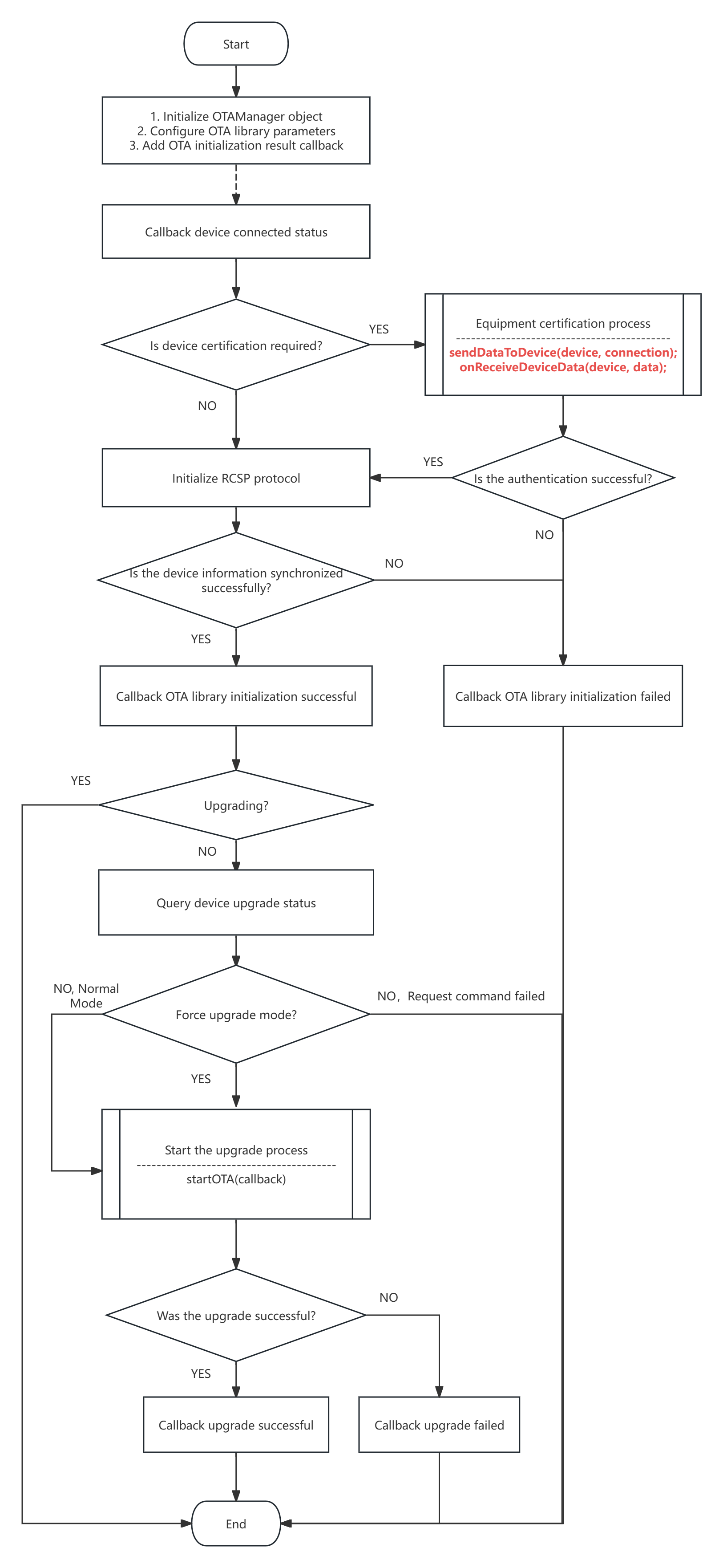
2.7 Special Upgrade Process for Reused Space
This feature is an upgrade process designed for small-capacity solutions.
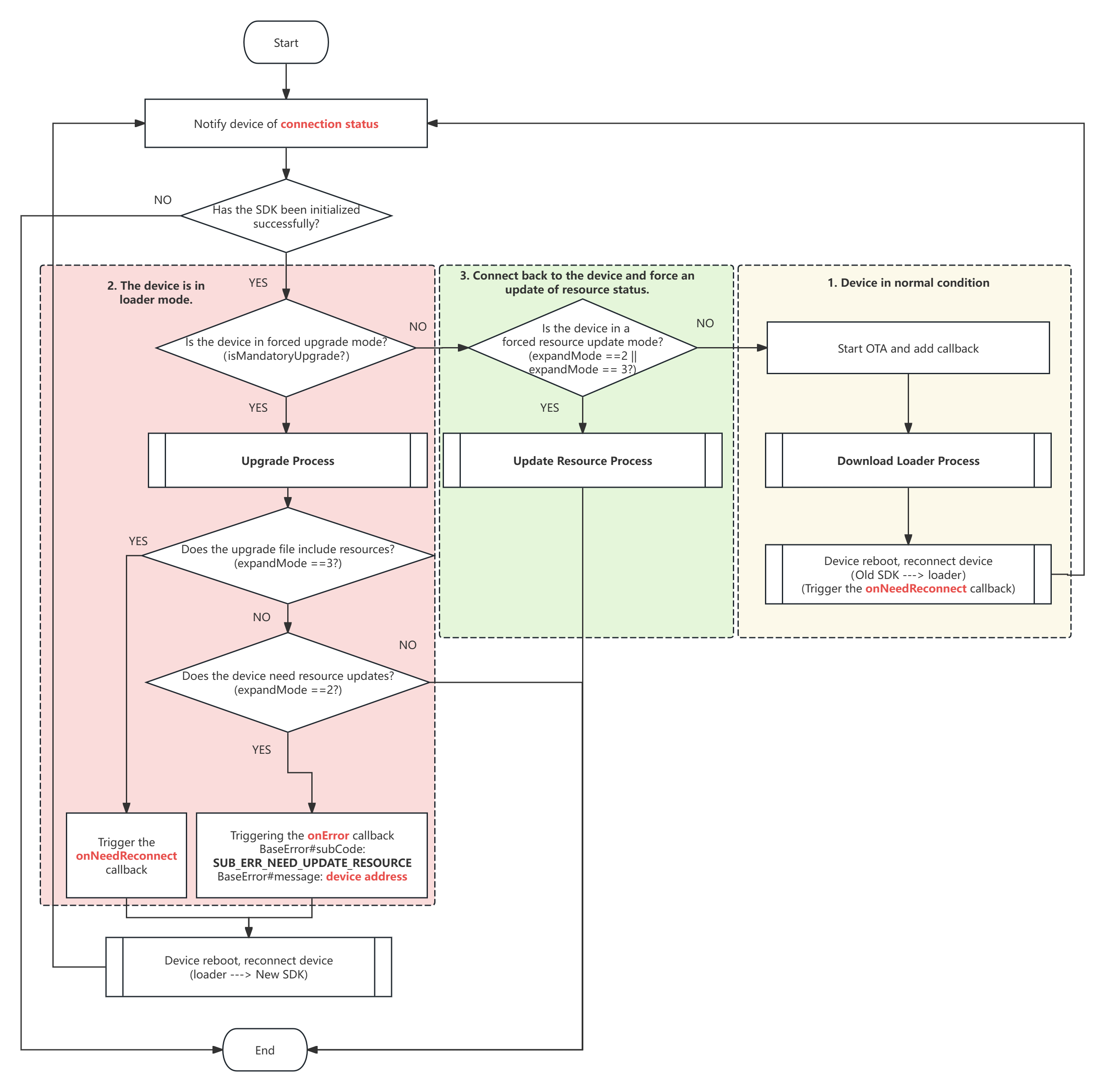
IUpgradeCallback#onNeedReconnect method triggers a device reconnection, which is handled internally by the SDK to complete the resource update.IUpgradeCallback#onError method notifies the upper-layer application to reconnect to the device and initializes the Watch Manager to perform a resource update.