12. ANC设置功能
12.1. ANC模式设置功能
12.1.1. 流程图
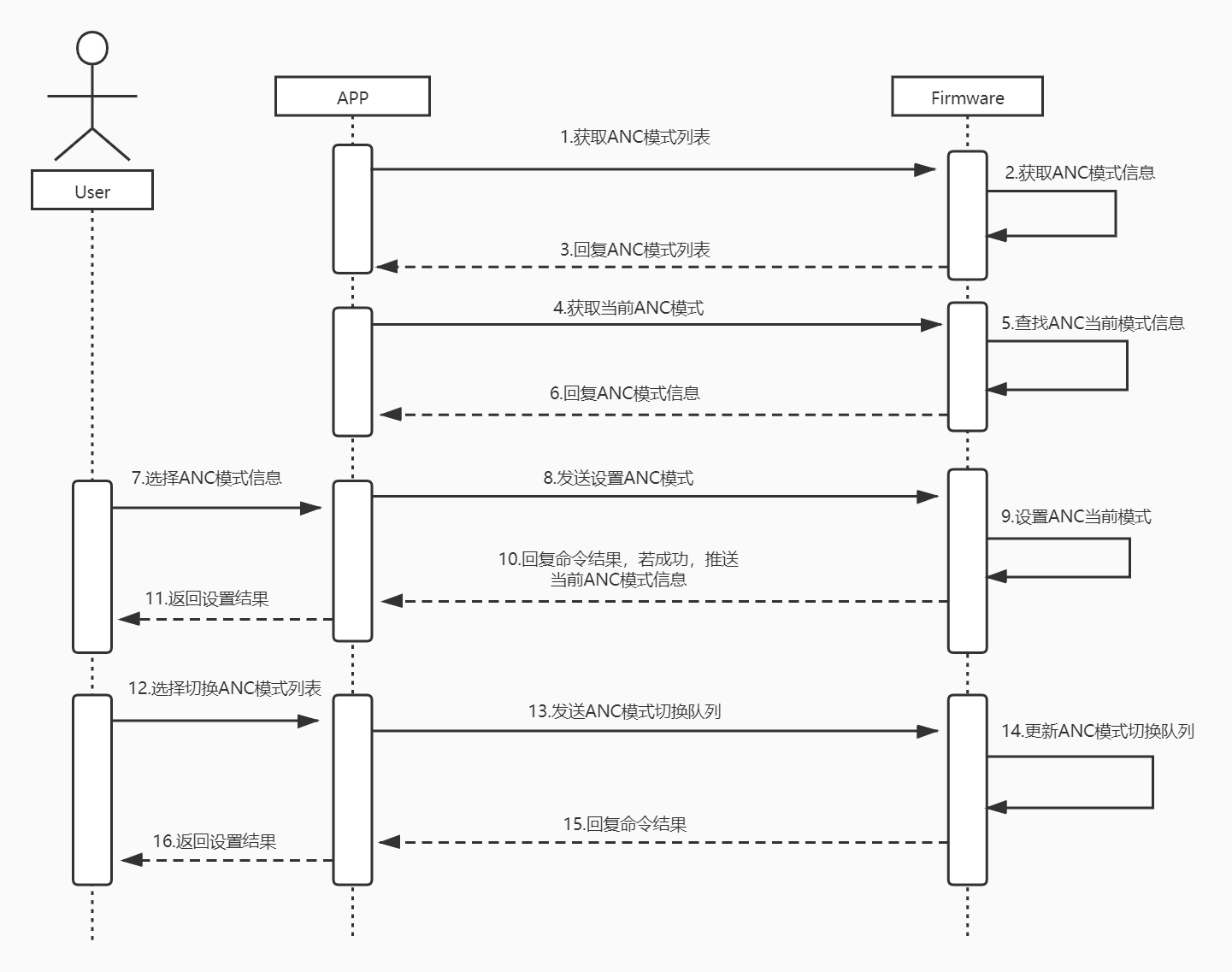
12.1.2. 获取所有噪声处理信息
JL_BluetoothManager方式
function :
AttrAndFunCode.SYS_INFO_FUNCTION_PUBLIC – 公共属性mask :
0x01 << AttrAndFunCode.SYS_INFO_ATTR_ALL_NOISE_MODE – 所有噪声处理信息命令构造
CommandBase getAllVoiceModesCmd = CommandBuilder.buildGetAllVoiceModes();
代码示例参考 查询设备系统信息 回复结果参考 VoiceMode
RCSPController方式
//获取RCSPController对象
RCSPController controller = RCSPController.getInstance();
//注册蓝牙RCSP事件监听器
controller.addBTRcspEventCallback(new BTRcspEventCallback() {
    @Override
    public void onVoiceModeList(BluetoothDevice device, List<VoiceMode> voiceModes) {
        //此处将会回调噪声处理信息列表
    }
});
//执行获取所有噪声处理信息功能并等待结果回调
controller.getAllVoiceModes(controller.getUsingDevice(), new OnRcspActionCallback<Boolean>() {
    @Override
    public void onSuccess(BluetoothDevice device, Boolean message) {
        //成功回调
        //数据将在BTRcspEventCallback#onVoiceModeList回调
    }

    @Override
    public void onError(BluetoothDevice device, BaseError error) {
        //失败回调
        //error - 错误信息
    }
});
Note
噪声处理模式,VoiceMode
12.1.2.1. VoiceMode
噪声处理模式
public class VoiceMode implements Parcelable {
    private int mode = -1;     //ANC模式
    private int leftMax;       //左声道最大值
    private int leftCurVal;    //左声道当前值
    private int rightMax;      //右声道最大值
    private int rightCurVal;   //右声道当前值

    //标准模式
    public final static int VOICE_MODE_CLOSE = 0;
    //降噪模式
    public final static int VOICE_MODE_DENOISE = 1;
    //通透模式
    public final static int VOICE_MODE_TRANSPARENT = 2;

}
12.1.3. 获取当前噪声处理模式
JL_BluetoothManager方式
function :
AttrAndFunCode.SYS_INFO_FUNCTION_PUBLIC – 公共属性mask :
0x01 << AttrAndFunCode.SYS_INFO_ATTR_CURRENT_NOISE_MODE – 当前噪声处理模式命令构造
CommandBase getCurrentVoiceModeCmd = CommandBuilder.buildGetCurrentVoiceMode();
代码示例参考 查询设备系统信息
RCSPController方式
//获取RCSPController对象
RCSPController controller = RCSPController.getInstance();
//注册蓝牙RCSP事件监听器
controller.addBTRcspEventCallback(new BTRcspEventCallback() {
    @Override
    public void onCurrentVoiceMode(BluetoothDevice device, VoiceMode voiceMode) {
        //此处将会回调当前噪声处理模式信息
    }
});
//执行获取当前噪声处理模式信息功能并等待结果回调
controller.getCurrentVoiceMode(controller.getUsingDevice(), new OnRcspActionCallback<Boolean>() {
    @Override
    public void onSuccess(BluetoothDevice device, Boolean message) {
        //成功回调
        //数据将在BTRcspEventCallback#onCurrentVoiceMode回调
    }

    @Override
    public void onError(BluetoothDevice device, BaseError error) {
        //失败回调
        //error - 错误信息
    }
});
Note
噪声处理模式,VoiceMode
12.1.4. 设置当前噪声处理模式
JL_BluetoothManager方式
function :
AttrAndFunCode.SYS_INFO_FUNCTION_PUBLIC – 公共属性type :
AttrAndFunCode.SYS_INFO_ATTR_CURRENT_NOISE_MODE – 当前噪声处理模式value : VoiceMode(n Bytes) – 降噪模式信息
命令构造
VoiceMode voiceMode;
CommandBase setCurrentVoiceModeCmd = CommandBuilder.buildSetCurrentVoiceMode(voiceMode);
代码示例参考 设置设备系统属性
RCSPController方式
//获取RCSPController对象
RCSPController controller = RCSPController.getInstance();
VoiceMode voiceMode; //voiceMode - 噪声处理模式
//执行设置当前噪声处理模式功能并等待结果回调
controller.setCurrentVoiceMode(controller.getUsingDevice(), voiceMode, new OnRcspActionCallback<Boolean>() {
    @Override
    public void onSuccess(BluetoothDevice device, Boolean message) {
        //成功回调
    }

    @Override
    public void onError(BluetoothDevice device, BaseError error) {
        //失败回调
        //error - 错误信息
    }
});
Note
噪声处理模式,VoiceMode
12.1.5. 设置切换噪声处理模式顺序
JL_BluetoothManager方式
//噪声模式切换不能小于2个
if (modes == null || modes.length < 2) return;
//设置模式切换顺序
int value = 0x00;
for (int mode : modes) {
    byte bit = (byte) (mode & 0xff);
    value = value | (0x01 << bit);
}
int function = AttrAndFunCode.ADV_TYPE_ANC_MODE_LIST; //ANC噪声处理功能码
byte[] data = CHexConver.intToBigBytes(value);     //功能数据
代码示例参考 设置设备功能
RCSPController方式
//获取RCSPController对象
RCSPController controller = RCSPController.getInstance();
//噪声模式切换不能小于2个
if (modes == null || modes.length < 2) return;
//设置模式切换顺序
int value = 0x00;
for (int mode : modes) {
    byte bit = (byte) (mode & 0xff);
    value = value | (0x01 << bit);
}
//执行设置模式切换顺序功能并等待结果回调
controller.modifyDeviceSettingsInfo(controller.getUsingDevice(), AttrAndFunCode.ADV_TYPE_ANC_MODE_LIST, CHexConver.intToBigBytes(value), new OnRcspActionCallback<Integer>() {
    @Override
    public void onSuccess(BluetoothDevice device, Integer message) {
        //成功回调
        //成功之后,可以获取结果
        controller.getDeviceSettingsInfo(device, 0x01 << AttrAndFunCode.ADV_TYPE_ANC_MODE_LIST, new OnRcspActionCallback<ADVInfoResponse>() {
            @Override
            public void onSuccess(BluetoothDevice device, ADVInfoResponse message) {
//              message.getModes();//噪声模式切换顺序
            }

            @Override
            public void onError(BluetoothDevice device, BaseError error) {
                //失败回调
                //error - 错误信息
            }
        });
    }

    @Override
    public void onError(BluetoothDevice device, BaseError error) {
        //失败回调
        //error - 错误信息
    }
});
Note
12.1.6. 按键设置切换噪声处理模式顺序
JL_BluetoothManager方式
List<ADVInfoResponse.KeySettings> list = new ArrayList<>(); //获取设备设置信息得到
list.get(0).setFunction(AttrAndFunCode.KEY_FUNC_ID_SWITCH_ANC_MODE); //anc
int function = AttrAndFunCode.ADV_TYPE_KEY_SETTINGS; //按键设置功能码
ByteArrayOutputStream outputStream = new ByteArrayOutputStream();
for (ADVInfoResponse.KeySettings settings : list) {
    try {
        outputStream.write(settings.toData());
    } catch (IOException e) {
        e.printStackTrace();
    }
}
byte[] data = outputStream.toByteArray();     //功能数据
代码示例参考 设置设备功能
RCSPController方式
//获取RCSPController对象
RCSPController controller = RCSPController.getInstance();
List<ADVInfoResponse.KeySettings> list = new ArrayList<>(); //获取设备设置信息得到
list.get(0).setFunction(AttrAndFunCode.KEY_FUNC_ID_SWITCH_ANC_MODE); //anc
//设置按键功能切换ANC设置功能并等待结果回调
controller.configKeySettings(controller.getUsingDevice(), list, new OnRcspActionCallback<Integer>() {
    @Override
    public void onSuccess(BluetoothDevice device, Integer message) {
        //成功回调
    }

    @Override
    public void onError(BluetoothDevice device, BaseError error) {
        //失败回调
        //error - 错误信息
    }
});
Important
切换噪声处理模式的按键功能ID固定是 255
12.2. 自适应ANC算法
12.2.1. 功能是否支持
public boolean isSupportAdaptiveANC() {
    //获取RCSPController对象
    RCSPController controller = RCSPController.getInstance();
    //获取当前操作设备
    BluetoothDevice usingDevice = controller.getUsingDevice();
    if (null == usingDevice) return false;
    //判断设备是否支持自适应ANC算法
    return controller.isSupportAdaptiveANC(usingDevice);
}
12.2.2. 获取自适应ANC信息
public void getAdaptiveANCData() {
    if (!isSupportAdaptiveANC()) return;
    //获取RCSPController对象
    final RCSPController controller = RCSPController.getInstance();
    //获取当前操作设备
    BluetoothDevice usingDevice = controller.getUsingDevice();
    if (null == usingDevice) return;
    DeviceInfo deviceInfo = controller.getDeviceInfo(usingDevice);
    if (null == deviceInfo) return; //设备未初始化
    boolean isForceRead = true; //是否强制读取
    //获取缓存的自适应ANC状态信息
    AdaptiveData adaptiveData = deviceInfo.getAdaptiveData();
    if (!isForceRead && null != adaptiveData) return; //已有缓存信息
    final BTRcspEventCallback eventCallback = new BTRcspEventCallback() {
        @Override
        public void onVoiceFunctionChange(BluetoothDevice device, VoiceFunc voiceFunc) {
            if (null == device || null == voiceFunc) return;
            if (voiceFunc instanceof AdaptiveData) {
                //回调自适应ANC数据
                controller.removeBTRcspEventCallback(this);
            }
        }
    };
    //注册RCSP事件监听器
    controller.addBTRcspEventCallback(eventCallback);
    //执行获取自适应ANC数据的接口
    controller.getAdaptiveANCData(usingDevice, new OnRcspActionCallback<Boolean>() {
        @Override
        public void onSuccess(BluetoothDevice device, Boolean message) {
            //回调操作成功
            //结果将在 BTRcspEventCallback#onVoiceFunctionChange 回调
        }

        @Override
        public void onError(BluetoothDevice device, BaseError error) {
            //回调操作失败
            controller.removeBTRcspEventCallback(eventCallback);
        }
    });
}
Note
12.2.2.1. AdaptiveData
自适应ANC数据
public class AdaptiveData extends VoiceFunc {
    /**
     * 不检测状态
     */
    public static final int STATE_NO_CHECK = 0;
    /**
     * 开始检测
     */
    public static final int STATE_START_CHECK = 1;


    private boolean isOn;  //开关
    private int state;     //状态
    private int code;      //结果码
}
12.2.3. 设置自适应ANC参数
public void setAdaptiveANCData() {
    if (!isSupportAdaptiveANC()) return;
    //获取RCSPController对象
    final RCSPController controller = RCSPController.getInstance();
    //获取当前操作设备
    BluetoothDevice usingDevice = controller.getUsingDevice();
    if (null == usingDevice) return;
    DeviceInfo deviceInfo = controller.getDeviceInfo(usingDevice);
    if (null == deviceInfo) return; //设备未初始化
    //获取缓存的自适应ANC状态信息
    AdaptiveData adaptiveData = deviceInfo.getAdaptiveData();
    if (null == adaptiveData) { //可以通过 RCSPController#getAdaptiveANCData 接口获取
        adaptiveData = new AdaptiveData();
    }
    //置反开关状态
    adaptiveData.setOn(!adaptiveData.isOn());
    //执行设置自适应ANC参数的接口
    controller.setAdaptiveANCData(usingDevice, adaptiveData, new OnRcspActionCallback<Boolean>() {
        @Override
        public void onSuccess(BluetoothDevice device, Boolean message) {
            //回调操作结果
        }

        @Override
        public void onError(BluetoothDevice device, BaseError error) {
            //回调操作失败
        }
    });
}
Note
12.2.4. 开始自适应ANC检测流程
public void startAdaptiveANCCheck() {
    if (!isSupportAdaptiveANC()) return;
    //获取RCSPController对象
    final RCSPController controller = RCSPController.getInstance();
    //获取当前操作设备
    BluetoothDevice usingDevice = controller.getUsingDevice();
    if (null == usingDevice) return;
    //执行开始自适应ANC算法检测流程的接口
    controller.startAdaptiveANC(usingDevice, new OnAdaptiveANCListener() {
        @Override
        public void onStart() {
            //回调检测流程开始
        }

        @Override
        public void onFinish(int code) {
            //回调检测流程结束
            //code --- 结果码
        }
    });
}
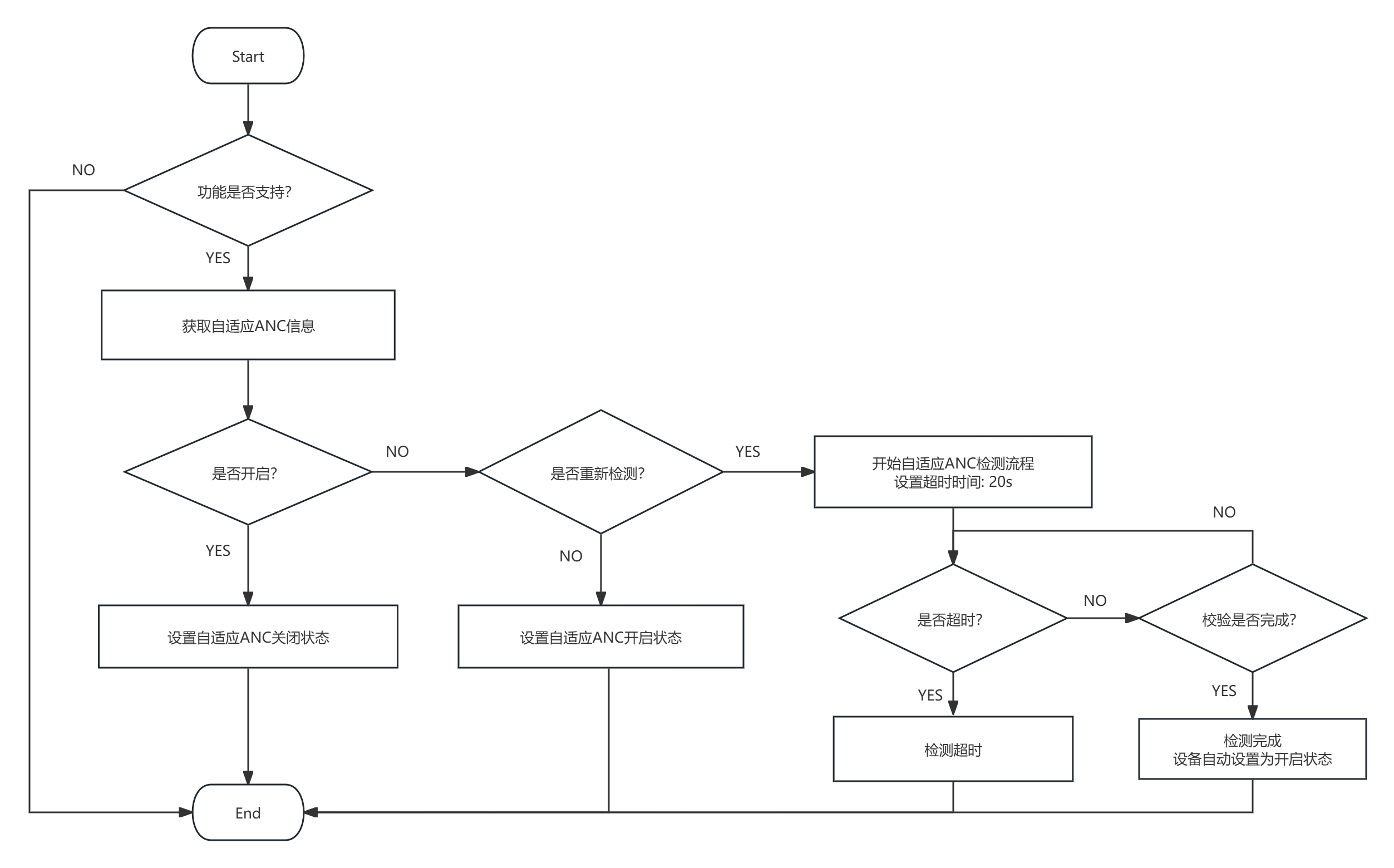
12.2.5. 实现流程图
12.3. 智能免摘
12.3.1. 功能是否支持
public boolean isSupportSmartNoPick() {
    //获取RCSPController对象
    final RCSPController controller = RCSPController.getInstance();
    //获取当前操作设备
    BluetoothDevice usingDevice = controller.getUsingDevice();
    if (null == usingDevice) return false;
    return controller.isSupportSmartNoPick(usingDevice);
}
12.3.2. 获取智能免摘信息
public void getSmartNoPick() {
    if(!isSupportSmartNoPick()) return;
    //获取RCSPController对象
    final RCSPController controller = RCSPController.getInstance();
    //获取当前操作设备
    BluetoothDevice usingDevice = controller.getUsingDevice();
    if (null == usingDevice) return;
    DeviceInfo deviceInfo = controller.getDeviceInfo(usingDevice);
    if (null == deviceInfo) return; //设备未初始化
    boolean isForceRead = true; //是否强制读取
    SmartNoPick smartNoPick = deviceInfo.getSmartNoPick();
    if (!isForceRead && smartNoPick != null) return; //已有缓存信息
    final BTRcspEventCallback eventCallback = new BTRcspEventCallback() {
        @Override
        public void onVoiceFunctionChange(BluetoothDevice device, VoiceFunc voiceFunc) {
            if (null == device || null == voiceFunc) return;
            if (voiceFunc instanceof SmartNoPick) {
                //回调智能免摘信息
                controller.removeBTRcspEventCallback(this);
            }
        }
    };
    //注册RCSP事件监听器
    controller.addBTRcspEventCallback(eventCallback);
    //执行获取智能免摘信息的接口
    controller.getSmartNoPick(usingDevice, new OnRcspActionCallback<Boolean>() {
        @Override
        public void onSuccess(BluetoothDevice device, Boolean message) {
            //回调操作成功
            //结果将在 BTRcspEventCallback#onVoiceFunctionChange 回调
        }

        @Override
        public void onError(BluetoothDevice device, BaseError error) {
            //回调操作失败
            controller.removeBTRcspEventCallback(eventCallback);
        }
    });
}
Note
12.3.2.1. SmartNoPick
智能免摘信息
public class SmartNoPick extends VoiceFunc {
    /**
     * 高灵敏度
     */
    public static final int SENSITIVITY_HIGH = 0;
    /**
     * 低灵敏度
     */
    public static final int SENSITIVITY_LOW = 1;

    /**
     * 没有自动关闭时间
     */
    public static final int CLOSE_TIME_NONE = 0;
    /**
     * 短时间(5s)
     */
    public static final int CLOSE_TIME_SHORT = 1;
    /**
     * 标准时间(15s)
     */
    public static final int CLOSE_TIME_STANDARD = 2;
    /**
     * 长时间(30s)
     */
    public static final int CLOSE_TIME_LONG = 3;


    private int op;           //操作
    private boolean isOn;     //开关
    private int sensitivity;  //灵敏度
    private int closeTime;    //自动关闭时间
}
12.3.3. 设置智能免摘参数
public void setSmartNoPickParam() {
    if(!isSupportSmartNoPick()) return;
    //获取RCSPController对象
    final RCSPController controller = RCSPController.getInstance();
    //获取当前操作设备
    BluetoothDevice usingDevice = controller.getUsingDevice();
    if (null == usingDevice) return;
    DeviceInfo deviceInfo = controller.getDeviceInfo(usingDevice);
    if (null == deviceInfo) return; //设备未初始化
    //获取缓存的智能免摘信息
    SmartNoPick smartNoPick = deviceInfo.getSmartNoPick();
    if (null == smartNoPick) { //可以通过 RCSPController#getSmartNoPick 接口获取
        smartNoPick = new SmartNoPick();
    }
    //置反开关状态
    //更多属性,在文档上获取
    smartNoPick.setOn(!smartNoPick.isOn());
    final BTRcspEventCallback eventCallback = new BTRcspEventCallback() {
        @Override
        public void onVoiceFunctionChange(BluetoothDevice device, VoiceFunc voiceFunc) {
            if (null == device || null == voiceFunc) return;
            if (voiceFunc instanceof SmartNoPick) {
                //回调智能免摘信息
                controller.removeBTRcspEventCallback(this);
            }
        }
    };
    //注册RCSP事件监听器
    controller.addBTRcspEventCallback(eventCallback);
    //执行设置智能免摘参数的接口
    controller.setSmartNoPickParam(usingDevice, smartNoPick, new OnRcspActionCallback<Boolean>() {
        @Override
        public void onSuccess(BluetoothDevice device, Boolean message) {
            //回调操作成功
            //结果将在 BTRcspEventCallback#onVoiceFunctionChange 回调
        }

        @Override
        public void onError(BluetoothDevice device, BaseError error) {
            //回调操作失败
            controller.removeBTRcspEventCallback(eventCallback);
        }
    });
}
Note
12.4. 场景降噪
12.4.1. 功能是否支持
public boolean isSupportSceneDenoising(){
    //获取RCSPController对象
    final RCSPController controller = RCSPController.getInstance();
    //获取当前操作设备
    BluetoothDevice usingDevice = controller.getUsingDevice();
    if (null == usingDevice) return false;
    return controller.isSupportSceneDenoising(usingDevice);
}
12.4.2. 获取场景降噪信息
public void getSceneDenoising(){
    if(!isSupportSceneDenoising()) return;
    //获取RCSPController对象
    final RCSPController controller = RCSPController.getInstance();
    //获取当前操作设备
    BluetoothDevice usingDevice = controller.getUsingDevice();
    if (null == usingDevice) return;
    DeviceInfo deviceInfo = controller.getDeviceInfo(usingDevice);
    if (null == deviceInfo) return; //设备未初始化
    boolean isForceRead = true; //是否强制读取
    SceneDenoising sceneDenoising = deviceInfo.getSceneDenoising();
    if (!isForceRead && sceneDenoising != null) return; //已有缓存信息
    final BTRcspEventCallback eventCallback = new BTRcspEventCallback() {
        @Override
        public void onVoiceFunctionChange(BluetoothDevice device, VoiceFunc voiceFunc) {
            if (null == device || null == voiceFunc) return;
            if (voiceFunc instanceof SceneDenoising) {
                //回调场景降噪信息
                controller.removeBTRcspEventCallback(this);
            }
        }
    };
    //注册RCSP事件监听器
    controller.addBTRcspEventCallback(eventCallback);
    //执行获取场景降噪信息的接口
    controller.getSceneDenoising(usingDevice, new OnRcspActionCallback<Boolean>() {
        @Override
        public void onSuccess(BluetoothDevice device, Boolean message) {
            //回调操作成功
            //结果将在 BTRcspEventCallback#onVoiceFunctionChange 回调
        }

        @Override
        public void onError(BluetoothDevice device, BaseError error) {
            //回调操作失败
            controller.removeBTRcspEventCallback(eventCallback);
        }
    });
}
Note
12.4.2.1. SceneDenoising
场景降噪信息
public class SceneDenoising extends VoiceFunc {
    /**
     * 智能
     */
    public static final int MODE_SMART = 0;
    /**
     * 轻度
     */
    public static final int MODE_MILD = 1;
    /**
     * 均衡
     */
    public static final int MODE_BALANCE = 2;
    /**
     * 深度
     */
    public static final int MODE_DEPTH = 3;

    private int mode;     //模式号
}
12.4.3. 设置场景降噪参数
public void setSceneDenoising() {
    if(!isSupportSceneDenoising()) return;
    //获取RCSPController对象
    final RCSPController controller = RCSPController.getInstance();
    //获取当前操作设备
    BluetoothDevice usingDevice = controller.getUsingDevice();
    if (null == usingDevice) return;
    DeviceInfo deviceInfo = controller.getDeviceInfo(usingDevice);
    if (null == deviceInfo) return; //设备未初始化
    //获取缓存的场景降噪信息
    SceneDenoising sceneDenoising = deviceInfo.getSceneDenoising();
    if (null == sceneDenoising) { //可以通过 RCSPController#getSceneDenoising 接口获取
        sceneDenoising = new SceneDenoising();
    }
    //设置智能模式
    sceneDenoising.setMode(SceneDenoising.MODE_SMART);
    final BTRcspEventCallback eventCallback = new BTRcspEventCallback() {
        @Override
        public void onVoiceFunctionChange(BluetoothDevice device, VoiceFunc voiceFunc) {
            if (null == device || null == voiceFunc) return;
            if (voiceFunc instanceof SceneDenoising) {
                //回调场景降噪信息
                controller.removeBTRcspEventCallback(this);
            }
        }
    };
    //注册RCSP事件监听器
    controller.addBTRcspEventCallback(eventCallback);
    //执行设置场景降噪参数的接口
    controller.setSceneDenoising(usingDevice, sceneDenoising, new OnRcspActionCallback<Boolean>() {
        @Override
        public void onSuccess(BluetoothDevice device, Boolean message) {
            //回调操作成功
            //结果将在 BTRcspEventCallback#onVoiceFunctionChange 回调
        }

        @Override
        public void onError(BluetoothDevice device, BaseError error) {
            //回调操作失败
            controller.removeBTRcspEventCallback(eventCallback);
        }
    });
}
Note
12.4.4. 注意事项
该功能仅在【ANC模式】下生效
12.5. 风噪监测
12.5.1. 功能是否支持
public boolean isSupportWindNoiseDetection(){
    //获取RCSPController对象
    final RCSPController controller = RCSPController.getInstance();
    //获取当前操作设备
    BluetoothDevice usingDevice = controller.getUsingDevice();
    if (null == usingDevice) return false;
    return controller.isSupportWindNoiseDetection(usingDevice);
}
12.5.2. 获取风噪监测信息
public void getWindNoiseDetection(){
    if(!isSupportWindNoiseDetection()) return;
    //获取RCSPController对象
    final RCSPController controller = RCSPController.getInstance();
    //获取当前操作设备
    BluetoothDevice usingDevice = controller.getUsingDevice();
    if (null == usingDevice) return;
    DeviceInfo deviceInfo = controller.getDeviceInfo(usingDevice);
    if (null == deviceInfo) return; //设备未初始化
    boolean isForceRead = true; //是否强制读取
    WindNoiseDetection windNoiseDetection = deviceInfo.getWindNoiseDetection();
    if (!isForceRead && windNoiseDetection != null) return; //已有缓存信息
    final BTRcspEventCallback eventCallback = new BTRcspEventCallback() {
        @Override
        public void onVoiceFunctionChange(BluetoothDevice device, VoiceFunc voiceFunc) {
            if (null == device || null == voiceFunc) return;
            if (voiceFunc instanceof WindNoiseDetection) {
                //回调风噪监测信息
                controller.removeBTRcspEventCallback(this);
            }
        }
    };
    //注册RCSP事件监听器
    controller.addBTRcspEventCallback(eventCallback);
    //执行获取风噪监测信息的接口
    controller.getWindNoiseDetection(usingDevice, new OnRcspActionCallback<Boolean>() {
        @Override
        public void onSuccess(BluetoothDevice device, Boolean message) {
            //回调操作成功
            //结果将在 BTRcspEventCallback#onVoiceFunctionChange 回调
        }

        @Override
        public void onError(BluetoothDevice device, BaseError error) {
            //回调操作失败
            controller.removeBTRcspEventCallback(eventCallback);
        }
    });
}
Note
12.5.2.1. WindNoiseDetection
风噪监测信息
public class WindNoiseDetection extends VoiceFunc {

    private boolean isOn;  //开关
}
12.5.3. 设置风噪监测参数
public void setWindNoiseDetection() {
    if(!isSupportWindNoiseDetection()) return;
    //获取RCSPController对象
    final RCSPController controller = RCSPController.getInstance();
    //获取当前操作设备
    BluetoothDevice usingDevice = controller.getUsingDevice();
    if (null == usingDevice) return;
    DeviceInfo deviceInfo = controller.getDeviceInfo(usingDevice);
    if (null == deviceInfo) return; //设备未初始化
    //获取缓存的风噪监测信息
    WindNoiseDetection windNoiseDetection = deviceInfo.getWindNoiseDetection();
    if (null == windNoiseDetection) { //可以通过 RCSPController#getWindNoiseDetection 接口获取
        windNoiseDetection = new WindNoiseDetection();
    }
    //置反开关状态
    windNoiseDetection.setOn(!windNoiseDetection.isOn());
    final BTRcspEventCallback eventCallback = new BTRcspEventCallback() {
        @Override
        public void onVoiceFunctionChange(BluetoothDevice device, VoiceFunc voiceFunc) {
            if (null == device || null == voiceFunc) return;
            if (voiceFunc instanceof WindNoiseDetection) {
                //回调风噪监测信息
                controller.removeBTRcspEventCallback(this);
            }
        }
    };
    //注册RCSP事件监听器
    controller.addBTRcspEventCallback(eventCallback);
    //执行设置风噪监测参数的接口
    controller.setWindNoiseDetection(usingDevice, windNoiseDetection, new OnRcspActionCallback<Boolean>() {
        @Override
        public void onSuccess(BluetoothDevice device, Boolean message) {
            //回调操作成功
            //结果将在 BTRcspEventCallback#onVoiceFunctionChange 回调
        }

        @Override
        public void onError(BluetoothDevice device, BaseError error) {
            //回调操作失败
            controller.removeBTRcspEventCallback(eventCallback);
        }
    });
}
Note
12.5.4. 注意事项
该功能仅在【ANC模式】下生效
12.6. 人声增强
12.6.1. 功能是否支持
public boolean isSupportVocalBooster(){
    //获取RCSPController对象
    final RCSPController controller = RCSPController.getInstance();
    //获取当前操作设备
    BluetoothDevice usingDevice = controller.getUsingDevice();
    if (null == usingDevice) return false;
    return controller.isSupportVocalBooster(usingDevice);
}
12.6.2. 获取人声增强信息
public void getVocalBooster(){
    if(!isSupportVocalBooster()) return;
    //获取RCSPController对象
    final RCSPController controller = RCSPController.getInstance();
    //获取当前操作设备
    BluetoothDevice usingDevice = controller.getUsingDevice();
    if (null == usingDevice) return;
    DeviceInfo deviceInfo = controller.getDeviceInfo(usingDevice);
    if (null == deviceInfo) return; //设备未初始化
    boolean isForceRead = true; //是否强制读取
    VocalBooster vocalBooster = deviceInfo.getVocalBooster();
    if (!isForceRead && vocalBooster != null) return; //已有缓存信息
    final BTRcspEventCallback eventCallback = new BTRcspEventCallback() {
        @Override
        public void onVoiceFunctionChange(BluetoothDevice device, VoiceFunc voiceFunc) {
            if (null == device || null == voiceFunc) return;
            if (voiceFunc instanceof VocalBooster) {
                //回调人声增强信息
                controller.removeBTRcspEventCallback(this);
            }
        }
    };
    //注册RCSP事件监听器
    controller.addBTRcspEventCallback(eventCallback);
    //执行获取人声增强信息的接口
    controller.getVocalBooster(usingDevice, new OnRcspActionCallback<Boolean>() {
        @Override
        public void onSuccess(BluetoothDevice device, Boolean message) {
            //回调操作成功
            //结果将在 BTRcspEventCallback#onVoiceFunctionChange 回调
        }

        @Override
        public void onError(BluetoothDevice device, BaseError error) {
            //回调操作失败
            controller.removeBTRcspEventCallback(eventCallback);
        }
    });
}
Note
12.6.2.1. VocalBooster
人声增强信息
public class VocalBooster extends VoiceFunc {

    private boolean isOn;   //开关
}
12.6.3. 设置人声增强参数
public void setVocalBooster() {
    if(!isSupportVocalBooster()) return;
    //获取RCSPController对象
    final RCSPController controller = RCSPController.getInstance();
    //获取当前操作设备
    BluetoothDevice usingDevice = controller.getUsingDevice();
    if (null == usingDevice) return;
    DeviceInfo deviceInfo = controller.getDeviceInfo(usingDevice);
    if (null == deviceInfo) return; //设备未初始化
    //获取缓存的人声增强信息
    VocalBooster vocalBooster = deviceInfo.getVocalBooster();
    if (null == vocalBooster) { //可以通过 RCSPController#getVocalBooster 接口获取
        vocalBooster = new VocalBooster();
    }
    //置反开关状态
    vocalBooster.setOn(!vocalBooster.isOn());
    final BTRcspEventCallback eventCallback = new BTRcspEventCallback() {
        @Override
        public void onVoiceFunctionChange(BluetoothDevice device, VoiceFunc voiceFunc) {
            if (null == device || null == voiceFunc) return;
            if (voiceFunc instanceof VocalBooster) {
                //回调人声增强信息
                controller.removeBTRcspEventCallback(this);
            }
        }
    };
    //注册RCSP事件监听器
    controller.addBTRcspEventCallback(eventCallback);
    //执行设置人声增强参数的接口
    controller.setVocalBooster(usingDevice, vocalBooster, new OnRcspActionCallback<Boolean>() {
        @Override
        public void onSuccess(BluetoothDevice device, Boolean message) {
            //回调操作成功
            //结果将在 BTRcspEventCallback#onVoiceFunctionChange 回调
        }

        @Override
        public void onError(BluetoothDevice device, BaseError error) {
            //回调操作失败
            controller.removeBTRcspEventCallback(eventCallback);
        }
    });
}
Note
12.6.4. 注意事项
该功能仅在【通透模式】下生效